
Donors
Open in NocthinkModule: Phonebook · URL: /phonebook/donors · Responsible role: Project Manager · Also used by: Owner/Director (full); Event Officer, Finance Staff, Finance Manager, F.A.T Manager, Accounting Staff (read)
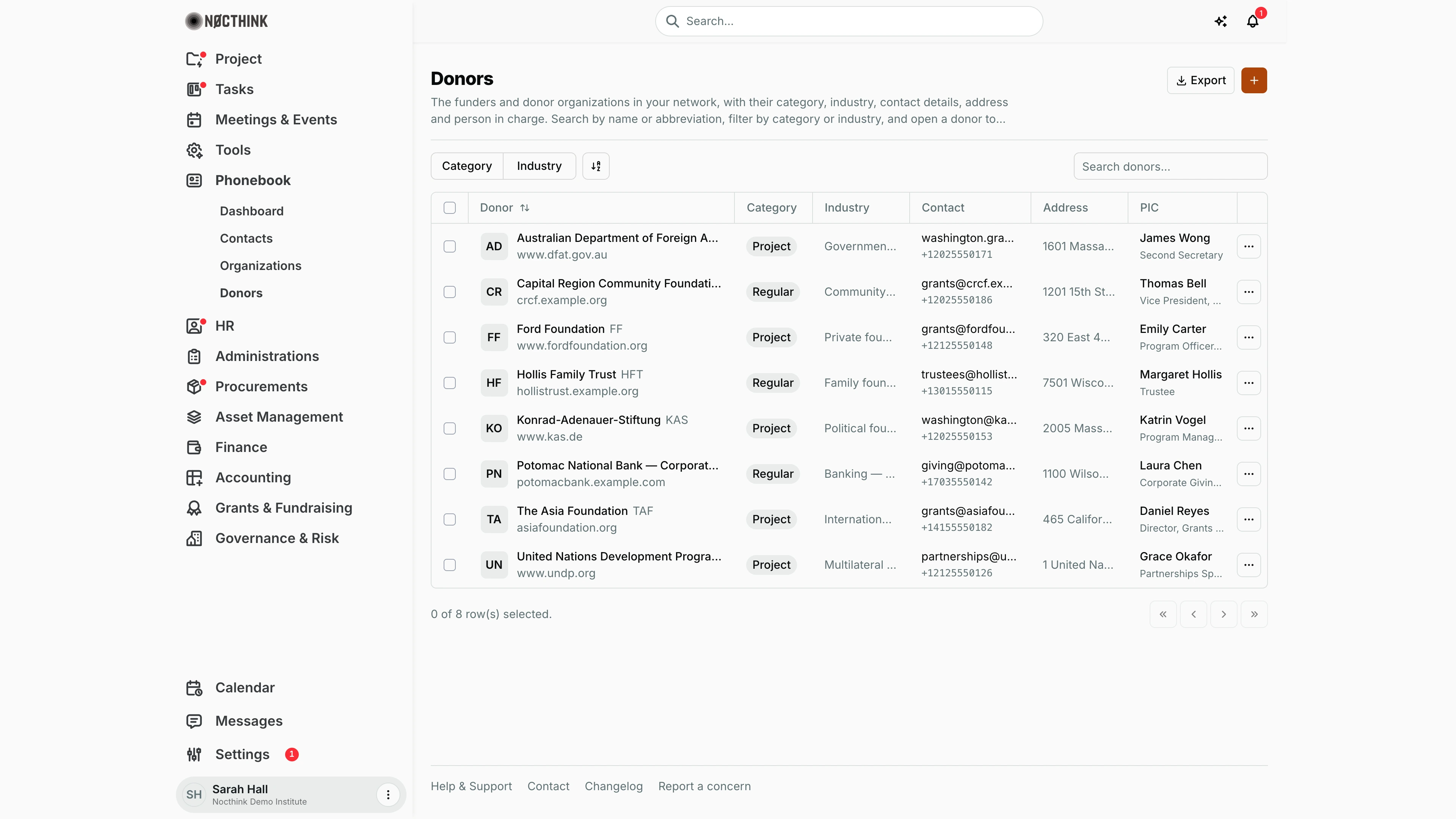
Screenshot: Sarah Hall (Finance Manager), Nocthink Demo Institute demo data. In the demo Sarah also holds the general Manager role, so she sees the orange + and the Edit/Delete row actions; a finance role on its own gives read access only.
Why I use this page
I keep our funder records here — foundations, bilateral agencies, multilaterals, corporate givers and family trusts — so that every project fund can be attributed to the right donor. When I set up a new grant on a project I first make sure the donor exists here, and when preparing a donor meeting I open the donor to see who our contacts are, what we have logged with them, and every fund they have provided across our projects.
What's on the screen
- Header — title Donors, description, an Export menu (PDF, Excel, CSV, JSON), and the orange + (Add Donor).
- Toolbar — Category filter (Regular, Project), Industry filter (Finance, Foundation, Government, Multilateral, Corporate, Individual, Development Finance), a column/sort control and Search donors….
- Table columns — select checkbox, Donor (logo or initials, name with its abbreviation beside it, and website underneath; sortable), Category pill (Regular or Project), Industry, Contact (email, with the phone number underneath; click to mail or call), Address (address and city), PIC (name and title, linking to a contact search), and a … menu with Send Email, Call, Visit Website (when present), View Details, Edit and Delete.
- Footer — row selection count and pagination.
How I …
How I add a donor
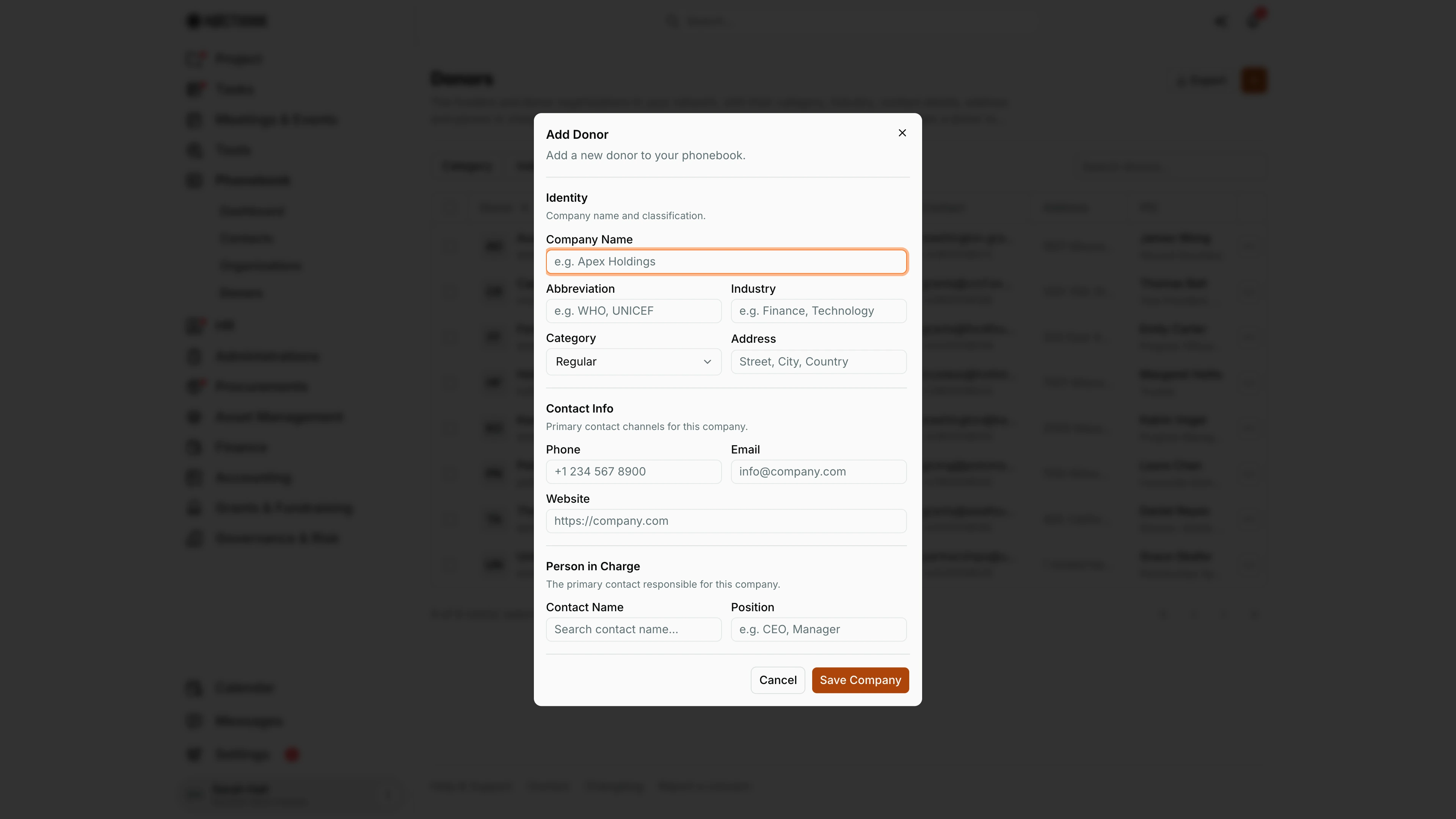
- Click the orange +. The Add Donor dialog opens ("Add a new donor to your phonebook.").
- Identity: Company Name (required), Abbreviation (e.g. KAS, UNDP), Industry (e.g. Foundation), Category (Regular or Project) and Address.
- Contact Info: Phone, Email, Website (full URL).
- Person in Charge: Contact Name and Position of our main relationship owner at the donor.
- Click Save Company. The record is saved with type donor and appears in this list (not under Organizations).
How I review a donor before a meeting
- Click the donor name or … → View Details. The drawer opens (see Donor detail drawer below).
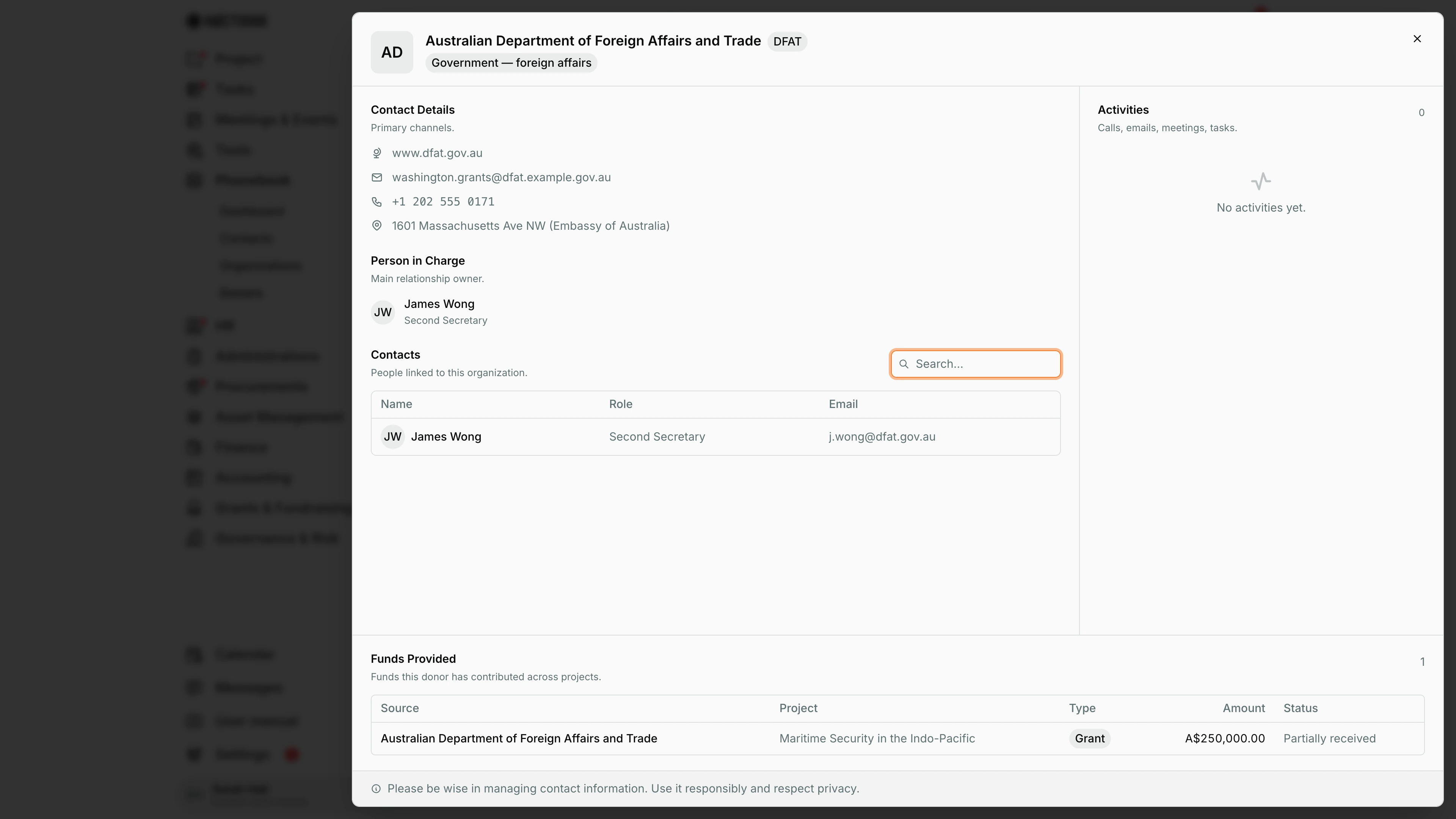
- Contacts — people linked to the donor (searchable).
- Activities — calls, emails, meetings and tasks logged with the donor.
- Funds Provided — "Funds this donor has contributed across projects": Source, Project, Type, Amount, Status.
- Contact Details and Person in Charge sit alongside.
Links from a project fund open this page with the donor's drawer already open (/phonebook/donors?donor=<id>).
How I update a donor
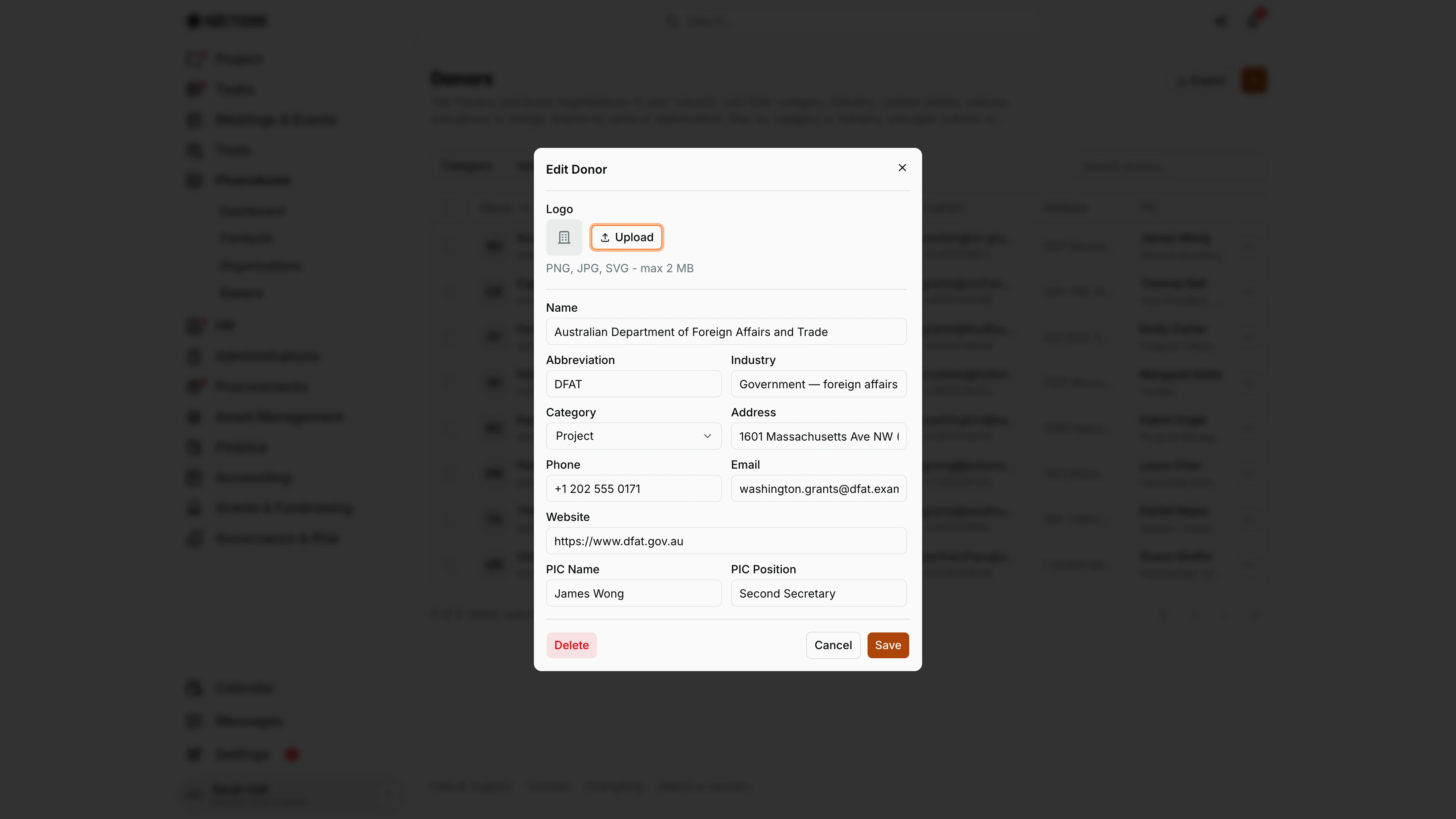
- Click … → Edit. The Edit Donor dialog opens (see Edit donor below).
- Upload or replace the Logo (PNG, JPG, SVG, max 2 MB) and edit Name, Abbreviation, Industry, Category, Address, Phone, Email, Website, PIC Name, PIC Position.
- Click Save.
How I delete a donor
- Click … → Delete and confirm "Delete <name>?". Check Funds Provided first — project funds reference the donor.
Detail page, forms & dialogs
Donor detail drawer
Screenshot: Sarah Hall (Finance Manager), Nocthink Demo Institute demo data.
Clicking a donor opens the same wide drawer as an organization, with one extra section. The header shows the donor's name, abbreviation and industry. Contact Details, Person in Charge, Contacts (people linked to the donor) and Activities work as on Organizations. Funds Provided ("Funds this donor has contributed across projects.") lists every project fund that names this donor as source: Source, Project, Type, Amount in the fund's currency and Status (e.g. "Partially received"), with a count at the top.
I read this before a donor meeting or a report: it shows at a glance what the donor has funded and how much has come in. The drawer is read-only; funds are recorded on the project, and the donor record is edited with ⋯ → Edit.
Add donor
Screenshot: Sarah Hall (Finance Manager), Nocthink Demo Institute demo data.
The orange + opens Add Donor ("Add a new donor to your phonebook."). It is the organization form plus Category: Regular or Project. Company Name is required; Abbreviation, Industry, Address, Phone, Email, Website and the Person in Charge name and position are optional. Save Company stores the record as a donor, so it shows in this list and in the Organization picker for contacts and project funds, marked "(donor)". Add the person who manages the relationship at the donor as a contact afterwards, so they show under Contacts in the drawer. Funds are not entered here: record them on the project, naming this donor as source, and they appear under Funds Provided. Cancel discards the form.
Edit donor
Screenshot: Sarah Hall (Finance Manager), Nocthink Demo Institute demo data.
⋯ → Edit opens Edit Donor, the organization edit form plus Category. Logo has Upload (PNG, JPG or SVG, max 2 MB). Below are Name, Abbreviation, Industry, Category (Regular or Project), Address, Phone, Email, Website, PIC Name and PIC Position. Save applies the changes. Delete at the bottom left removes the donor after a confirmation; check Funds Provided in the drawer first, because project funds point to the donor. Use it when a donor changes its programme officer: update PIC Name and PIC Position, and add the new person in Contacts. Cancel closes without saving.
Access & permissions
- The page requires
donors.view(lib/domain-routes.ts). docs/role.md §4.2: F for Owner/Director, W for Project Manager, R for Event Officer and the finance/accounting roles; plain Staff, HR, General Affairs, Asset and Procurement do not see the menu. - Writing (add, edit, logo, delete) needs
donors.create/update/delete(Project Manager and Owner/Director in the baseline roles); phonebook permissions alone are not enough. The + button and the row menu's Edit / Delete only appear for people who hold the matching permission. Turning an organization into a donor needs both the phonebook and the donors permission. - Donor portal users (organization role "donor") do not use this page; they only see
/donor-portal.
Caveats
- Donor records are also counted in the Phonebook dashboard's Organizations total.
- Delete is permanent after a browser confirm; there is no archive.
- The Industry filter only offers seven fixed values, while the field is free text — a donor typed "Bilateral" (or, in the demo, "Private foundation" or "Multilateral development agency") cannot be filtered, only searched.
- The PIC link searches contacts by the PIC's name; the PIC itself is plain text, not linked to a contact record.
Limitations
- Export covers every donor loaded on the page; there is no import.
- No bulk actions for selected rows.
- Funds are recorded on projects, not here; Funds Provided is read-only.
- No giving-history totals or charts on this page (see Grants & Fundraising for fundraising work).
Related menus
- Organizations — non-donor institutions, same form and drawer.
- Contacts — donor program officers and other people.
- Dashboard — phonebook overview; includes donors in the Organizations count.