
Dashboard
Open in NocthinkModule: Phonebook · URL: /phonebook/dashboard · Responsible role: General Affairs / Admin · Also used by: Owner/Director (full); Project Manager, Event Officer, Procurement (write); all other staff (read)
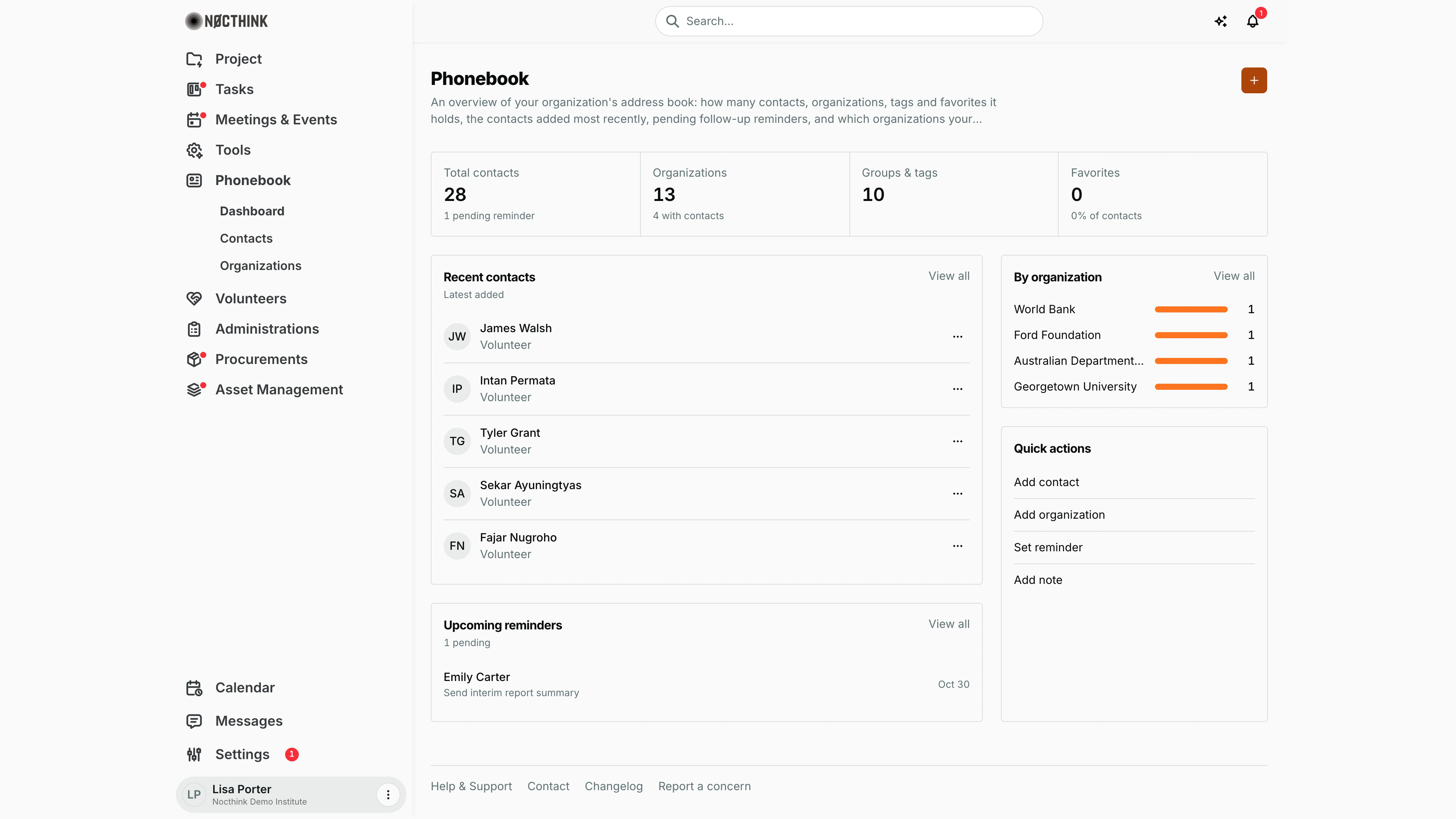
Screenshot: Lisa Porter (Operations Officer), Nocthink Demo Institute demo data.
Why I use this page
I keep the institute's address book tidy, and this dashboard is my health check on it. Each morning I glance at the pending follow-up reminders, check who was added recently (so I can complete missing positions and companies), and see which partner organizations we actually have people at. The quick actions take me straight to the page where I add a contact, organization, reminder or note.
What's on the screen
- Header — title Phonebook, description and an orange + (labelled "Go to contacts") that opens Contacts.
- Stat cards (each card links to its page):
- Total contacts — contacts I can see, with "N pending reminders" ("1 pending reminder" for one).
- Organizations — all organization and donor records, with "N with contacts".
- Groups & tags — number of distinct tags in use (top 10).
- Favorites — contacts I have hearted, with "N% of contacts".
- Recent contacts (Latest added) — the five newest contacts with initials, name and position; a lock icon marks a private contact. Each row has a … menu with Remove. View all opens Contacts.
- Upcoming reminders (N pending) — up to five pending reminders: contact name, note and date. View all opens the reminders list (
/phonebook/reminders). - By organization — up to ten organizations ranked by how many contacts are linked to them, with a bar and count. View all opens Organizations.
- Quick actions — Add contact, Add organization, Set reminder, Add note.
How I …
How I work through my follow-ups
- Read Upcoming reminders — each line shows who, what and when (e.g. "Emily Carter — Send interim report summary — Oct 30").
- Click View all to open the reminders list, where I can add a reminder (Add reminder: Contact, Note, Remind at) or act on existing ones.
- To add a reminder from a person's record, open them in Contacts and use the Reminders section of the contact drawer.
How I complete newly added contacts
- In Recent contacts, note entries with no position.
- Click View all, find the contact and use … → Edit to fill in the details.
How I add something quickly
- Under Quick actions, click Add contact or Add organization — I land on that list; then click its orange +.
- Set reminder opens the reminders list; Add note opens Notes (
/notes).
How I remove a stray contact
- In Recent contacts, click the row's … menu → Remove.
- Confirm "Remove <name>?". The contact is deleted from the phonebook (not just hidden from the dashboard).
Access & permissions
- The menu needs
phonebook.view, which every staff member gets via the Staff baseline role (docs/role.md §4.2: R for Staff; W for Project Manager, Event Officer, General Affairs and Procurement; F for Owner/Director). - Adding, editing and deleting require
phonebook.create,phonebook.updateandphonebook.delete; read-only staff see the buttons but the API refuses the change.
Caveats
- Private contacts created by someone else are not counted or listed — the API only shows public contacts plus my own private ones. Two colleagues can therefore see different totals.
- Favorites are personal: they count only the contacts I hearted.
- Organizations counts donor records too (in the demo, 13 = 5 organizations + 8 donors), while the Organizations list shows organizations only.
- Groups & tags is capped at the top 10 tags, so it never shows more than 10.
- Remove from Recent contacts is a permanent delete after a browser confirm.
Limitations
- No date filters or trend charts.
- The quick actions only navigate; none of them opens a create dialog directly.
- The tags, favorites and reminders pages (
/phonebook/tags,/phonebook/favorites,/phonebook/reminders) are not in the sidebar; reach them from the stat cards and View all links here.
Related menus
- Contacts — the people behind the counts; notes, reminders and activity per contact.
- Organizations — partner institutions; source of By organization.
- Donors — funder records (included in the Organizations count).
- All Events — contacts can be invited to events from Contacts.