
Dashboard
Open in NocthinkModule: Tasks · URL: /tasks/dashboard · Responsible role: Staff (every member, own tasks) · Also used by: all roles, same personal scope. Owner/Director and Project Managers see the same page about their own tasks only.
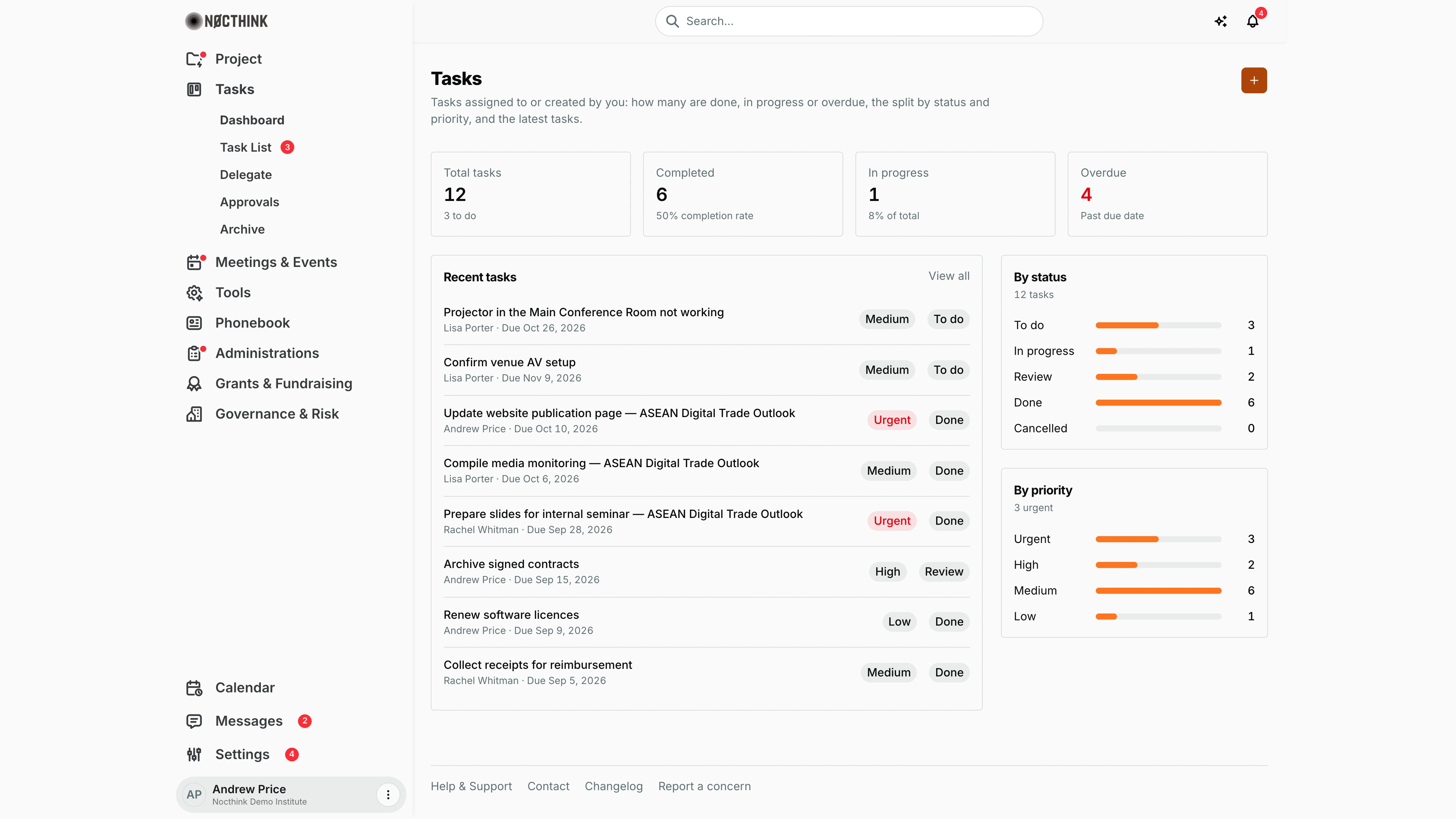
Screenshot: Andrew Price (Senior Researcher), Nocthink Demo Institute demo data.
Why I use this page
I use the Tasks dashboard to see the state of my own workload at a glance: everything assigned to me or created by me, how much is done, what is in progress, and what is overdue. I check it at the start and end of the week to decide what to push, delegate or close. For the actual work I click through to the task or the Task List.
What's on the screen
- Header — Tasks, with "Tasks assigned to or created by you: how many are done, in progress or overdue, the split by status and priority, and the latest tasks." The + button (New task) opens the Task List.
- KPI cards:
- Total tasks, with "n to do"; links to the Task List;
- Completed, with "n% completion rate";
- In progress, with "n% of total";
- Overdue, with "Past due date". The value turns red when it is above 0.
- Recent tasks — the 8 newest tasks (by creation date). Each row shows the title, "<assignee> · Due <date>", a priority pill (Urgent in red) and a status pill. View all opens the Task List. Click a row to open the task.
- By status — bars for To do, In progress, Review, Done and Cancelled, with the total ("12 tasks").
- By priority — bars for Urgent, High, Medium and Low, headed by the urgent count ("3 urgent").
How I …
Check my weekly workload
- Open Tasks → Dashboard.
- Read Overdue. If it is red, go to the Task List and sort or filter by due date to find those tasks.
- Compare In progress with To do. If too much is open, consider Delegating or re-prioritising.
- Check By priority. Urgent tasks should not sit in To do.
Open a recent task
- In Recent tasks, click the row.
- The task page opens (
/tasks/<id>), where I can change the status, comment, attach files, forward it or approve it.
Create a task
- Click + in the header. The Task List opens.
- Use its + (Create task) to add the task: Title (required), Description, Status, Priority, Due date, Assignee, Project or Event, then Create task.
Access & permissions
The Tasks section needs tasks.view. Every staff member keeps their own Tasks menus (role.md §3). This page is personal for everyone: it shows only tasks where I am the assignee or the creator, even for the Director or a Project Manager who can see more tasks elsewhere.
Caveats
- Counts include tasks I created for other people, so "Overdue" can include someone else's late work that I assigned.
- Overdue means a due date in the past with a status other than Done or Cancelled. Tasks in Review count as overdue too.
- Archived tasks are excluded. Tasks approved more than 10 days ago are archived automatically, so they drop out of these numbers.
- The page reads the newest 100 tasks visible to me and then keeps only mine. In very busy organizations older tasks may not be counted.
- Due dates are shown in my browser's local date.
Limitations
- No filters, date range or drill-down on the bars (bars are not clickable).
- No team view. Managers who want to see a team's workload need the Project Tasks board.
- The + button does not open a form directly; it goes to the Task List.
- No export.
Related menus
- Task List — full list behind View all and Total tasks.
- Delegate — tasks others assigned to me.
- Approvals — formal approval requests.
- Archive — archived tasks (excluded here).
- Home Dashboard — My work shows open tasks plus pending approvals.