
Calendar
Open in NocthinkModule: Meetings & Events · URL: /events/calendar · Responsible role: Event Officer · Also used by: Owner/Director (full), all other staff (read)
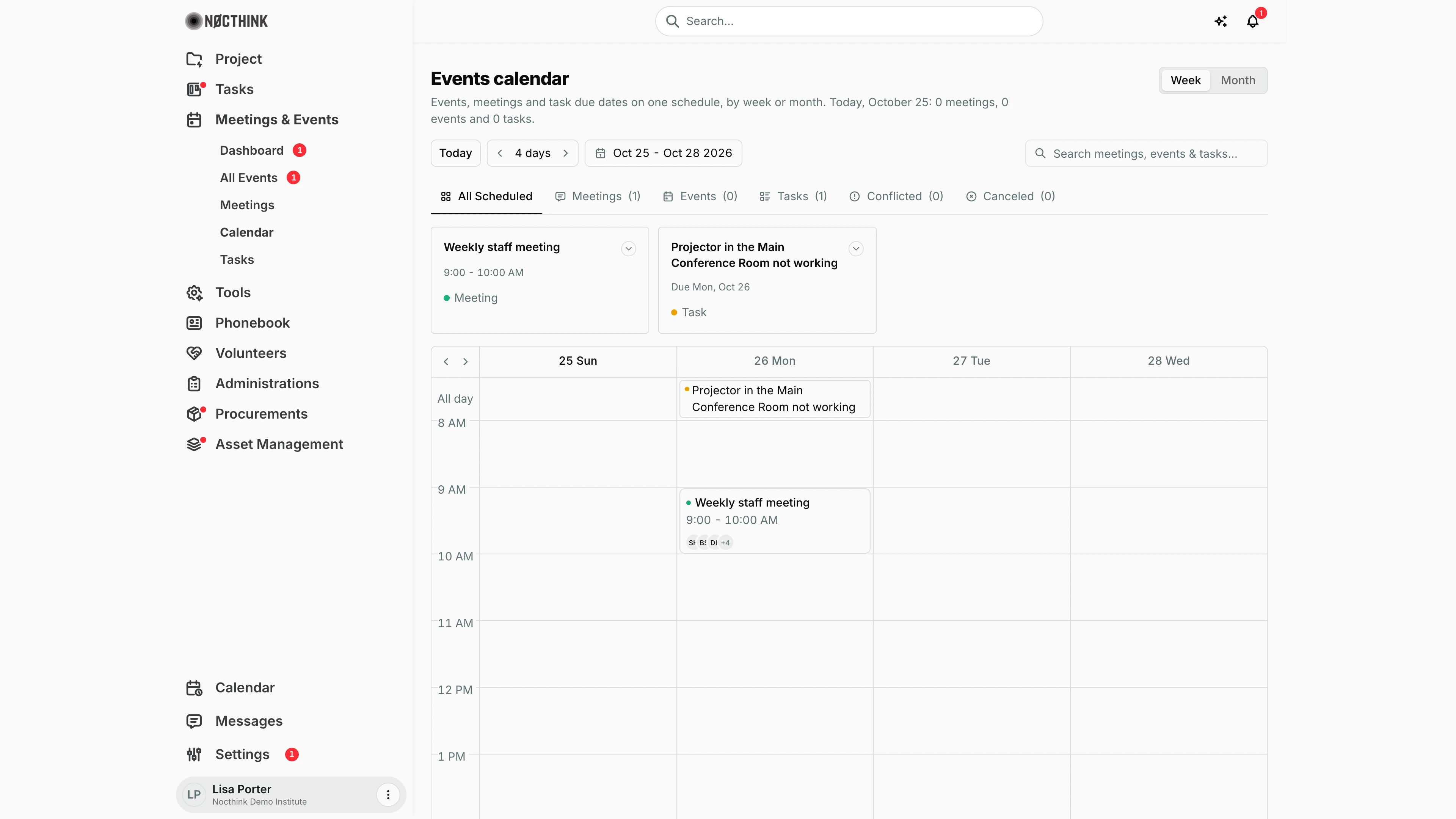
Screenshot: Lisa Porter (Operations Officer), Nocthink Demo Institute demo data.
Why I use this page
This is my scheduling board. Events, meetings and open task due dates sit on one grid, so before I confirm a date or book a room I check here for clashes. The Conflicted tab is the first thing I look at after rooms are booked: it lists meetings that share a room at overlapping times.
What's on the screen
- Header — title Events calendar, a sentence with today's counts ("Today, October 25: 0 meetings, 0 events and 0 tasks."), and a Week / Month switch on the right.
- Toolbar — Today button, a period stepper (< 4 days > in week view), the date range shown (e.g. "Oct 25 - Oct 28 2026"), and Search meetings, events & tasks… (matches titles).
- Filter tabs with counts — All Scheduled, Meetings, Events, Tasks, Conflicted, Canceled. Counts cover the visible window only.
- Item cards — a horizontal strip of the items in the window. Each card shows the title, time or "Due <date>", the venue/room or project, and a pill (Meeting, Event, Task, Today, "N Conflicted" or Cancelled). Meeting cards end with Join Meeting or See Conflict; both open the meeting.
- Grid — in week view, four day columns starting from the anchor day, an All day row (office holidays/office events and task due dates), and hourly rows 8 AM–7 PM with timed meetings and events. Small < > arrows on the grid move one day. In month view, full weeks (Monday first) with items listed in each day.
- Coloured dots tell the kind apart: one colour each for meeting, event and task.
How I …
How I check a week for clashes
- Open Meetings & Events → Calendar. It opens in the organization's default view (Week unless Settings → Events says otherwise).
- Click Today, then use > to step forward (one day at a time in week view).
- Click the Conflicted tab. Each card shows "N Conflicted" — the number of other meetings in the same room at an overlapping time.
- Click See Conflict to open the meeting and change its room or time from Meetings.
How I look at a whole month
- Click Month in the top-right switch.
- Use < / > to move a month at a time; Today returns to the current month.
- Click any item to open it (events go to the event workspace, meetings to the meeting detail, tasks to the task page).
How I find one item quickly
- Type part of the title in Search meetings, events & tasks….
- Combine with a tab (e.g. Events) to narrow further. Search only looks inside the current window — move the window if nothing shows.
Access & permissions
- Needs
events.view, which every staff member has (docs/role.md §4.1: R for Staff, F for Owner/Director and Event Officer). - What appears depends on what the underlying lists return to me: all events in the organization; only the meetings I organize or attend (unless I have full meetings scope); the tasks the tasks API shows me.
Caveats
- Only open tasks with a due date are shown — tasks that are Done, Cancelled or Archived drop off.
- Conflict detection only compares meetings that have a Room and are not cancelled. Events are never checked for venue clashes, and meetings without a room never conflict.
- Cancelled meetings and events stay on the grid with strikethrough text; use the Canceled tab to list them.
- Times use my browser's time zone. The hourly grid shows 8 AM–7 PM; timed items outside those hours are easier to find in Month view or with search.
- Office calendar entries (holidays, office events) that are marked recurring repeat every year on the same date.
Limitations
- Read-only: I cannot create, drag or resize items on this calendar. Create events in All Events, meetings in Meetings, tasks in Tasks.
- Week view always shows 4 days; there is no 7-day or day view.
- No export or calendar subscription (iCal) feed.
- Personal calendar items live in the separate footer Calendar (
/calendar), not here.
Related menus
- Meetings — fix conflicts by changing a meeting's room or time.
- All Events — event dates and venues.
- Tasks — event tasks whose due dates appear in the All day row.
- Dashboard — compact month calendar with day dots.