
Tasks
Open in NocthinkModule: Meetings & Events · URL: /events/tasks · Responsible role: Event Officer · Also used by: Owner/Director (full), all other staff (read; can work tasks assigned to them)
Screenshot: Lisa Porter (Operations Officer), Nocthink Demo Institute demo data.
Why I use this page
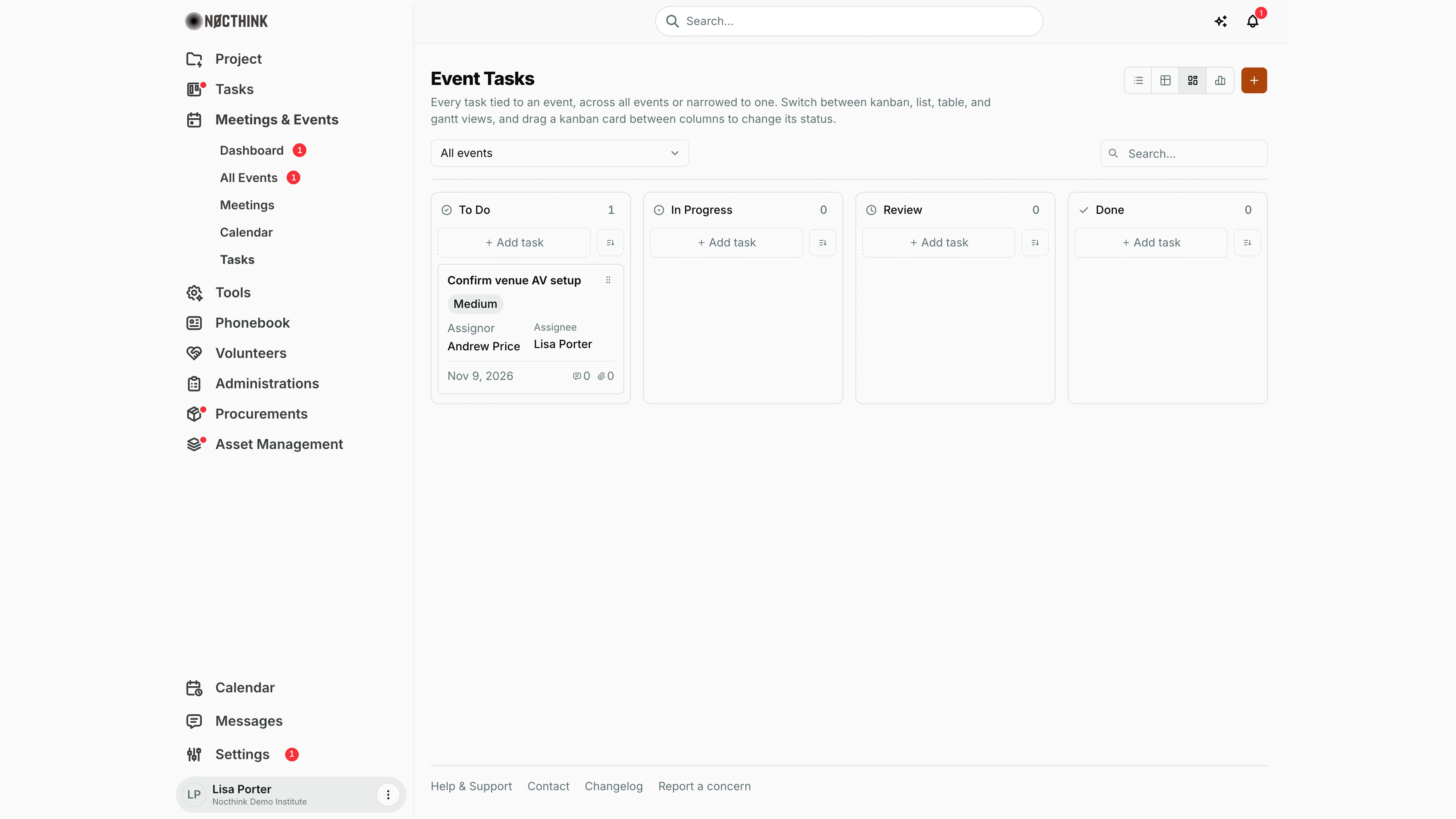
Every event comes with a checklist — venue AV, catering, speaker travel, badges. I track those to-dos here across all events at once, or narrowed to one event when I am in the final week before it. The kanban board is what I put on screen in the event team stand-up: we drag cards across as work moves.
What's on the screen
- Header — title Event Tasks, description, a view switcher (list, table, kanban, gantt icons) and an orange + (New task) button.
- Toolbar — an event picker (All events or one event by name) and a Search… box (in list and kanban views; table and gantt views have their own search).
- Kanban board (default view) — columns To Do, In Progress, Review, Done, each with a count, an + Add task button and a sort control.
- Task card — title, priority pill (Low, Medium, High, Urgent), Assignor and Assignee, due date, and comment and attachment counts. The title opens the task page.
- The chosen view is kept in the URL (
?view=kanban|list|table|gantt), so I can bookmark it.
How I …
How I add a task for an event
- In the column where the task should start (usually To Do), click + Add task. The Create task dialog opens with that column's status preselected (see New event task below).
- Enter Title (required) and optionally Description.
- Set Priority (Low, Medium, High, Urgent) and Due date.
- Choose an Assignee (or leave Unassigned).
- Check Event. It is pre-filled with the event selected in the picker (from the header + or a column's + Add task). With All events selected, pick it yourself. This is essential — see Caveats.
- Optionally pick a Project.
- Click Create task.
How I move work along
- Drag a card from one column to another (e.g. To Do → In Progress). The status saves as soon as I drop it.
- If the save fails, an error appears and I should refresh before trying again.
- To mark a task Cancelled, open it and change Status in the edit dialog — there is no Cancelled column.
How I focus on one event
- Open the event picker and choose the event (e.g. "Washington Economic Policy Forum 2026").
- Switch to gantt view to see due dates on a timeline, or table view to sort and search.
- Choose All events to go back.
How I find a task
- Type in Search… (list/kanban) or the table's own search box.
- Click the task title to open its full page (
/tasks/<id>) with comments and attachments.
Detail page, forms & dialogs
New event task
Screenshot: Lisa Porter (Operations Officer), Nocthink Demo Institute demo data.
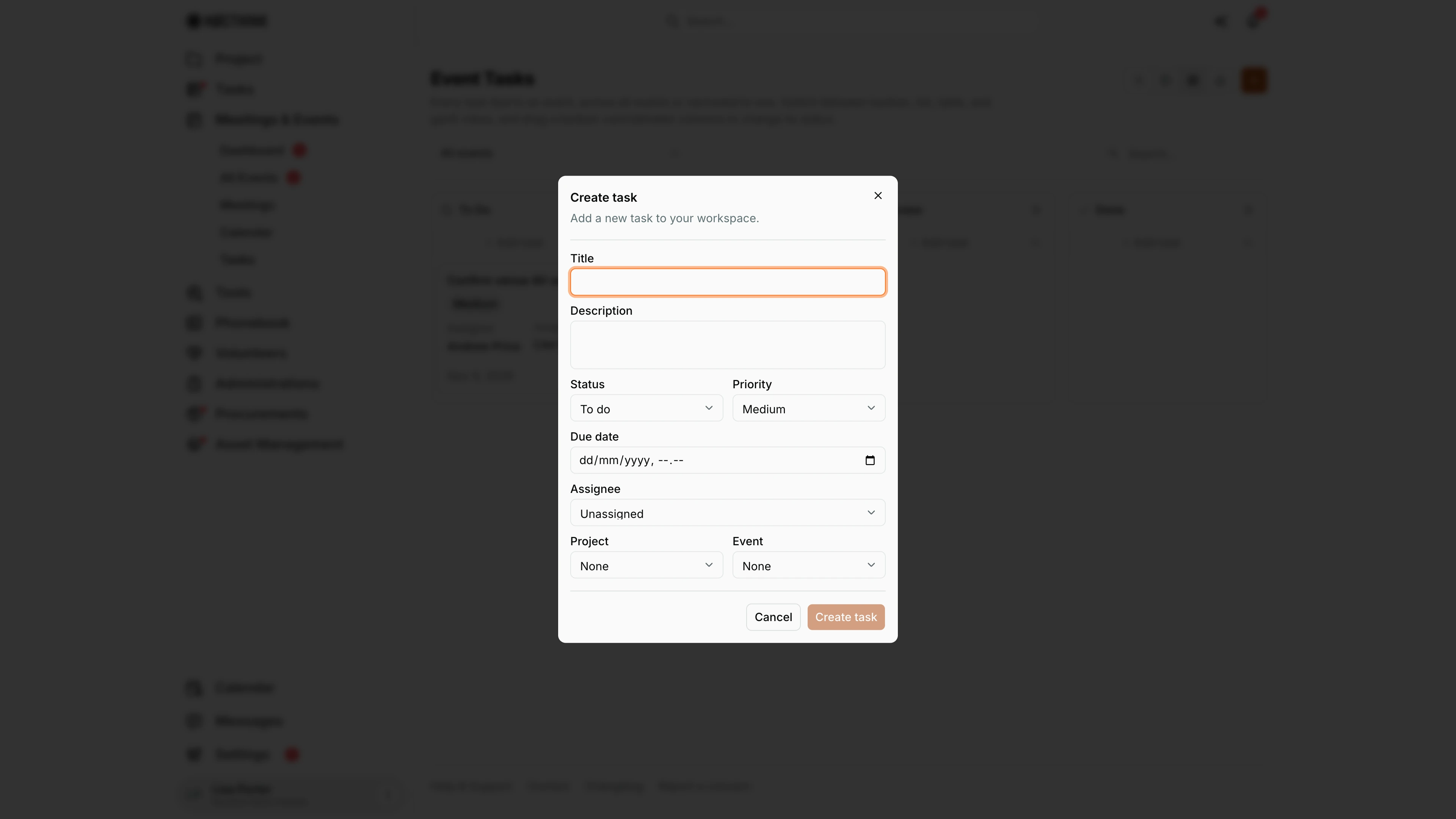
The orange + in the header opens Create task ("Add a new task to your workspace."), the same task form used everywhere in Nocthink. Title is required; Description, Status (To do, In progress, Review, Done, Cancelled), Priority (Low, Medium, High, Urgent), Due date (date and time), Assignee (or Unassigned), Project and Event are optional. The screenshot was taken with All events in the picker, so Event reads None: set it here, or the task will not appear on this board (see How I add a task for an event above). Create task stays disabled until the title is filled in. The saved task opens on its own page, described under Task detail in Task List.
Access & permissions
- Needs
events.view(every staff member). docs/role.md §4.1: R for Staff, F for Owner/Director and Event Officer. - Creating and editing tasks goes through the Tasks module, so it follows my
tasks.*permissions; approving tasks is a separatetasks.approvepage in the Tasks module.
Caveats
- This page only lists tasks that have an Event set. A task created with Event left at None is saved but will not appear here — it shows only in the main Tasks module.
- Cancelled tasks are hidden from the kanban board but still exist (visible in list/table views).
- Dragging a card changes its status immediately; there is no confirm step.
- Due dates are shown as dates without time.
Limitations
- The orange + in the header opens the same Create task dialog, starting in To Do.
- No bulk status change or bulk assign.
- No export from this page.
- Tasks can also be managed per event in the event workspace's Tasks tab (All Events → View Details); both show the same records.
Related menus
- All Events — event workspace Tasks tab for a single event.
- Calendar — open tasks appear by due date in the All day row.
- Dashboard — event overview.
- Tasks module (sidebar Tasks) — all tasks, including those not linked to an event.