
Archive
Open in NocthinkModule: Project · URL: /project/archive · Responsible role: Project Manager · Also used by: Owner/Director (full). Hidden from everyone else (requires project.approve).
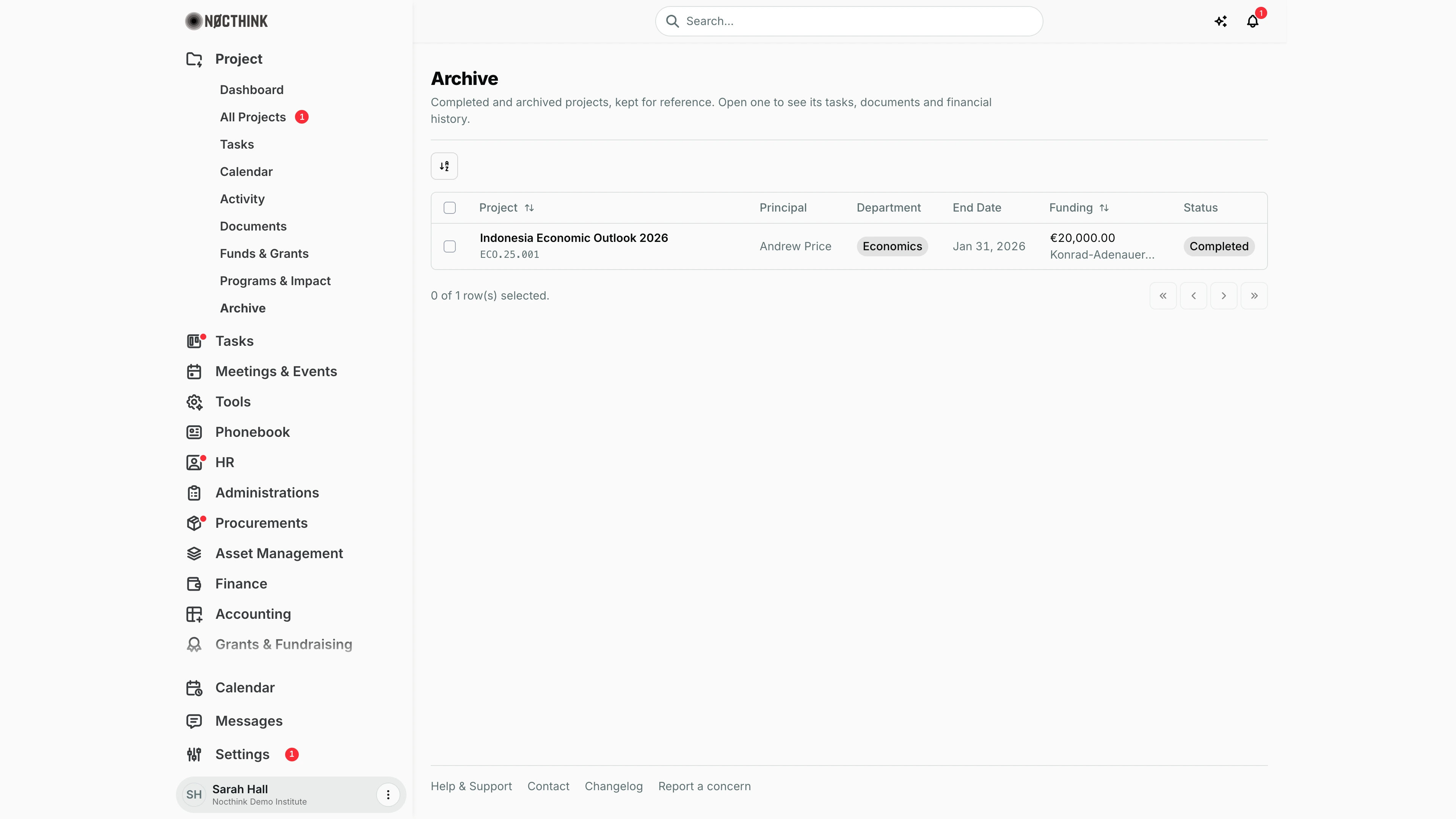
Screenshot: Sarah Hall (Finance Manager), Nocthink Demo Institute demo data; her demo login holds project.approve, so the menu is visible to her. With finance authority she sees funding and donors; people who are not on the project team and have no finance authority see ******* / "Restricted" instead.
Why I use this page
As Project Manager I use the Archive to look back at finished work: when a donor asks for a past report, when I reuse a methodology, or when an auditor wants the tasks, documents and financial history of a closed project. It keeps Completed and Archived projects out of my way in day-to-day lists while leaving them one click away. I visit it occasionally, typically at year end or during audits.
What's on the screen
- Header — Archive, with "Completed and archived projects, kept for reference. Open one to see its tasks, documents and financial history."
- Toolbar — a view/sort toggle. This page has no search box or filters.
- Table — the same columns as All Projects:
- Project — the name, linked to the project page, with the project number underneath; sortable;
- Principal;
- Department;
- End Date — such as Jan 31, 2026;
- Funding — totals and donors, or
*******when I may not see them; sortable; - Status — Completed or Archived.
- Footer — "0 of 1 row(s) selected." and paging arrows. With nothing finished yet, the page says "No finished projects yet."
How I …
Look up a finished project's history
- Open Project → Archive.
- Sort by Project or Funding if the list is long.
- Click the project name to open its page.
- Use the project's tabs to read its tasks, documents, funds and financial history. Everything is read-only while the project stays Completed or Archived.
Move a project into the Archive
- Go to All Projects and open ⋯ → Edit on the project.
- Set Status to Completed (work finished) or Archived (kept for reference only), then save.
- The project now appears here and becomes locked.
Reopen a project
- Find it here and note the name, then go to All Projects (the Archive has no actions menu).
- Open ⋯ → Edit and set Status back to Active or Planning.
- Its tasks, documents and funds become editable again, and it leaves the Archive.
Access & permissions
The menu and URL require project.approve (lib/domain-routes.ts), so in practice the Owner/Director and the Project Manager role see it. The list shows every Completed or Archived project in the organization. Funding is masked unless I am on the project's team, lead it, or have finance authority. Opening a project shows only the modules my project role allows.
Caveats
- Completed and Archived projects are locked: tasks, documents, funds and other records cannot be created, edited or deleted, and the project itself cannot be deleted, until its status is moved back.
- On Hold projects are also locked but do not appear here; they stay in All Projects.
- Archived projects still appear in All Projects, the Project Dashboard counts and the Activity log. The Archive is a filtered view, not a separate store.
- The page loads up to 500 projects in one request. In a very large organization, older finished projects beyond that would not be listed.
Limitations
- No search, status filter or export on this page.
- No row actions (no reopen, edit or delete here). Status changes happen in All Projects.
- No archive date or "archived by" column. The status change appears only in the project's own logs.
Related menus
- All Projects — change status to archive or reopen a project.
- Dashboard — By status shows how many projects are Completed or Archived.
- Documents — read-only documents of archived projects.
- Funds & Grants — closed funds of finished projects.