
Conflicts of Interest
Open in NocthinkModule: Governance & Risk · URL: /governance/coi · Responsible role: Executive Director / Deputy Director acting as board secretary (collects disclosures); governance approver (reviews them) · Also used by: users with a governance role (record disclosures, see "(restricted)" instead of conflict details); not visible to ordinary staff
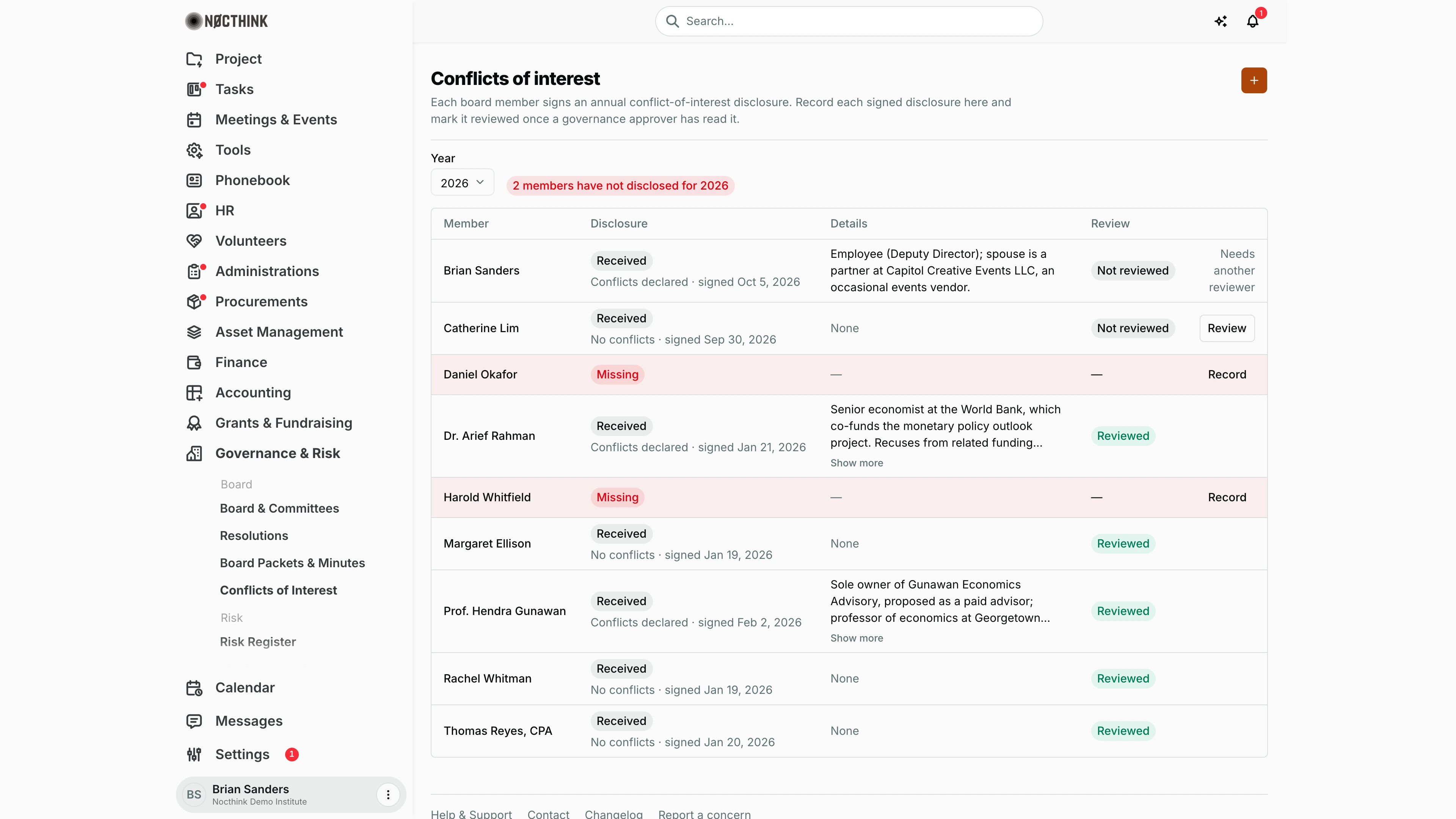
Screenshot: Brian Sanders (Deputy Director), Nocthink Demo Institute demo data. His own disclosure shows "Needs another reviewer" instead of Review.
Why I use this page
Every board member signs a conflict-of-interest disclosure once a year; the Form 990 governance questions and our COI policy depend on us collecting and reviewing them. I use this page at the start of each year to chase signatures, enter each signed form as it comes back, and make sure a governance approver has read every disclosure that reports a conflict. Before a vote on a contract or funding decision, I check here who should recuse.
What's on the screen
- Header: Conflicts of interest with the orange + (Record disclosure).
- Year picker (next year back to five years ago) and a status pill: red "N members have not disclosed for <year>" or green "Every member has disclosed for <year>".
- A notice for non-approvers: conflict details are shown only to governance approvers; others see "(restricted)".
- Table, one row per board member (missing rows are tinted red). Columns:
- Member
- Disclosure — Received or red Missing; under a received disclosure, "Conflicts declared" or "No conflicts" and the signed date
- Details — the conflict description (the widest column; cut off after three lines, with Show more / Show less whenever text is actually hidden), None, or "(restricted)"
- Review — green Reviewed or Not reviewed
- Actions — Review (unreviewed disclosures, approvers only) or Record (missing disclosures). On my own unreviewed disclosure, an approver sees "Needs another reviewer" instead of Review.
How I …
Record a signed disclosure
- Select the Year at the top.
- Click Record on the member's row (member pre-selected), or + to pick the member yourself.
- In Record disclosure (see Record disclosure below), check the Member and Year (2000–2100).
- If the form lists any conflict, tick The member reported one or more conflicts and describe each one in Details (required in that case).
- Enter Signed on (the date on the signed form).
- Click Record disclosure. The row changes to Received / Not reviewed.
Review a disclosure
- As a governance approver, read the Details on a Not reviewed row.
- If a conflict affects an upcoming decision, note who must recuse on the related resolution.
- Click Review. The row shows Reviewed, and the reviewer and time are stored.
Chase missing disclosures
- Pick the year and look at the red pill and the Missing rows.
- Send the form to those members (outside the app), then record each one as it comes back.
Check prior years
- Change Year to see an earlier cycle, including who disclosed and which conflicts were reviewed.
Detail page, forms & dialogs
Record disclosure
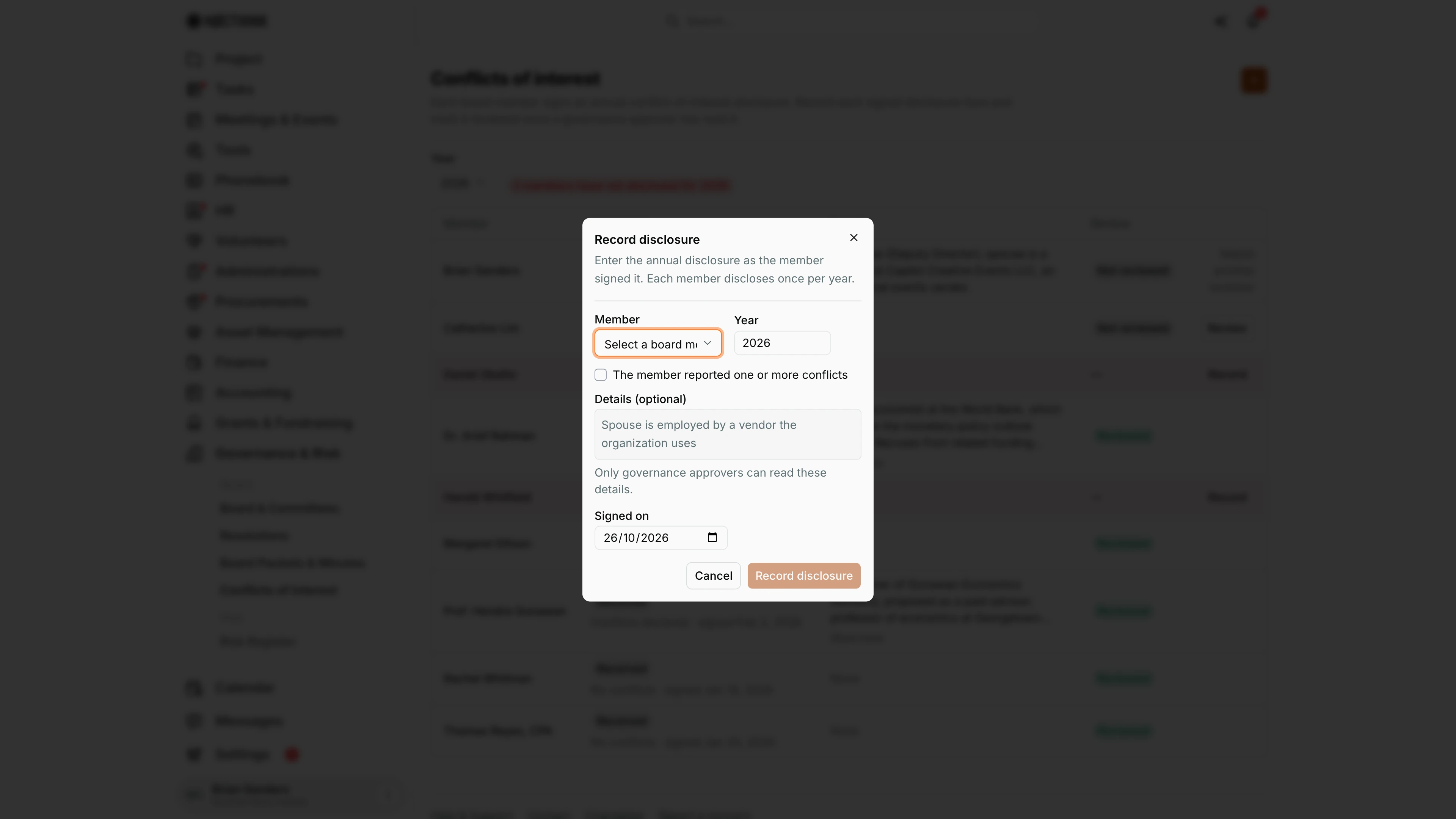
Screenshot: Brian Sanders (Deputy Director), Nocthink Demo Institute demo data.
+ (or Record on a member's row, which pre-selects the member) opens Record disclosure: "Enter the annual disclosure as the member signed it. Each member discloses once per year."
- Member lists the board members; those who already disclosed for the chosen year are marked "(already disclosed)".
- Year defaults to the year selected on the page.
- The member reported one or more conflicts: when ticked, Details becomes required; otherwise it is optional. "Only governance approvers can read these details."
- Signed on is the date on the signed form (defaults to today).
Record disclosure saves it and the member's row shows the disclosure as received and not yet reviewed. A second person then marks it reviewed from the list.
Access & permissions
- Governance is a restricted-view domain: the owner, directors and users with
governance.viewcan open the page. - Recording a disclosure needs
governance.create; Review needsgovernance.approve. - Conflict Details are returned by the server only to governance approvers; everyone else sees "(restricted)" for members with conflicts.
Caveats
- One disclosure per member per year: a second one for the same year is rejected with "This member already disclosed for that year."
- Details are mandatory when has conflicts is ticked ("Describe each conflict.").
- Recording and reviewing are permanent: there is no edit, delete or un-review. Check the form before saving.
- I cannot review my own disclosure. A board member counts as me when the member record is linked to my user account or has my email address; the server refuses with "You cannot review your own disclosure; another governance approver must review it." Keep board member emails up to date so this check works.
- The member list comes from Board & Committees and includes members who are not currently serving.
- The year defaults to the current calendar year in your browser, not the fiscal year.
Limitations
- Board members cannot sign or submit disclosures themselves; the secretary keys them in. No upload of the signed form.
- No reminders or e-mails to members with missing disclosures.
- Recusals are not created automatically from a disclosure; they are recorded vote by vote on Resolutions.
- No export of the disclosure register.
Related menus
- Board & Committees — the roster this list is built from.
- Resolutions — where a conflicted member's recusal and reason are recorded.
- Form 990 Workpapers — governance answers about the COI policy and its monitoring.