
Board & Committees
Open in NocthinkModule: Governance & Risk · URL: /governance/board · Responsible role: Executive Director / Deputy Director acting as board secretary (staff liaison to the board) · Also used by: governance approvers (change bylaws settings, see confidential items); users given a role with governance.view (read only); not visible to ordinary staff
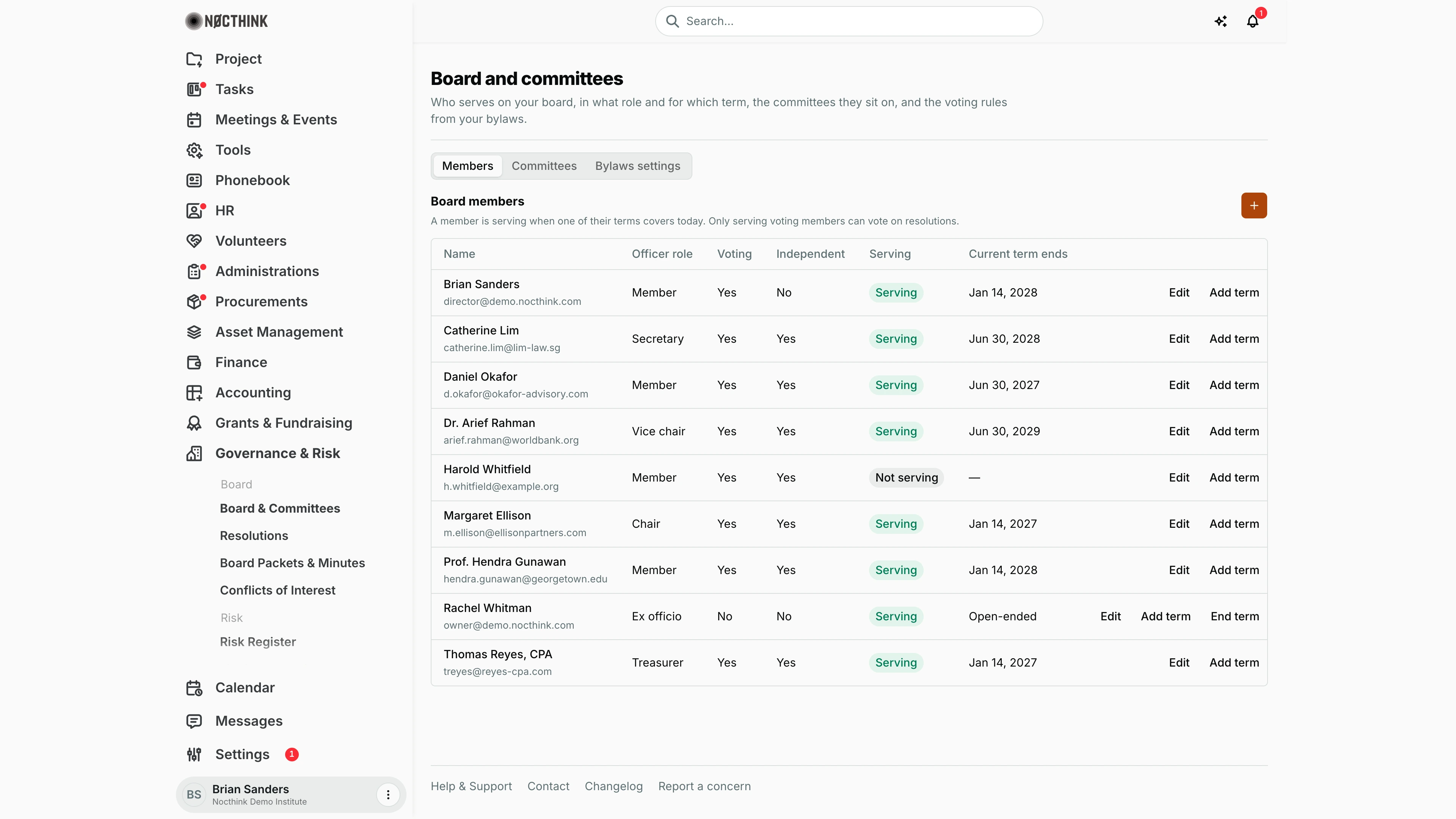
Screenshot: Brian Sanders (Deputy Director), Nocthink Demo Institute demo data.
Why I use this page
I keep the board roster here: who sits on the board, in which officer role, for which term, and on which committees. Everything else in Governance depends on it — only members with a current voting term can vote on resolutions, and the conflict-of-interest list is built from this roster. I open it after every annual meeting or election, when someone resigns, and when the 60/30-day "Board term ending" reminder arrives. The bylaws settings (quorum and default voting threshold) also live here.
What's on the screen
- Header: Board and committees, with a short description.
- Tabs: Members, Committees, Bylaws settings.
- Members tab: a Board members section with an orange + button (Add board member) and the note that a member is serving when one of their terms covers today, and that only serving voting members can vote on resolutions. Table columns:
- Name (with email underneath)
- Officer role — Chair, Vice chair, Treasurer, Secretary, Member or Ex officio
- Voting and Independent — Yes/No
- Serving — green Serving pill or grey Not serving
- Current term ends — a date, Open-ended for a term with no end date, or — when not serving
- Row actions: Edit, Add term, and End term (only shown when the member has an open-ended term, as on Rachel Whitman's ex officio row in the screenshot).
- Committees tab: one card per committee (name, charter text, members with a Chair pill), with Make chair / Make member and Remove per member, and an Add member + Role picker with an Add button. A + button creates a committee.
- Bylaws settings tab: Quorum (Majority of eligible voting members, or A fixed number of members), Default voting threshold (Simple majority, Two thirds, Unanimous), Leave recused members out of the quorum count, and Bylaws reference, with Save settings.
How I …
Add a new board member
- On Members, click the + button.
- In Add board member (see Add board member below), enter Name (required) and optionally Email.
- Pick the Officer role; tick Voting member (on by default) and Independent as appropriate.
- Set First term starts (defaults to today) and, if the bylaws give a fixed term, First term ends. Leave the end blank for an open-ended term (e.g. ex officio).
- Optionally choose a Linked contact from the phonebook.
- Click Add member. The member appears with Serving if the term covers today.
Record a re-election or new term
- Click Add term on the member's row. The dialog lists their existing terms (see Add term below).
- Enter Starts, optionally Ends, and a Note such as "Elected at the annual meeting".
- Click Add term. Terms cannot overlap; the server rejects an overlapping range.
End a term early (resignation, removal)
- Click End term on the row (only available for an open-ended term).
- Set Last day of the term and click End term. After that date the member can no longer vote.
- For a member whose term already has a fixed end date there is no early-end button (see Limitations); I note the resignation in the minutes and, if they should stop voting at once, untick Voting member via Edit.
Set up a committee
- Open Committees and click + (see Committees and Create committee below).
- Enter Name (e.g. "Audit committee") and optionally the Charter; click Create.
- In the committee card, choose a board member under Add member, pick Role (Member or Chair) and click Add.
- Use Make chair / Make member to switch roles, or Remove to take someone off.
Configure the bylaws voting rules
- Open Bylaws settings (see Bylaws settings below; editable only with
governance.approve; others see "Only governance approvers can change these settings."). - Choose the Quorum rule; for A fixed number of members, enter Members needed for quorum as a whole number of at least 1.
- Pick the Default voting threshold, decide whether recused members are left out of the quorum count, and enter the Bylaws reference (article and section).
- Click Save settings. A "Saved." confirmation appears.
Detail page, forms & dialogs
Add board member
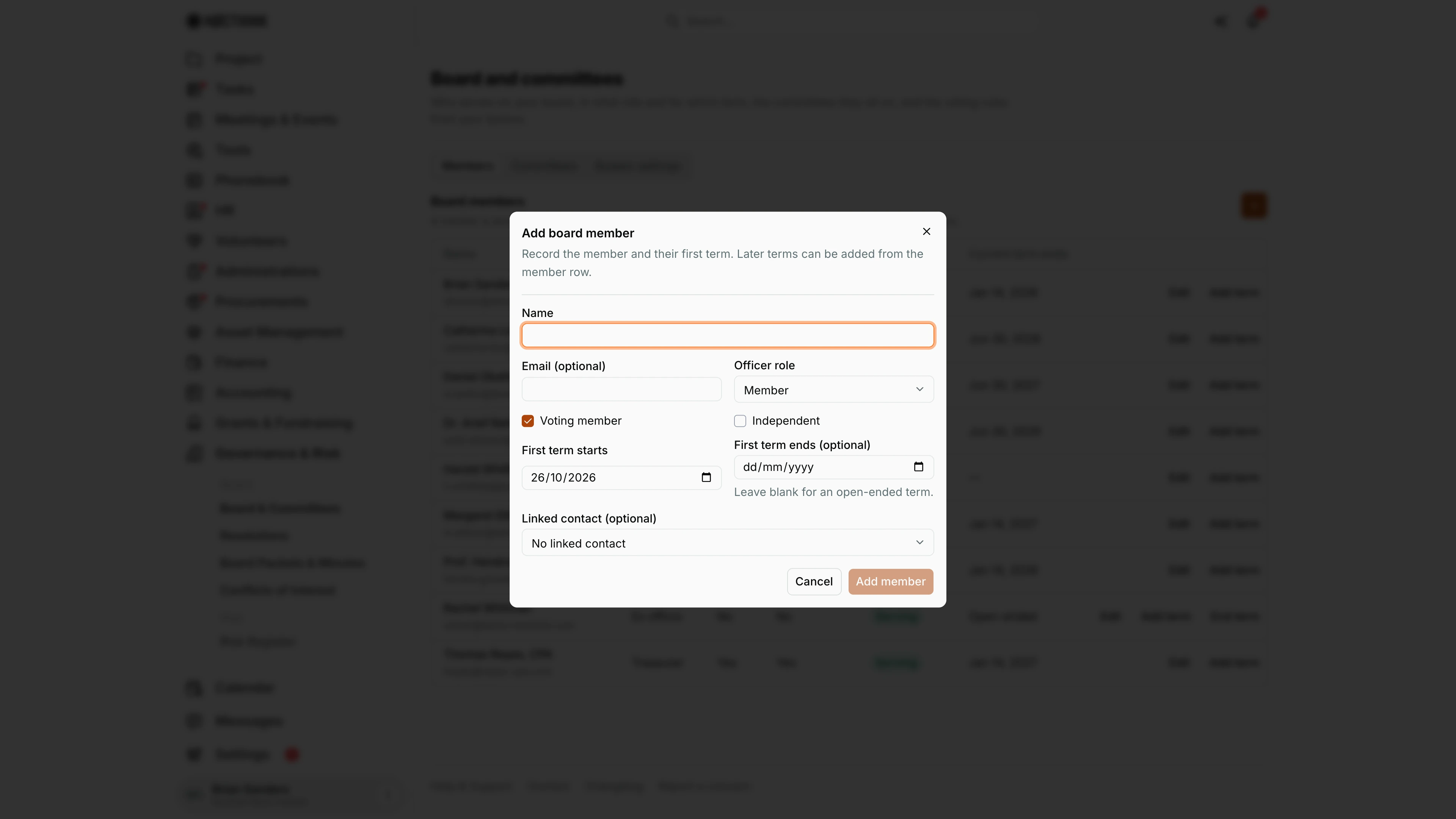
Screenshot: Brian Sanders (Deputy Director), Nocthink Demo Institute demo data.
The + on Members opens Add board member, which records the person and their first term in one step: "Record the member and their first term. Later terms can be added from the member row."
- Name is required; Email is optional.
- Officer role is one of Chair, Vice chair, Treasurer, Secretary, Member or Ex officio (default Member).
- Voting member is ticked by default; Independent is not.
- First term starts defaults to today. First term ends (optional) can be left blank for an open-ended term; it cannot be earlier than the start, otherwise Add member stays disabled.
- Linked contact (optional) ties the member to a phonebook contact.
Add member saves the member and the term. The row shows Serving when the term covers today.
Edit board member
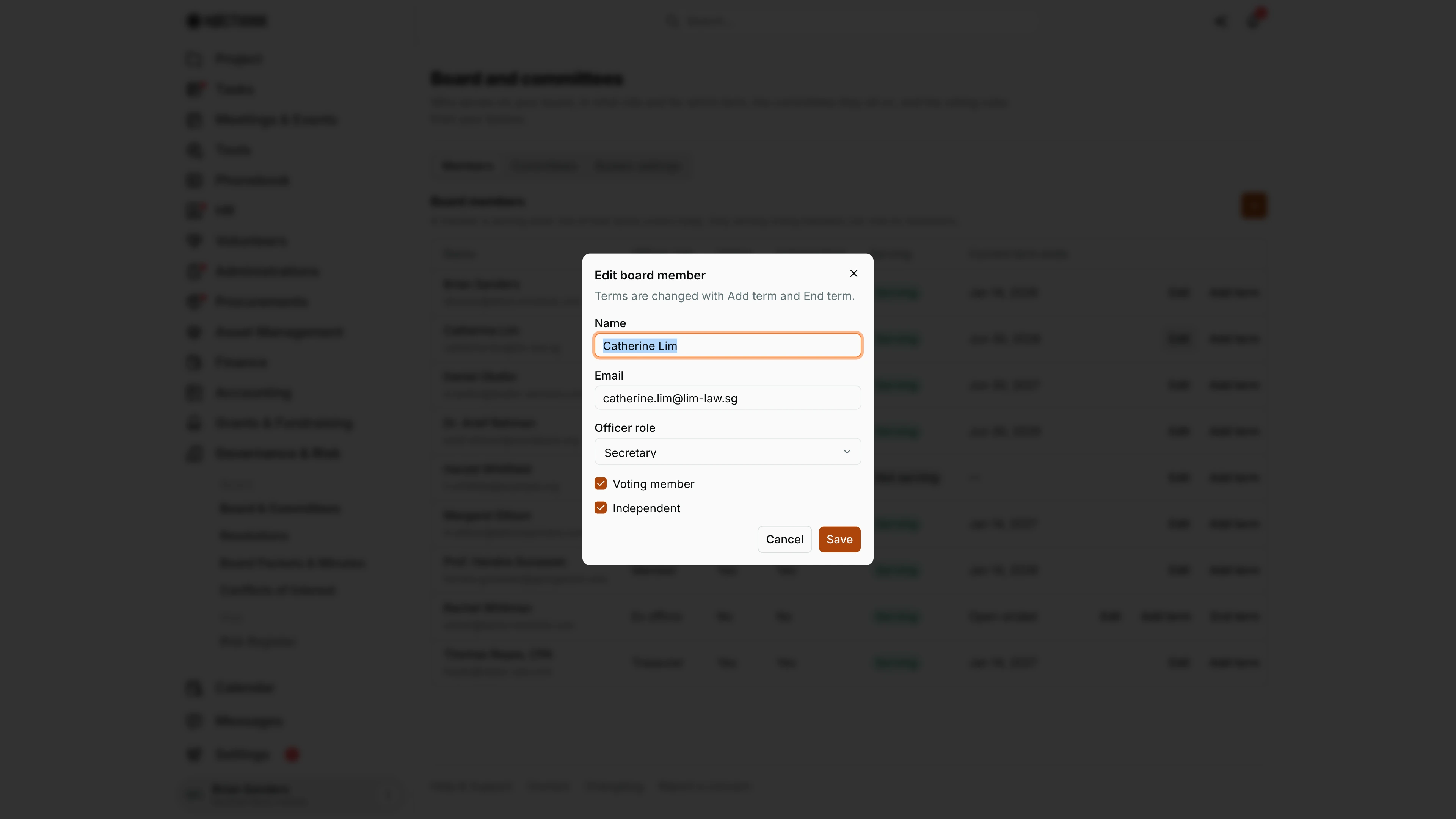
Screenshot: Brian Sanders (Deputy Director), Nocthink Demo Institute demo data.
Edit on a member row opens Edit board member. It changes who the member is, not when they serve: "Terms are changed with Add term and End term."
I can correct Name and Email, change the Officer role (here Catherine Lim is Secretary), and switch Voting member and Independent on or off. Unticking Voting member takes the person off the Record votes list of any resolution still open for voting, which is how I stop a member with a fixed-end term from voting after a resignation. Save stores the change; Cancel discards it.
Add term
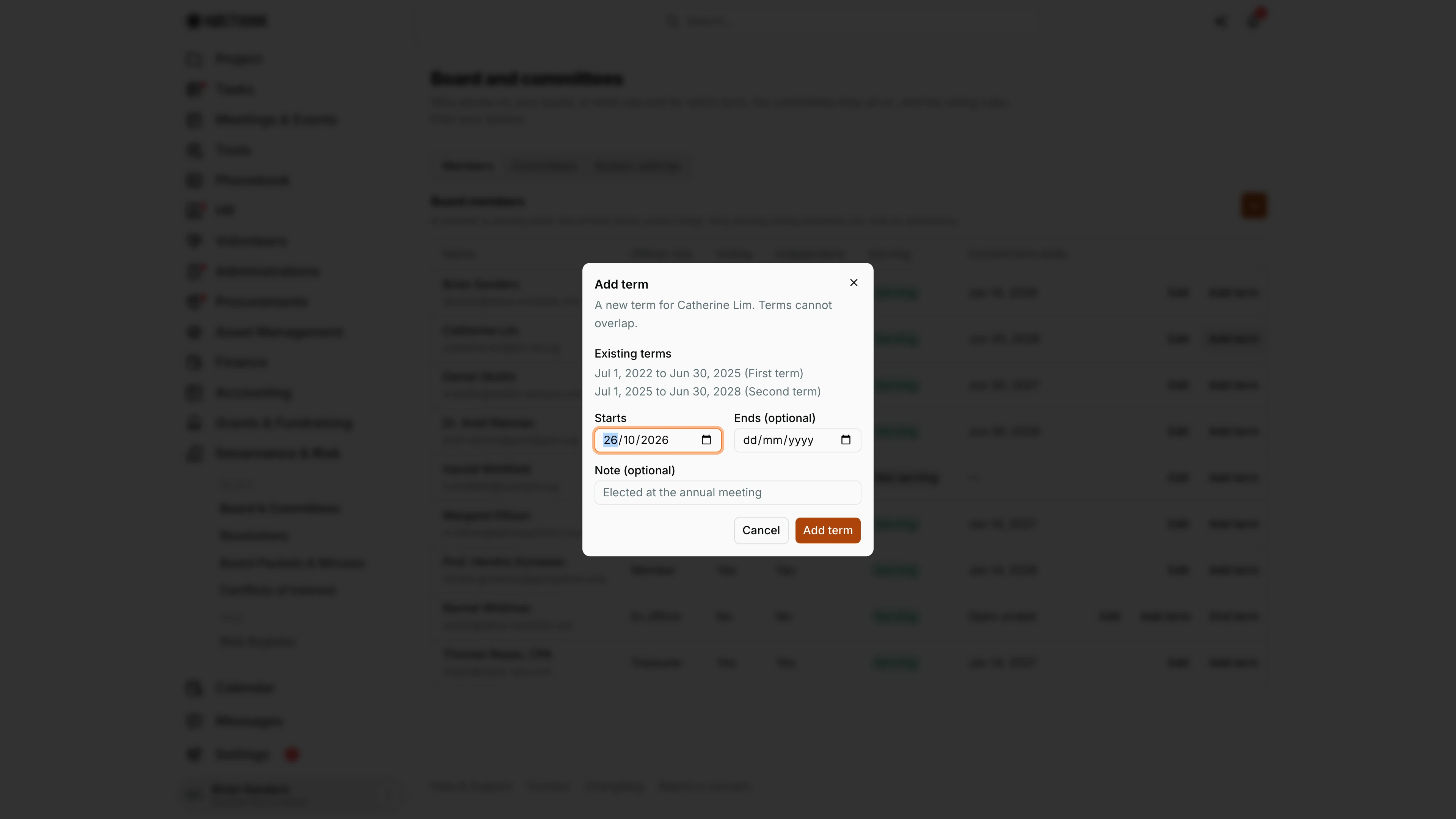
Screenshot: Brian Sanders (Deputy Director), Nocthink Demo Institute demo data.
Add term on a member row records a re-election or a new appointment. The dialog first lists Existing terms, each with its dates and note (Catherine Lim has a first term from Jul 1, 2022 to Jun 30, 2025 and a second to Jun 30, 2028), so I can see where the new one must start.
- Starts is required.
- Ends (optional) stays blank for an open-ended term.
- Note (optional) records the basis, for example "Elected at the annual meeting".
Add term saves it. Terms cannot overlap; the server refuses a range that touches an existing term. A member whose current term is open-ended also gets an End term button on the row, which closes that term on a Last day of the term.
Committees
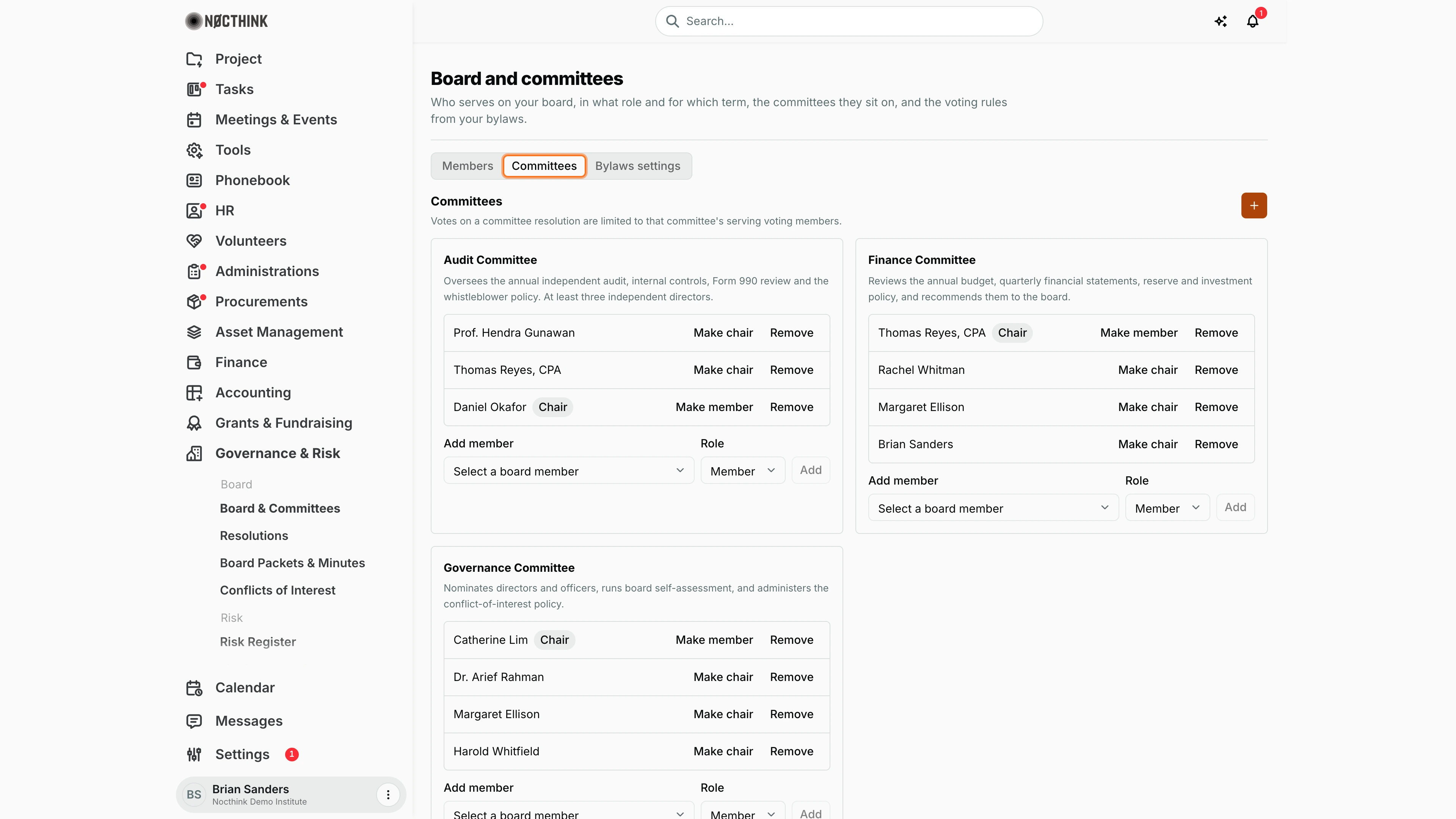
Screenshot: Brian Sanders (Deputy Director), Nocthink Demo Institute demo data.
The Committees tab shows one card per committee: its name, the start of its charter, and its members with a Chair pill on the chair. "Votes on a committee resolution are limited to that committee's serving voting members."
On each member line I can click Make chair or Make member to switch the role, or Remove to take the person off the committee. Under the list, Add member offers only board members who are not yet on that committee, with a Role of Member or Chair, and Add saves it at once. The + at the top opens Create committee (below).
Create committee
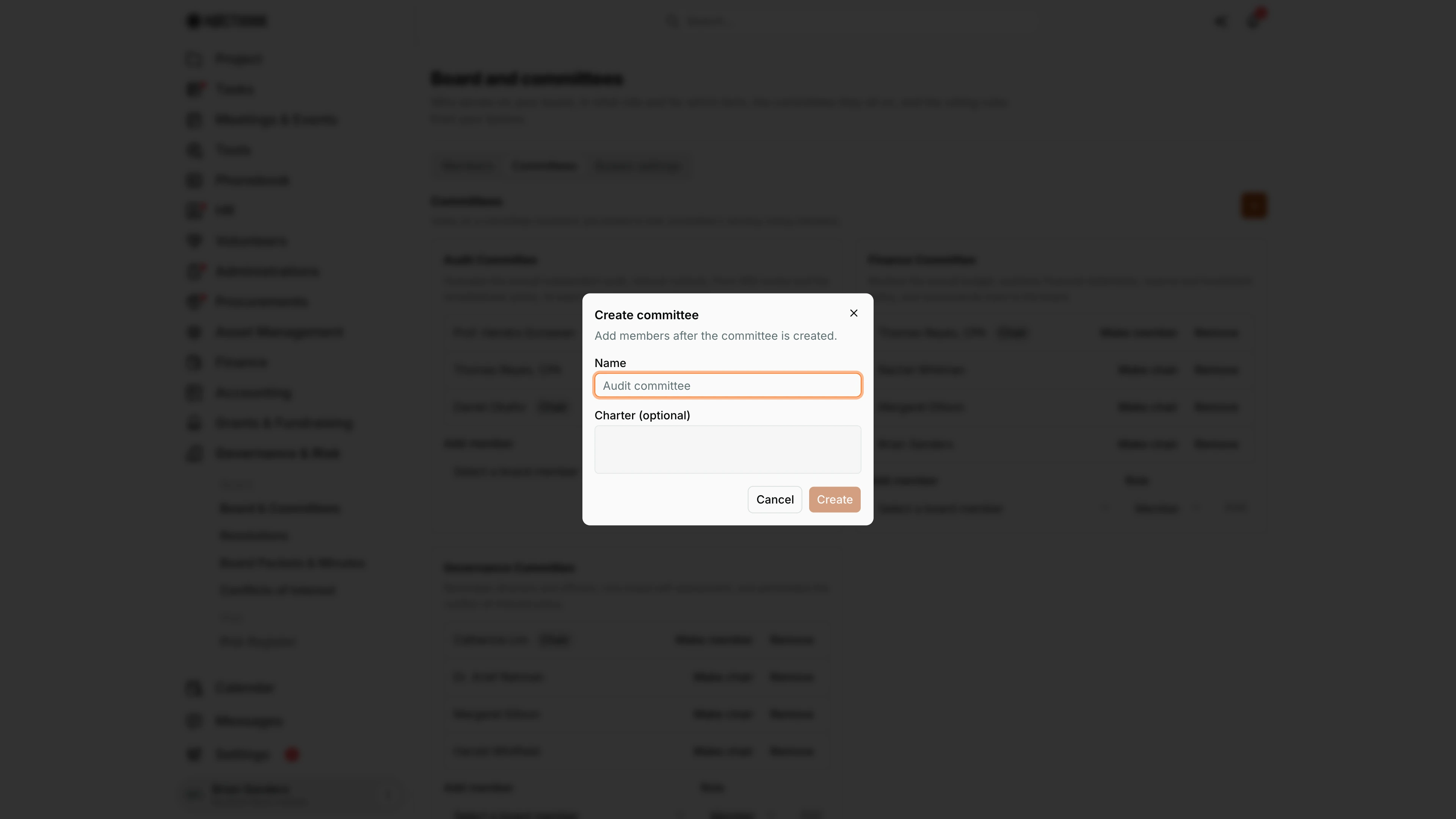
Screenshot: Brian Sanders (Deputy Director), Nocthink Demo Institute demo data.
The + on the Committees tab opens Create committee: "Add members after the committee is created."
I enter the Name (required, for example "Audit committee") and, optionally, the Charter: the committee's purpose and duties as the board adopted them. Create stays disabled until there is a name. It saves the committee and the new card appears with "No members yet."; I then add members and a chair from the card. A committee exists so that a resolution can name it as its Voting body, which limits that vote to the committee's serving voting members.
Bylaws settings
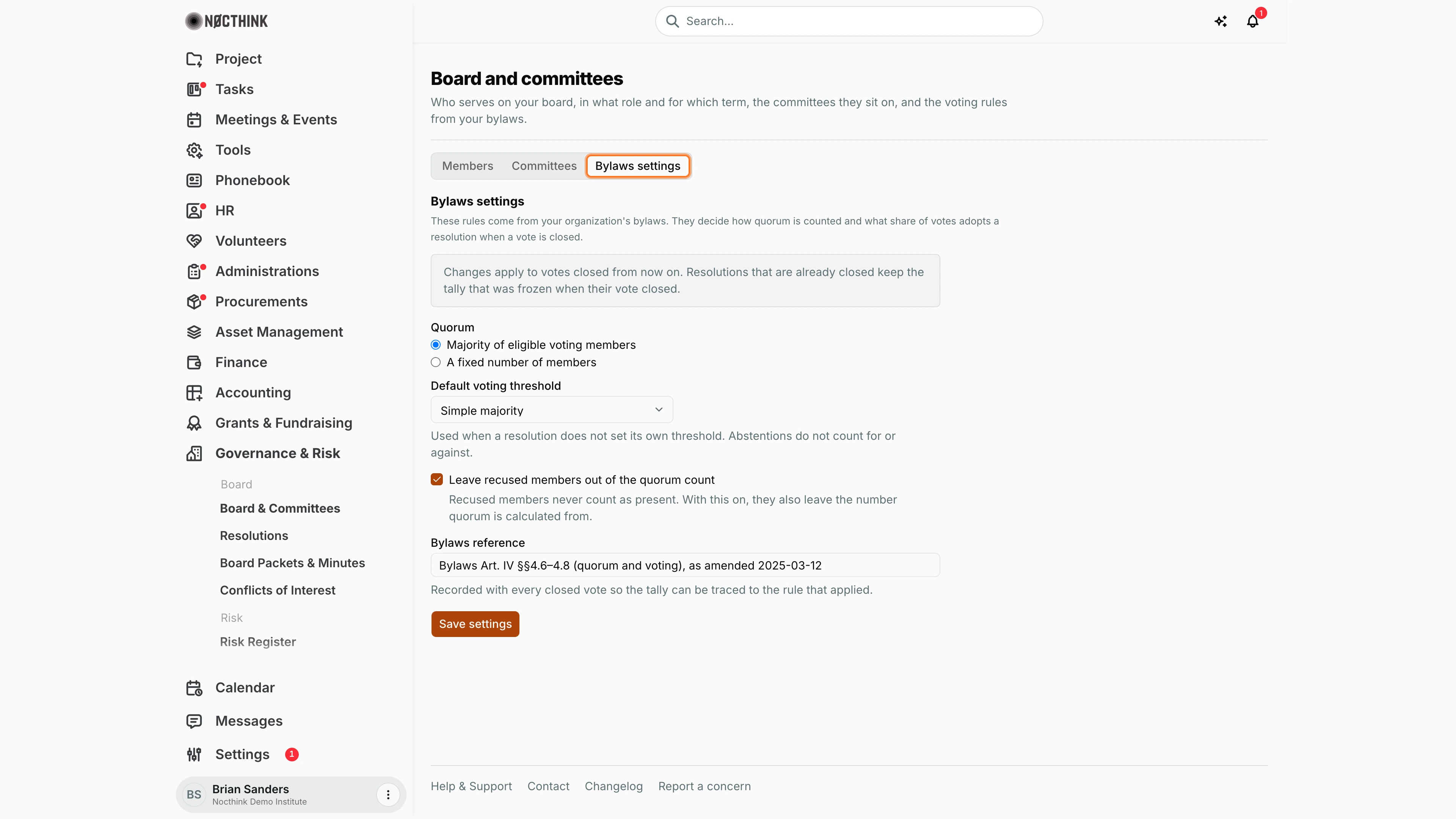
Screenshot: Brian Sanders (Deputy Director), Nocthink Demo Institute demo data.
The Bylaws settings tab holds the voting rules every vote is closed under: "These rules come from your organization's bylaws. They decide how quorum is counted and what share of votes adopts a resolution when a vote is closed."
- Quorum: Majority of eligible voting members, or A fixed number of members with Members needed for quorum (a whole number of at least 1).
- Default voting threshold, used when a resolution does not set its own. Abstentions do not count for or against.
- Leave recused members out of the quorum count: recused members never count as present; with this on they also leave the base quorum is calculated from.
- Bylaws reference, recorded with every closed vote.
A notice reminds me that changes apply only to votes closed from now on. Only governance approvers see Save settings; others see "Only governance approvers can change these settings." with the form read-only.
Access & permissions
- The whole Governance section is a restricted-view domain: unlike most modules,
governance.viewis not open to all staff. The organization owner (Executive Director) and directors (Deputy Director) see everything; anyone else needs a role that grantsgovernance.view. - Adding members and committees needs
governance.create; editing members, adding/ending terms and changing committee membership needgovernance.update; changing Bylaws settings needsgovernance.approve. - This module is not covered by docs/role.md; in the demo tenant it is run by the Executive Director and Deputy Director, with the board secretary role played by staff.
Caveats
- Serving is calculated from today's date in UTC against the term dates; a term ending today still counts as serving.
- Only members with Voting = Yes and a current term are eligible voters. Marking someone non-voting removes them from the eligible count for every resolution closed afterwards.
- Bylaws settings changes apply only to votes closed from now on; already-closed resolutions keep the tally frozen at closing.
- An end date must be on or after the start date; the dialogs block saving otherwise.
- Organization owners get an automatic "Board term ending" notification 60 and 30 days before a term's end date.
- Committee votes are limited to that committee's serving voting members, so keep committee membership current before opening a committee resolution.
Limitations
- There is no delete for board members, terms or committees, and no way to edit an existing term's dates; End term works only on open-ended terms.
- Committees cannot be renamed or have their charter edited from this page after creation.
- No export or print of the roster from this page.
Related menus
- Resolutions — votes are recorded only for serving voting members listed here.
- Board Packets & Minutes — materials for the meetings this board holds.
- Conflicts of Interest — one annual disclosure per member on this roster.
- Phonebook — contacts that can be linked to a board member.