
Findings & Actions
Open in NocthinkModule: Governance & Risk · URL: /risk/findings · Responsible role: Deputy Director (risk owner; tracks findings to closure and signs off) · Also used by: finding and action owners (Finance Manager, HR Officer, Operations Officer) with risk.update; "Program and impact" role (researcher1, read only); not visible to ordinary staff
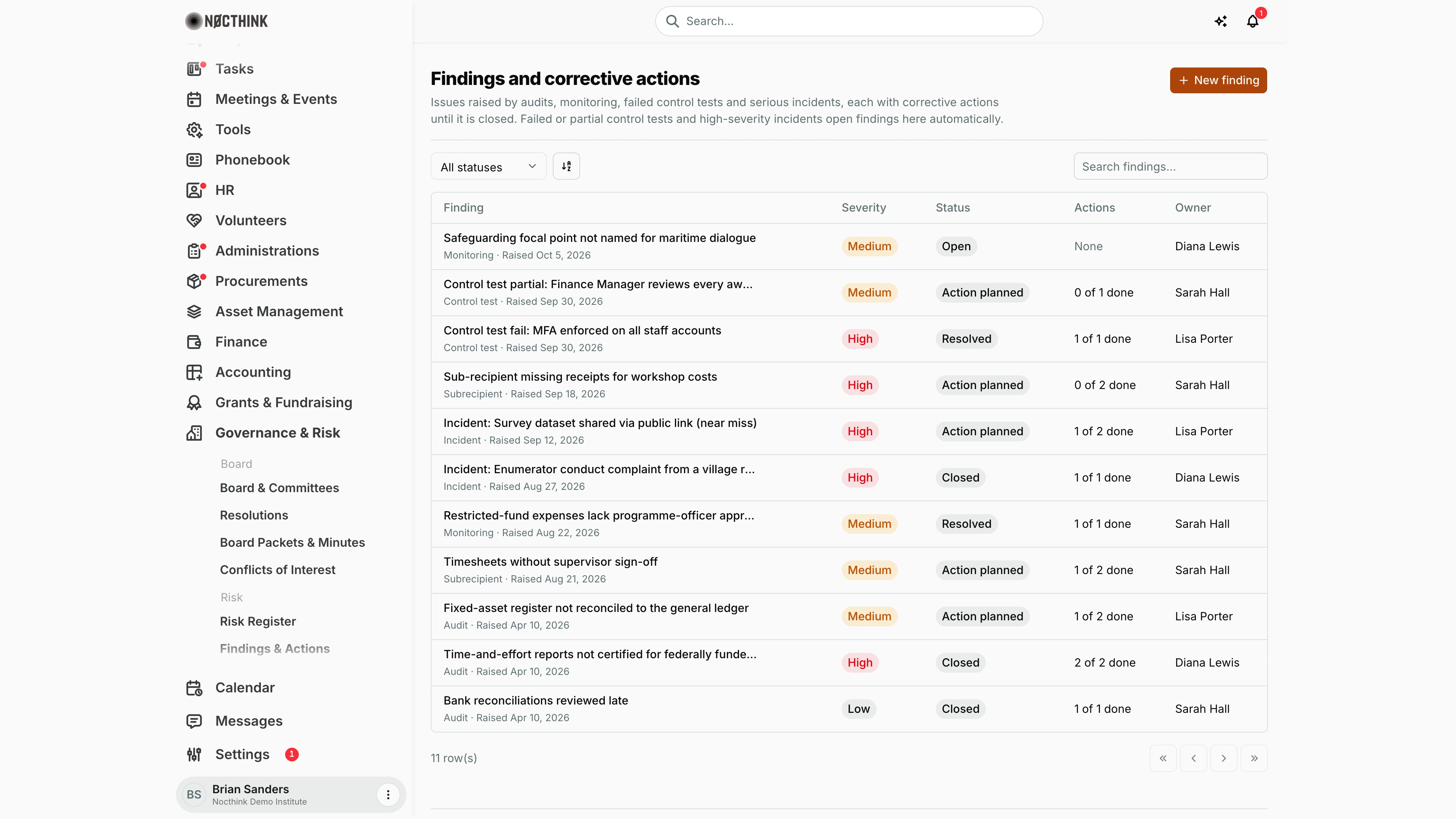
Screenshot: Brian Sanders (Deputy Director), Nocthink Demo Institute demo data.
Why I use this page
This is where every issue that needs fixing ends up: audit management-letter points, monitoring and subrecipient findings, failed or partial control tests from the Risk Register, and high-severity incidents. For each one I agree corrective actions with an owner and due date, chase them, and close the finding with evidence. I go through the open list weekly and before each audit committee meeting; auditors and funders ask to see it.
What's on the screen
- Header: Findings and corrective actions with the New finding button.
- Toolbar: All statuses filter (Open, Action planned, Resolved, Closed), a sort control and Search findings… (by title).
- Table (newest first, 50 per page):
- Finding — title, with the source (Audit, Monitoring, Control test, Incident, Subrecipient, Other) and "Raised <date>" underneath; automatically created ones start with "Control test fail/partial:" or "Incident:". Long titles are shortened; click to open the detail panel.
- Severity — High (red), Medium (amber), Low
- Status — Open, Action planned, Resolved, Closed
- Actions — "N of M done" or "None"
- Owner — or "Unassigned".
- Detail panel: severity, status, owner, raised by, reference, description, closure details (when closed); Corrective actions with Mark complete and an Add action form; and Close finding for risk approvers.
How I …
Raise a finding by hand
- Click New finding (see New finding below).
- Enter the Title (required); choose Severity (default Medium) and Source (default Audit).
- Add a Source reference such as "FY2026 audit, item 3", choose the Owner and optionally a Related risk.
- Write the Description and click Create finding. It starts as Open.
Plan corrective actions
- Click the finding title (see Finding detail below).
- Under Corrective actions, describe the New corrective action, set Due date and Owner.
- Click Add action. The first action moves the finding from Open to Action planned.
- Repeat for each step agreed with the owner.
Complete actions
- Open the finding and click Mark complete on each finished action; it shows Done with the completion date.
- When the last open action is completed, the finding moves to Resolved automatically.
Close a finding
- Open the finding (needs
risk.approve). - Under Close finding, describe how the issue was resolved in Closure evidence (required for High; recommended for Low/Medium).
- Click Close finding. Its status becomes Closed with my name and the date.
- For a High finding, the close is refused unless every corrective action is done and I am neither its owner nor the person who raised it — ask another approver if I raised it.
Follow up a finding opened automatically
- After a failed control test, use the Open the finding link in the Risk Register (it opens this page with the finding selected), or after a high-severity incident, look for "Incident: …".
- Assign an owner by planning actions, then work through the steps above.
Detail page, forms & dialogs
Finding detail
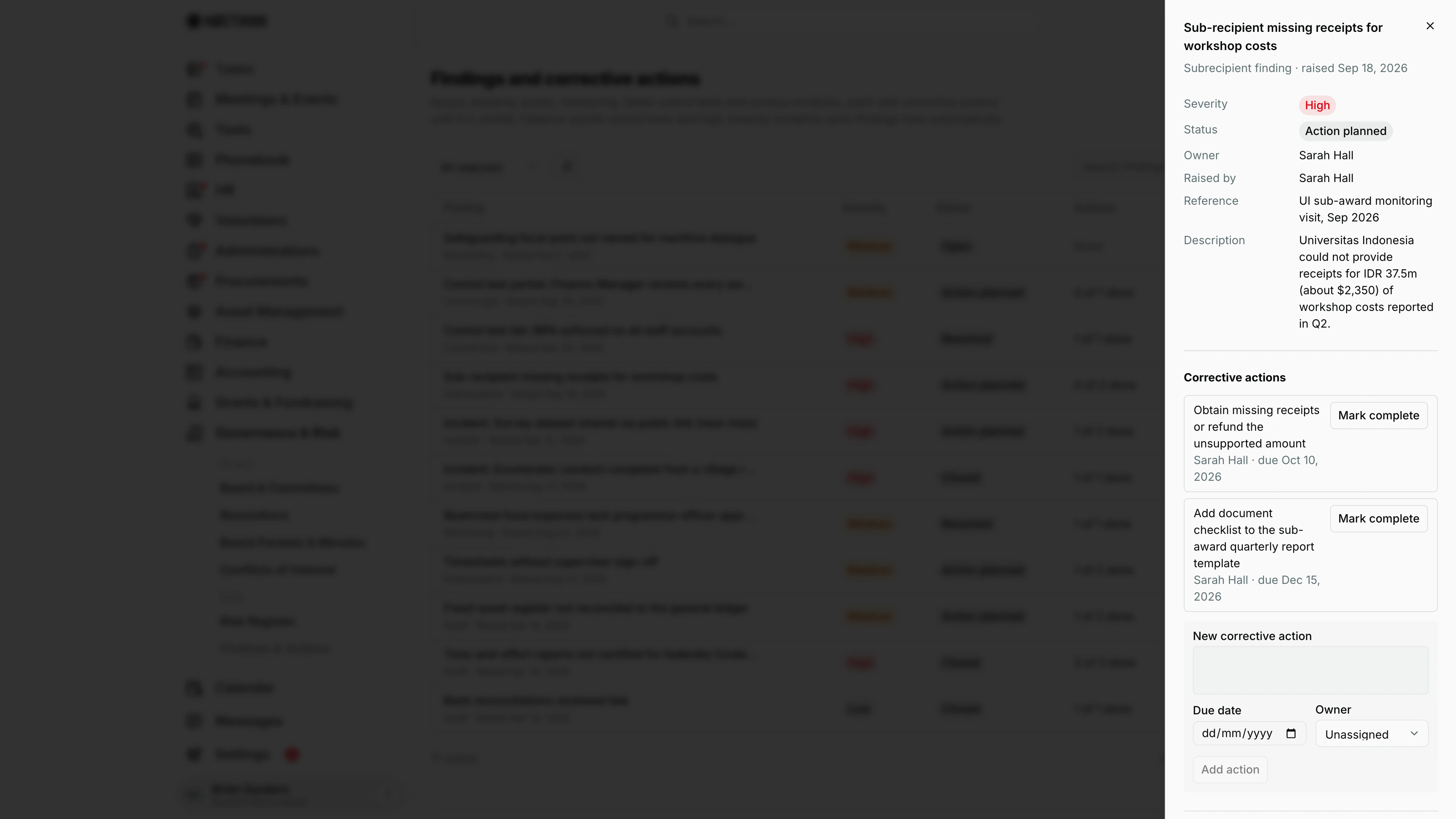
Screenshot: Brian Sanders (Deputy Director), Nocthink Demo Institute demo data.
Clicking a finding title opens its panel. The header gives the source and date raised (here "Subrecipient finding · raised Sep 18, 2026"). The facts show Severity, Status, Owner, Raised by, Reference and Description, plus Closed and Closure evidence once closed.
Corrective actions lists each step with its owner and due date and a Mark complete button; below them, New corrective action with Due date, Owner and Add action.
Close finding (approvers with risk.approve) takes Closure evidence. For a High finding the panel spells out the rule: "To close it you need closure evidence, every corrective action done (2 still open), and the sign-off must come from someone other than the finding's owner or the person who raised it."
New finding
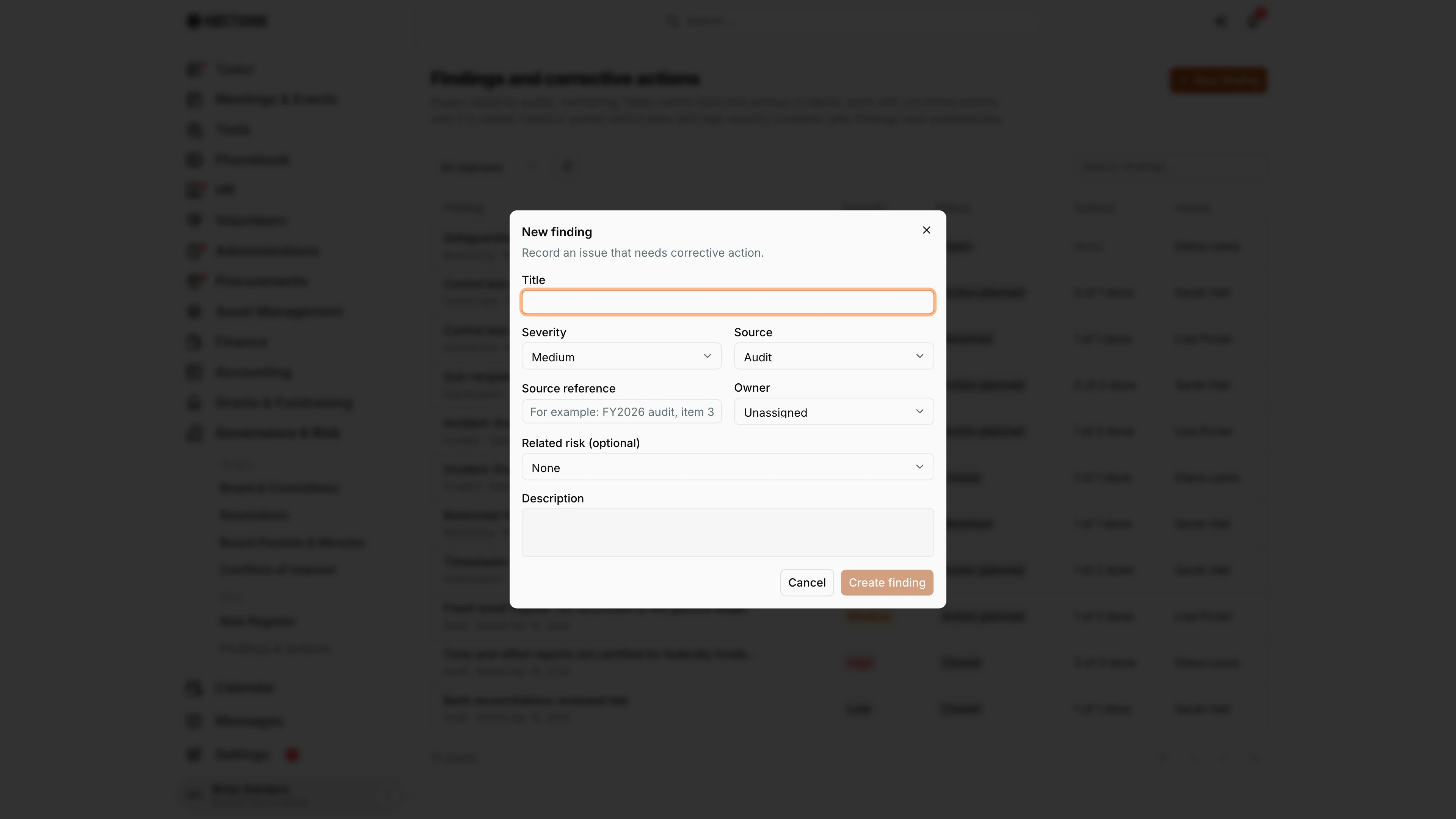
Screenshot: Brian Sanders (Deputy Director), Nocthink Demo Institute demo data.
New finding opens a dialog: "Record an issue that needs corrective action."
- Title is required.
- Severity: Low, Medium (default) or High.
- Source: Audit (default), Monitoring, Control test, Incident, Subrecipient or Other.
- Source reference, for example "FY2026 audit, item 3".
- Owner and Related risk (optional), which links the finding to a risk in the register.
- Description.
Create finding saves it as Open. I then plan corrective actions in the finding panel. Findings also arrive without this dialog: a Partial or Fail control test in the Risk Register and a High incident each open one automatically.
Access & permissions
- Risk is a restricted-view domain: the owner, directors and users with
risk.viewcan open it. The demo "Program and impact" role has view only. - New finding needs
risk.create; adding and completing actions needrisk.update; Close finding needsrisk.approve.
Caveats
- Closing is final: there is no reopen, and no actions can be added to a closed finding.
- High-severity findings require closure evidence, all actions done, and a sign-off by someone other than the owner or reporter (enforced by the server).
- Low and medium findings can be closed even with actions still open, so check the "N of M done" count first.
- Mark complete cannot be undone.
- Automatic findings from incidents are created without an owner ("Unassigned"); findings from control tests take the control's owner.
- Owners are not notified when a finding or action is assigned to them, and overdue actions are not flagged.
Limitations
- Findings and actions cannot be edited or deleted after creation (title, severity, owner and due dates are fixed).
- No attachments; evidence is free text.
- No export or report for the audit committee.
- No filter by severity, source or owner.
Related menus
- Risk Register — failed or partial control tests open findings here; findings can link to a risk.
- Incidents — high-severity incidents open a finding here.
- Subawards — partner monitoring that produces subrecipient findings.
- Obligations — audit filings whose results often lead to findings.