
Form 990 Workpapers
Open in NocthinkModule: Governance & Risk (Compliance) · URL: /compliance/form-990 · Responsible role: Finance Manager (prepares the workpaper) · Also used by: a separate compliance approver who reviews and approves it (e.g. Executive Director); Deputy Director (full access); not visible to ordinary staff
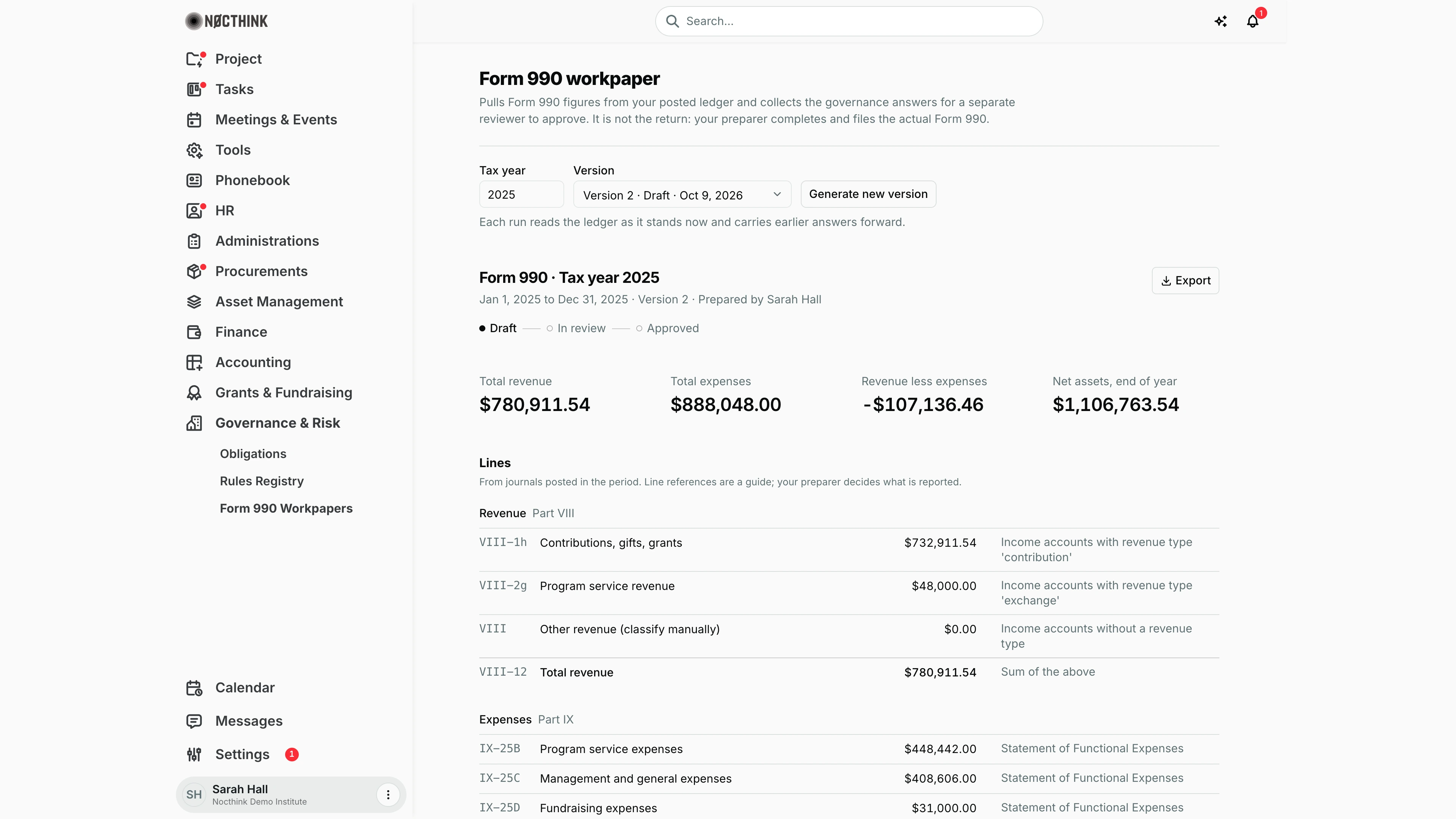
Screenshot: Sarah Hall (Finance Manager), Nocthink Demo Institute demo data. No discrepancy box appears because nothing needs fixing in the 2025 figures; the Summary, Balance sheet, Governance (5 of 8 answered) and Sign-off sections continue below the fold.
Why I use this page
Each year, before our outside preparer drafts the Form 990, I build a workpaper here. It pulls the Part VIII revenue, Part IX functional expenses, Part I summary and Part X balance-sheet figures from our posted ledger, lists anything that needs fixing first, and collects our answers to the Part VI governance questions. A second person approves it, and I export it for the preparer. It is not the return and does not file anything; the matching irs.990 obligation is tracked on Obligations.
What's on the screen
- Header: Form 990 workpaper, with the reminder that the preparer files the actual return.
- Controls: Tax year (defaults to last year), Version picker ("Version 2 · Draft · Oct 9, 2026"), and Generate workpaper / Generate new version, with the note that each run reads the ledger as it stands now and carries earlier answers forward.
- Workpaper header: "Form 990 · Tax year 2025" (or "return family unconfirmed"), the period, version and preparer, and an Export menu (PDF, Excel, CSV, JSON).
- Status steps: Draft — In review — Approved.
- Check these before relying on the figures (amber, shown only when there is something to fix; absent in the screenshot): discrepancies such as an unconfirmed return family, expenses without a functional class, revenue without a revenue type, assets − liabilities ≠ net assets, draft journals excluded, or a year kept in a previous system.
- Key figures: Total revenue, Total expenses, Revenue less expenses, Net assets, end of year.
- Lines: grouped as Revenue (Part VIII), Expenses (Part IX), Summary (Part I), Balance sheet (Part X), with Part, Line, Amount and Source (e.g. "Income accounts with revenue type 'contribution'").
- Governance: eight Part VI questions (voting and independent members, COI policy and monitoring, whistleblower and retention policies, minutes, board review of the 990) with "N of 8 answered" and Save answers.
- Sign-off: Prepared by, Reviewed by, and Submit for review or Approve.
How I …
Generate the workpaper
- Close the books for the year first: post draft journals, classify revenue types and allocate expenses to functional classes in Accounting.
- Enter the Tax year and click Generate workpaper (or Generate new version if one exists).
- Read every bullet under Check these before relying on the figures and fix the cause in the ledger or Settings → Nonprofit (return family), then generate a new version.
Answer the governance questions
- In Governance, enter the counts for VI-1a and VI-1b (cross-check against Board & Committees at year end).
- Choose Yes or No for each policy question (check Conflicts of Interest and Board Packets & Minutes for the evidence).
- Click Save answers. Answers carry forward into later versions.
Submit for review
- When all eight questions are answered, click Submit for review (disabled with "Answer the N remaining governance questions first" otherwise).
- The status moves to In review; answers are now locked.
Approve (reviewer)
- As a compliance approver who is not the preparer, open the tax year and version.
- Review the figures, discrepancies and answers, then click Approve. "Reviewed by" shows my name and date.
Export for the preparer
- Click Export and choose PDF, Excel, CSV or JSON.
- Send the file with the audited financial statements to the preparer.
Detail page, forms & dialogs
IRS Form 990
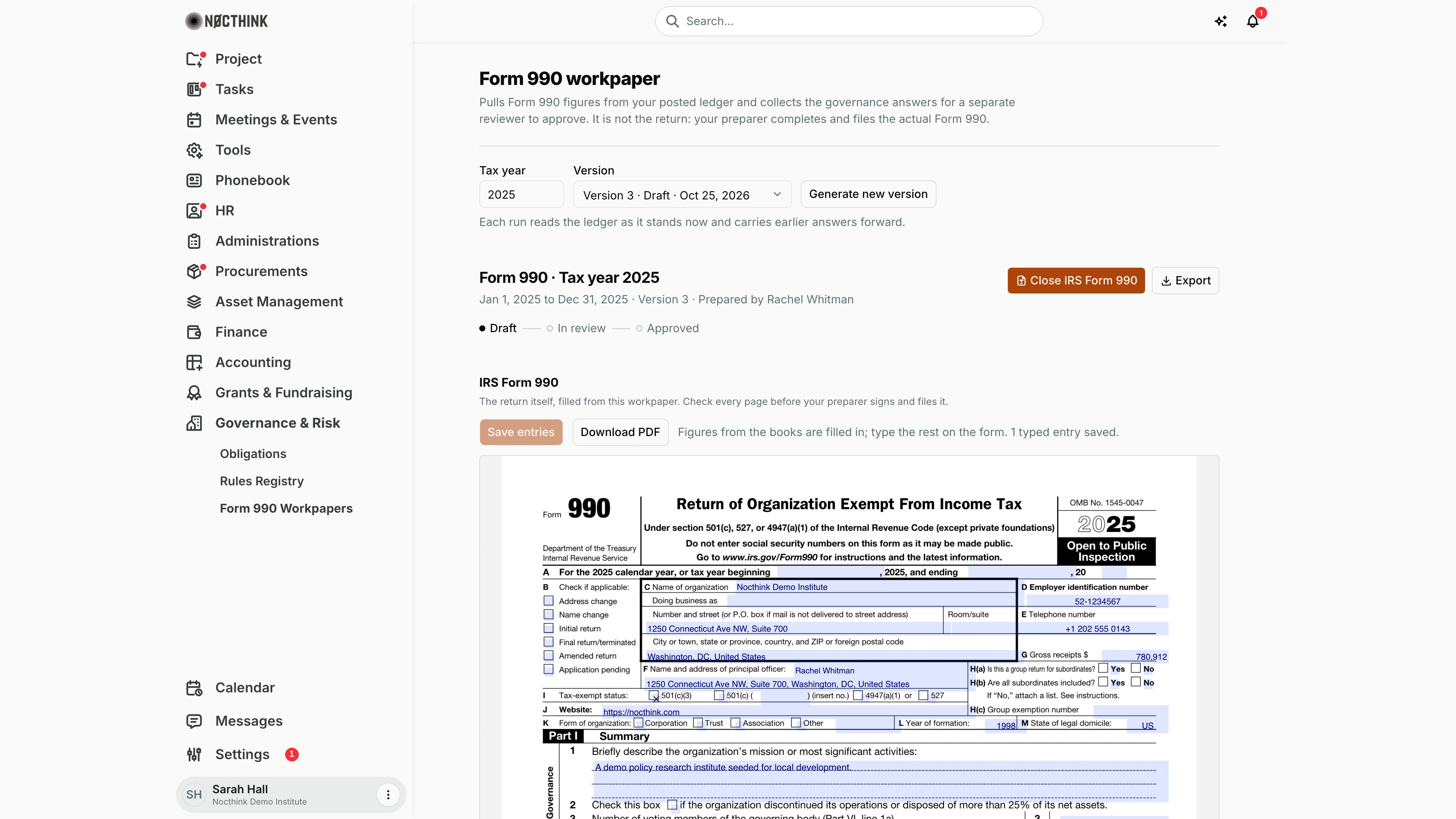
Screenshot: Sarah Hall (Finance Manager, also holds the F.A.T Manager role), Nocthink Demo Institute demo data.
IRS Form 990 next to Export opens the actual IRS form, filled from this workpaper, under the workpaper header; the button then reads Close IRS Form 990. "The return itself, filled from this workpaper. Check every page before your preparer signs and files it."
While the version is a Draft, the form fields are editable: figures from the books are already filled in, and I type the rest on the form. Save entries stores what I typed with the version, and the line beside it counts the saved entries. Download PDF produces the filled PDF to hand to the preparer. Once the version is in review or approved, it says "This version is locked. Generate a new version to change entries."
The button is disabled, with the reason shown, when the return is not a full Form 990, when the tax year does not begin in the year of the bundled IRS form, or when the ledger is not in U.S. dollars. A version generated before the full fill shows a warning to generate a new version.
Access & permissions
- Compliance is a restricted-view domain and part of the opt-in U.S. nonprofit modules (Settings → Nonprofit).
- Viewing and exporting need
compliance.view; generating needscompliance.create; saving answers and Submit for review needcompliance.update; Approve needscompliance.approve. - The preparer cannot approve their own workpaper (enforced by the server).
Caveats
- Figures come only from journals posted in the period; drafts are excluded and listed as a discrepancy. Years kept in a previous accounting system show $0 and must be taken from the audited statements.
- Each version is a snapshot. After submitting or approval nothing can be changed; generate a new version to pick up ledger corrections (earlier answers are carried forward, but the new version starts as Draft and needs approval again).
- The form shown depends on the expected return in the regulatory profile; until a reviewer confirms it there, the heading says "return family unconfirmed".
- Line references are a guide only; the preparer decides what is reported.
- Amounts are in the organization's base currency.
Limitations
- Covers only Parts I (summary), VI (selected questions), VIII, IX and X; no schedules (A, B, D, O…), compensation (Part VII) or 990-EZ/990-N/990-PF specific layouts.
- No e-filing, and approval does not update the
irs.990obligation; record the filing on Obligations. - No send-back from In review to Draft; generate a new version instead.
- Governance answers are free-standing; they are not pulled automatically from the board or COI records.
Related menus
- Obligations — the
irs.990andirs.8868filings this workpaper supports. - Rules Registry — the Form 990 rule and its due date.
- Board & Committees and Conflicts of Interest — evidence for the Part VI answers.
- Journal Entries — where journals are posted and accounts classified for the figures.