
Risk Register
Open in NocthinkModule: Governance & Risk · URL: /risk/register · Responsible role: Deputy Director (organizational risk owner, with the Executive Director) · Also used by: risk owners named on each risk (Finance Manager, HR Officer, Operations Officer); "Program and impact" role (researcher1, read only); governance/risk approvers (edit scale); not visible to ordinary staff
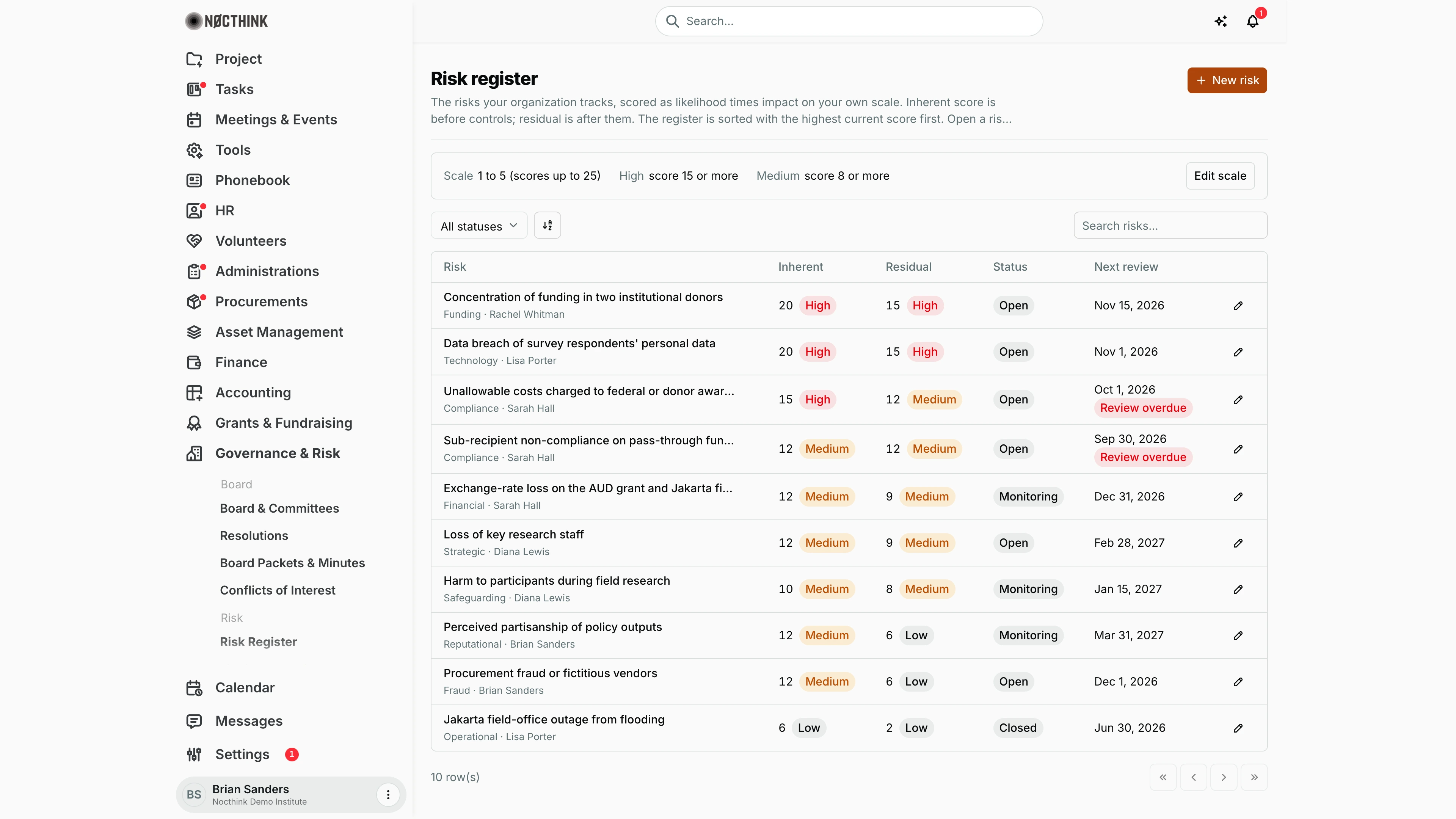
Screenshot: Brian Sanders (Deputy Director), Nocthink Demo Institute demo data.
Why I use this page
I keep the organization's risk register here: each risk with its cause, owner, inherent and residual score, mitigations and next review date, plus the controls that reduce it and the tests that prove those controls work. I review the top of the list before every board or audit committee meeting, follow up on anything flagged Review overdue, and record control tests each quarter. A failed or partial test automatically opens a finding so the follow-up does not get lost.
What's on the screen
- Header: Risk register with the New risk button.
- Scale summary: Scale 1 to 5 (scores up to 25), High score 15 or more, Medium score 8 or more, and Edit scale (risk approvers only).
- Toolbar: All statuses filter (Open, Monitoring, Closed), a sort control, and Search risks… (by title).
- Table (highest current score first — residual if assessed, otherwise inherent), 50 rows per page:
- Risk — title (long titles are shortened; hover for the full text), with the category (Funding, Technology, Compliance…) and the owner (or "Unassigned") underneath; click to open the detail panel
- Inherent — score with a High/Medium/Low pill
- Residual — score and pill, or "Not assessed"
- Status — Open, Monitoring, Closed
- Next review — date, with a red Review overdue pill under it when the date has passed and the risk is not closed
- A pencil icon at the end of each row to edit.
- Detail panel: category, owner, inherent and residual (likelihood × impact = score), next review, cause, mitigations, Edit risk, and the Controls list with each control's tests and a Record test button.
How I …
Add a risk
- Click New risk (see New risk below).
- Enter the Title (required). Pick or type a Category (suggestions: strategic, financial, operational, compliance, reputational, safeguarding, fraud, technology, funding).
- Choose the Owner and describe the Cause.
- Under Inherent rating (before controls) set Likelihood and Impact; the score is shown as I go.
- Describe the Mitigations.
- Optionally set the Residual rating (after controls) — both likelihood and impact, or neither.
- Set Status, Next review date, and optionally link a Project and a Grant.
- Click Create risk.
Review and re-score a risk
- Filter or search for the risk and click the pencil (or open it and click Edit risk); see Edit risk below.
- Update ratings, mitigations and status; move Next review date forward.
- Click Save changes. The list re-sorts by the new score.
Add a control
- Click the risk title to open the panel (see Risk detail below).
- Under Controls, describe the New control (e.g. "two people approve every payment"), choose the Frequency (Monthly, Quarterly, Annual, Ad hoc) and the Owner.
- Click Add control.
Record a control test
- In the panel, click Record test on the control.
- Choose the Result (Pass, Partial, Fail), the Tested on date and describe the Evidence (required).
- Click Record test.
- For Partial (medium severity) or Fail (high severity), a finding is opened automatically; use Open the finding to go to it, then Done.
Change the scoring scale
- Click Edit scale (needs
risk.approve; see Risk scale and thresholds below). - Set Scale maximum (3–10), Medium from and High from (medium ≥ 1, high above medium and at most the scale squared).
- Click Save.
Detail page, forms & dialogs
Risk detail
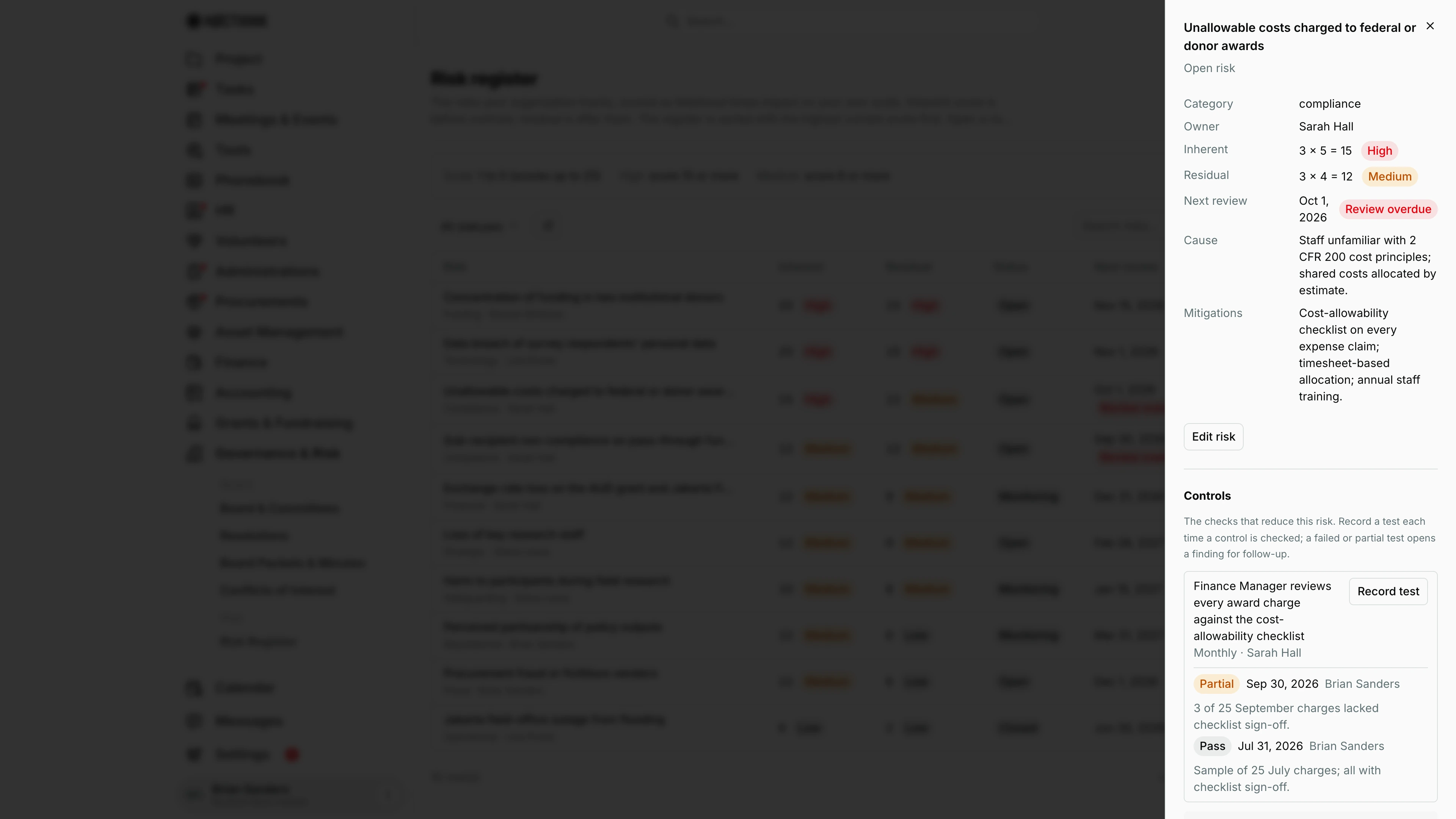
Screenshot: Brian Sanders (Deputy Director), Nocthink Demo Institute demo data.
Clicking a risk title opens its panel. The header shows the title and status (here Open risk). The facts list Category, Owner, Inherent and Residual as likelihood × impact = score with a High/Medium/Low pill (3 × 5 = 15 High, then 3 × 4 = 12 Medium), Next review with Review overdue when the date has passed, Cause and Mitigations. Edit risk opens the same dialog as the pencil in the list.
Under Controls ("The checks that reduce this risk…"), each control shows its description, frequency and owner, a Record test button and its test history: result pill (Pass, Partial, Fail), date, tester and evidence. Here the Finance Manager's monthly allowability review passed in July and was Partial in September. At the bottom, New control with Frequency and Owner and Add control adds another check.
New risk
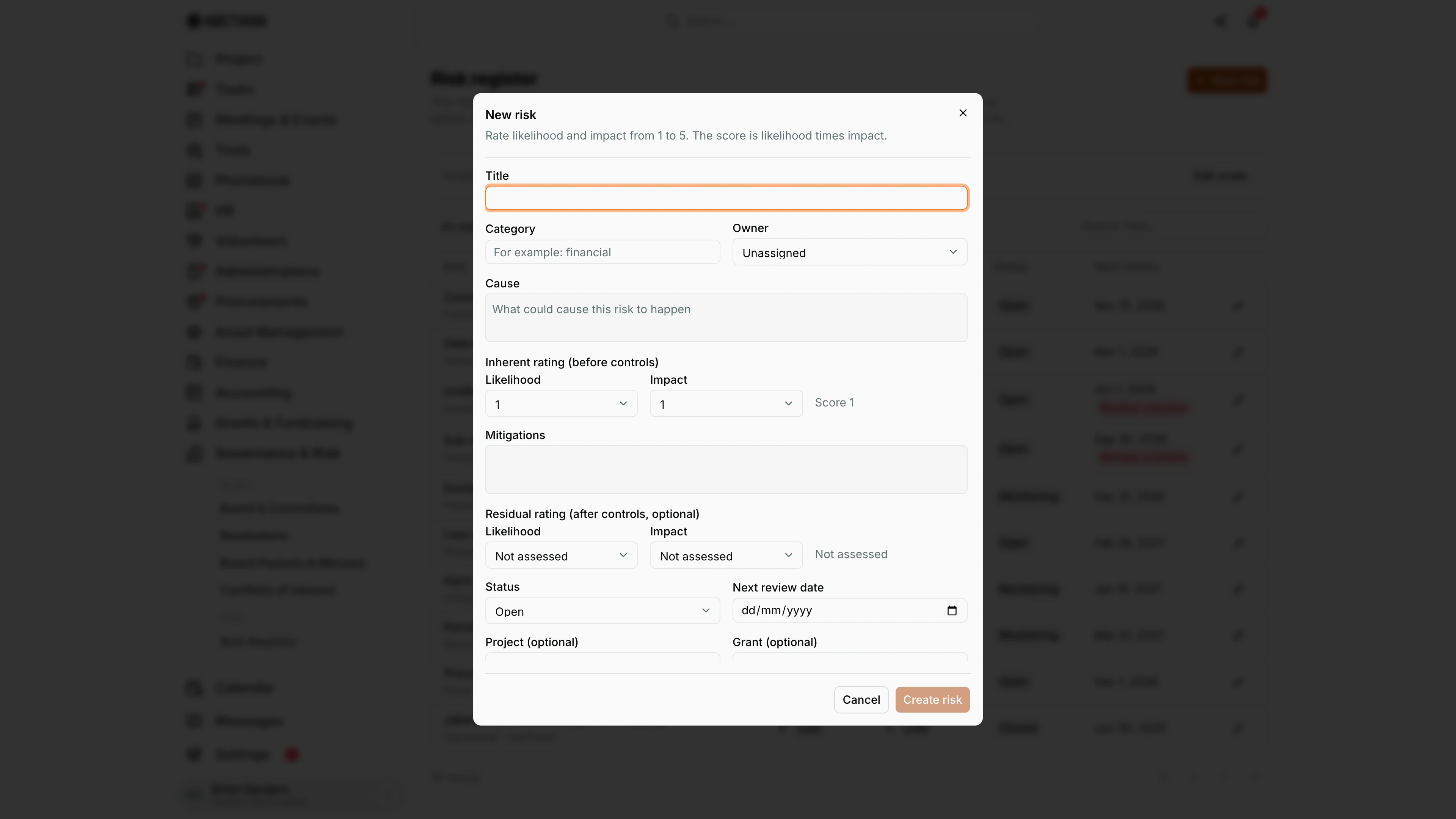
Screenshot: Brian Sanders (Deputy Director), Nocthink Demo Institute demo data.
New risk opens a dialog headed "Rate likelihood and impact from 1 to 5. The score is likelihood times impact." (the maximum follows the scale set under Edit scale).
- Title (required) and Category, a free field that suggests strategic, financial, operational, compliance and the other usual categories.
- Owner and Cause.
- Inherent rating (before controls): Likelihood and Impact, with the Score shown as I choose.
- Mitigations.
- Residual rating (after controls, optional): both values or Not assessed for both.
- Status (Open, Monitoring, Closed), Next review date, and optional Project and Grant links.
Create risk adds it to the register, sorted by its current score.
Edit risk
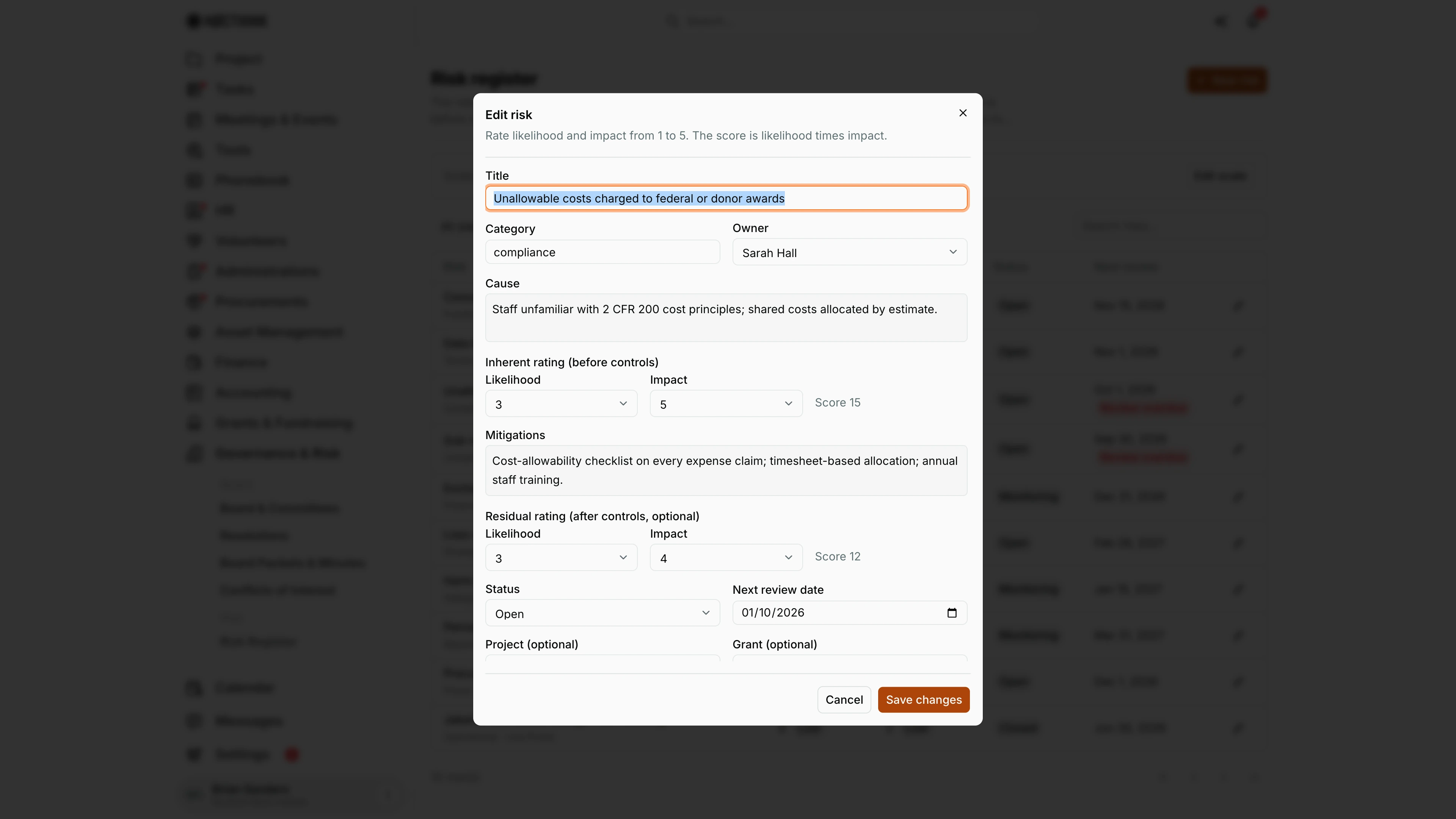
Screenshot: Brian Sanders (Deputy Director), Nocthink Demo Institute demo data.
The pencil on a row, or Edit risk in the panel, opens Edit risk with every field filled in. This is where I re-score a risk at its review: change the inherent or residual Likelihood and Impact (the Score updates as I go, here 15 and 12), update Cause and Mitigations, set Status to Monitoring or Closed, and move Next review date forward so the "Review overdue" flag clears.
Save changes stores it and the list re-sorts by the new score. Cancel discards the edits.
Risk scale and thresholds
Screenshot: Brian Sanders (Deputy Director), Nocthink Demo Institute demo data.
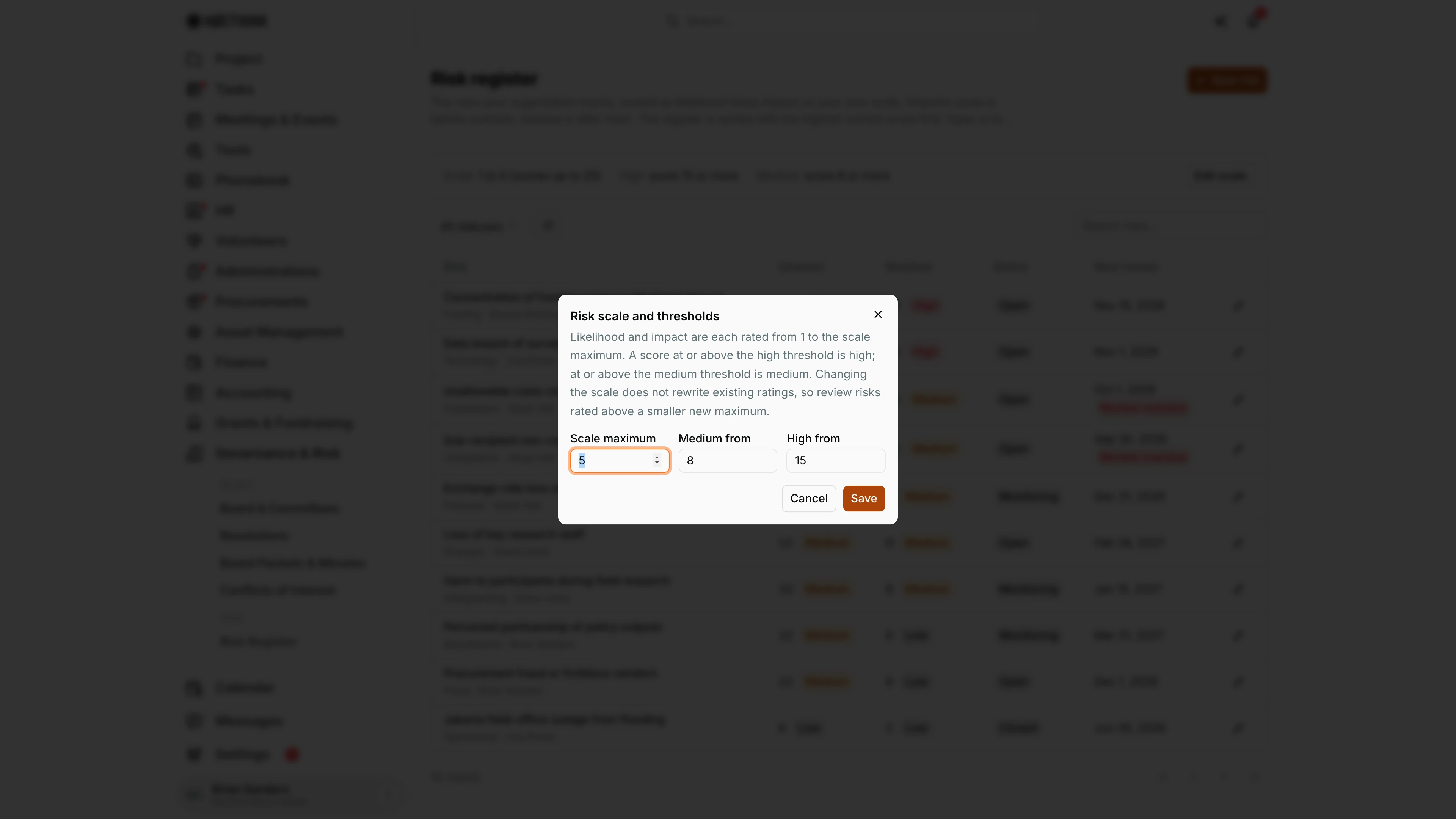
Edit scale opens Risk scale and thresholds: "Likelihood and impact are each rated from 1 to the scale maximum. A score at or above the high threshold is high; at or above the medium threshold is medium. Changing the scale does not rewrite existing ratings, so review risks rated above a smaller new maximum."
The demo organization uses Scale maximum 5, Medium from 8 and High from 15. Save applies the new bands to every score shown on the page; it needs risk.approve.
Access & permissions
- Risk is a restricted-view domain: only the owner, directors and users with
risk.viewsee it. In the demo, the "Program and impact" role gives researcher1 read-only access. - Creating a risk needs
risk.create; editing risks, adding controls and recording tests needrisk.update; Edit scale needsrisk.approve. - Not covered by docs/role.md.
Caveats
- Changing the scale does not rewrite existing ratings; ratings above a smaller new maximum must be reviewed by hand.
- The sort uses the residual score when one exists, so a risk with good controls drops down the list even if its inherent score is high.
- Review overdue is based on today's date in UTC.
- Control tests are permanent records with the tester stored; a wrong test cannot be edited or deleted.
- Risk owners are not notified when they are assigned or when a review falls due.
Limitations
- No delete for risks or controls, and controls cannot be edited after they are added.
- No heat map, export or board report from this page.
- No filter by category, owner or project; search covers the title only.
- Evidence for tests is free text; files cannot be attached.
Related menus
- Findings & Actions — failed and partial control tests open findings there.
- Incidents — events that may show a risk has materialized.
- Subawards — partner risk assessments for pass-through funds.
- Awards — grants a risk can be linked to.