
Resolutions
Open in NocthinkModule: Governance & Risk · URL: /governance/resolutions · Responsible role: Executive Director / Deputy Director acting as board secretary · Also used by: governance approvers (close votes, confidential resolutions); users with a governance role (draft, open, record votes); not visible to ordinary staff
Screenshot: Brian Sanders (Deputy Director), Nocthink Demo Institute demo data.
Why I use this page
This is the board's decision register. I draft each resolution before a meeting (or for a written consent), open it when it is put to the board or a committee, record every member's vote as it was taken, and close the vote so the system counts it under our bylaws and freezes the result. Approving minutes, budgets, bank accounts, contracts and compensation all go through here, so I open it before and right after every board or committee meeting.
What's on the screen
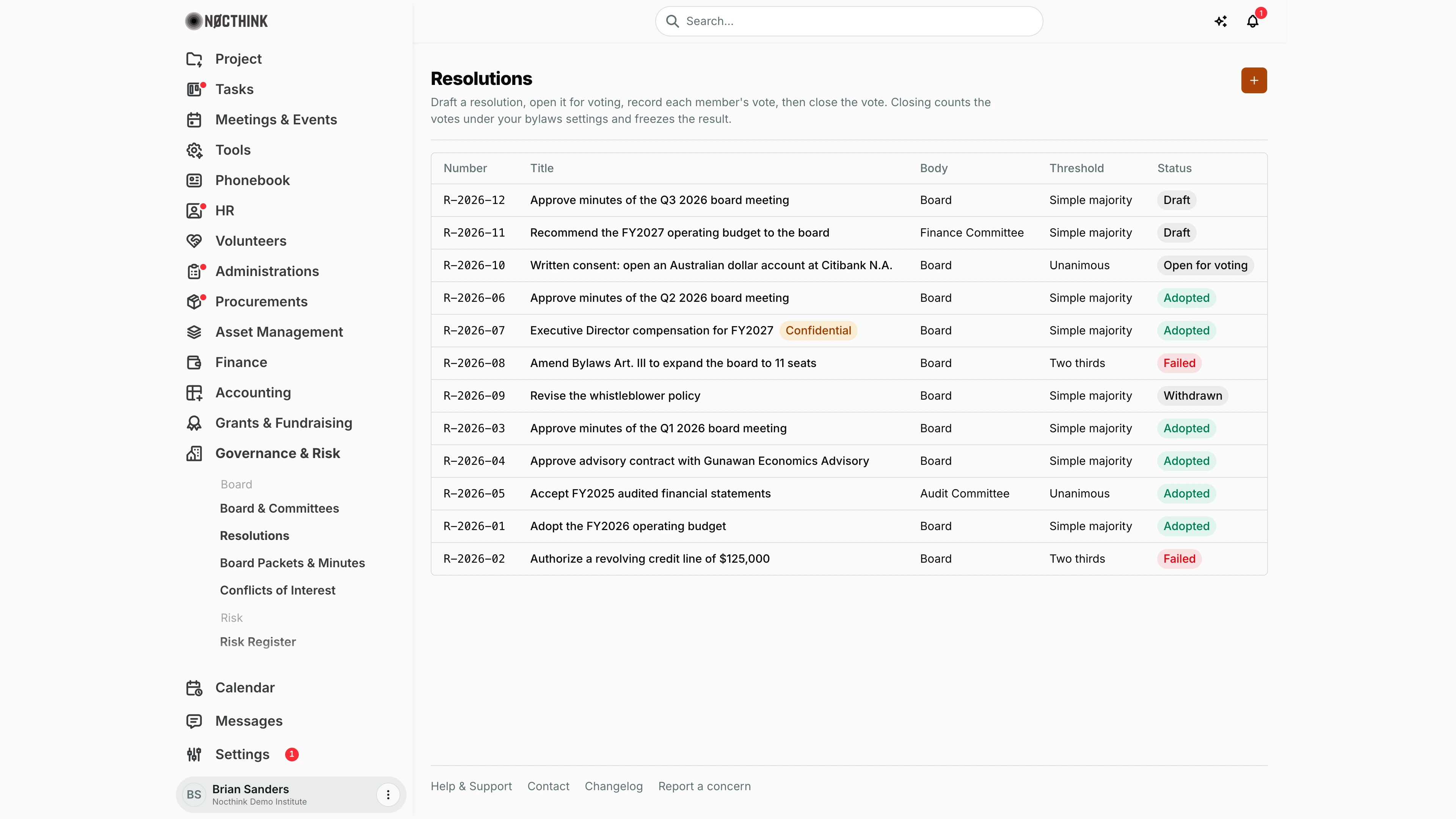
- Header: Resolutions with the orange + button (New resolution) and the reminder that closing counts the votes under the bylaws settings and freezes the result.
- Table (most recently created first, so numbers are not always in order) with columns:
- Number — e.g. R-2026-12, or — if none was given
- Title — click it to open the detail panel; confidential items carry an amber Confidential pill (R-2026-07 in the screenshot)
- Body — Board or the committee name (Finance Committee, Audit Committee)
- Threshold — Simple majority, Two thirds or Unanimous
- Status — Draft, Open for voting, Adopted (green), Failed (red), Withdrawn
- Detail panel (side sheet): number, title, status, body and threshold; the Text; buttons Open for voting, Close vote and Withdraw depending on status; a Record votes table while open; after closing, a Final tally and Recorded votes.
How I …
Draft a resolution
- Click +.
- In New resolution (see New resolution below), enter an optional Number (e.g. 2026-01), the Title and the Text ("Resolved, that…"). Title and text are required.
- Pick the Voting body: Full board or a committee.
- Optionally link a Meeting from Meetings & Events.
- Leave Threshold on Bylaws default or choose Simple majority, Two thirds or Unanimous.
- If I am a governance approver and this is an executive-session item, tick Confidential.
- Click Save draft. The resolution appears with status Draft.
Open the vote and record votes
- Click the resolution title, then Open for voting (see Resolution detail below).
- Under Record votes, each serving voting member of the chosen body is listed. For each, click Yes, No or Abstain as voted at the meeting. I can change a yes/no/abstain while the vote is open.
- For a member with a conflict, click Recused, enter the Reason (required, e.g. "Related party to the vendor") and click Record recusal.
Close the vote
- With the resolution open, click Close vote (governance approvers only; others see "Only governance approvers can close the vote.").
- Confirm Close vote in the dialog.
- The status changes to Adopted or Failed and the Final tally (see Adopted resolution below) shows eligible members, quorum base, quorum needed, present, yes/no/abstain/recused, threshold, whether quorum was met, and the bylaws reference.
Withdraw a resolution
- Open a Draft or Open for voting resolution and click Withdraw.
- Confirm Withdraw. It stays on the record as Withdrawn and can no longer be voted on.
Approve minutes with a resolution
- Draft and adopt a resolution such as "Approve minutes of the Q3 2026 board meeting".
- The adopted resolution is what the minutes approval references (see Board Packets & Minutes).
Detail page, forms & dialogs
Resolution detail
Screenshot: Brian Sanders (Deputy Director), Nocthink Demo Institute demo data.
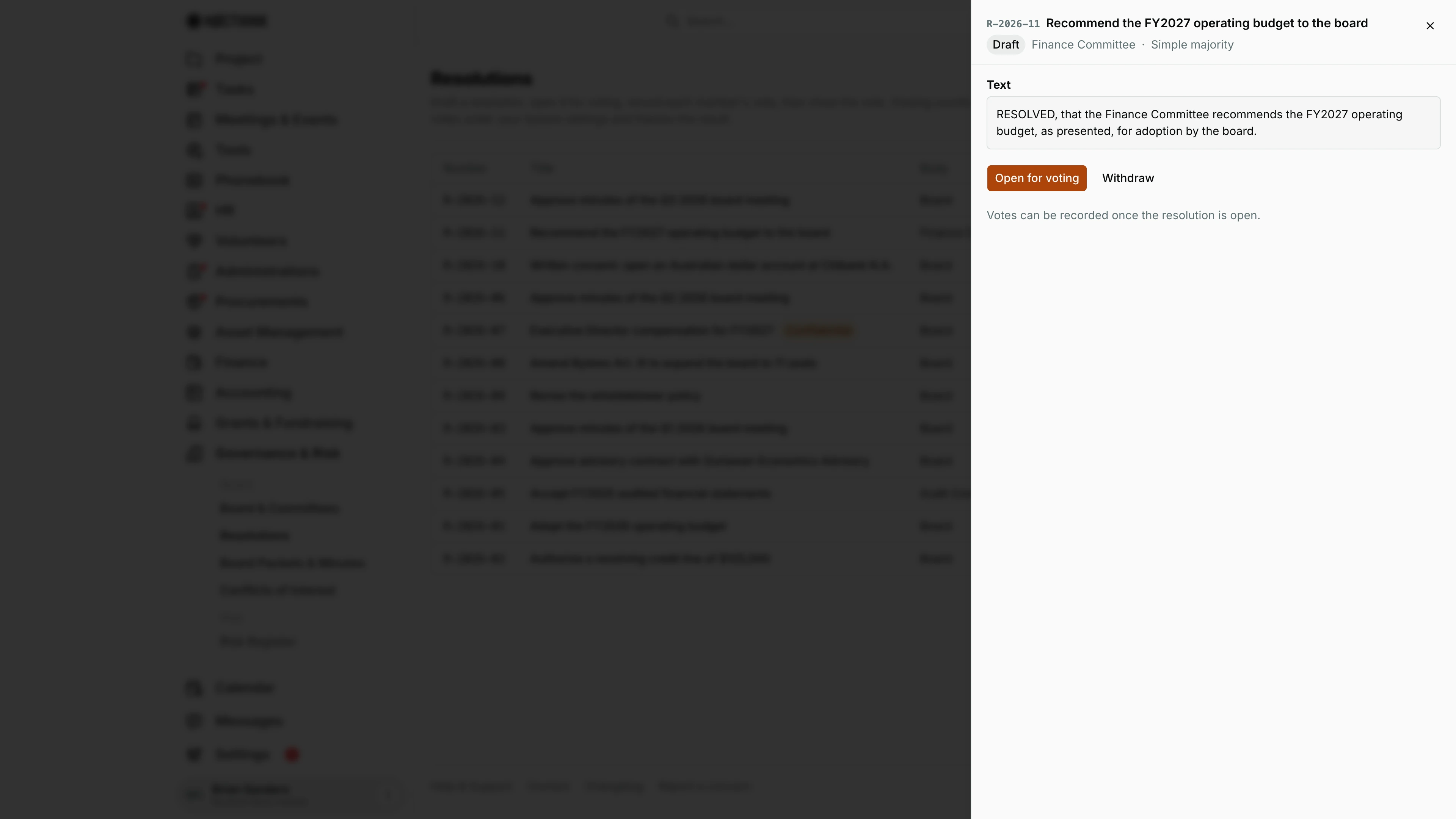
Clicking a resolution title opens its panel. The header shows the Number and title, the status pill, a Confidential pill when set, the voting body (Full board or the committee, here the Finance Committee) and the threshold (here Simple majority). Text shows the resolution as worded.
What follows depends on the status:
- Draft: Open for voting and Withdraw, with "Votes can be recorded once the resolution is open."
- Open for voting: Close vote (governance approvers only; others see "Only governance approvers can close the vote."), Withdraw, and Record votes, a row per serving voting member of the body with Yes, No, Abstain and Recused. Recused opens Record recusal, which needs a Reason and cannot be undone.
- Adopted or Failed: the Final tally and Recorded votes (see Adopted resolution below).
- Withdrawn: "This resolution was withdrawn on …".
Adopted resolution
Screenshot: Brian Sanders (Deputy Director), Nocthink Demo Institute demo data.
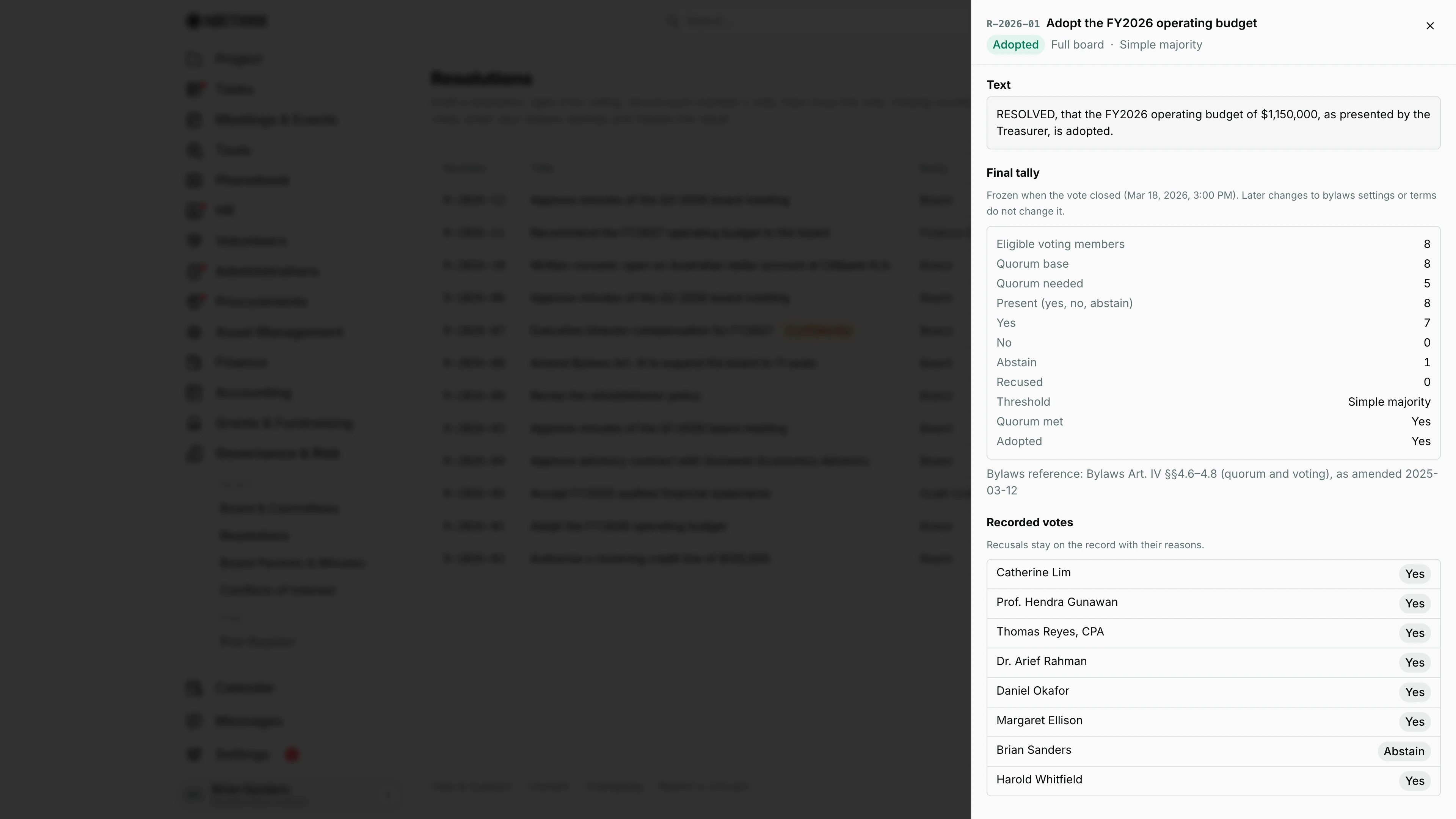
Once the vote is closed, the panel of an Adopted (or Failed) resolution has no action buttons. It shows the Final tally, "Frozen when the vote closed (…). Later changes to bylaws settings or terms do not change it.":
- Eligible voting members, Quorum base, Quorum needed and Present (yes, no, abstain)
- Yes, No, Abstain and Recused
- Threshold, Quorum met and Adopted
- the Bylaws reference that applied, or "not recorded"
Below it, Recorded votes lists each member with their vote pill; a recusal keeps its Reason on the record. This panel is what I point the auditor or the Form 990 preparer to as evidence that the board approved an item.
New resolution
Screenshot: Brian Sanders (Deputy Director), Nocthink Demo Institute demo data.
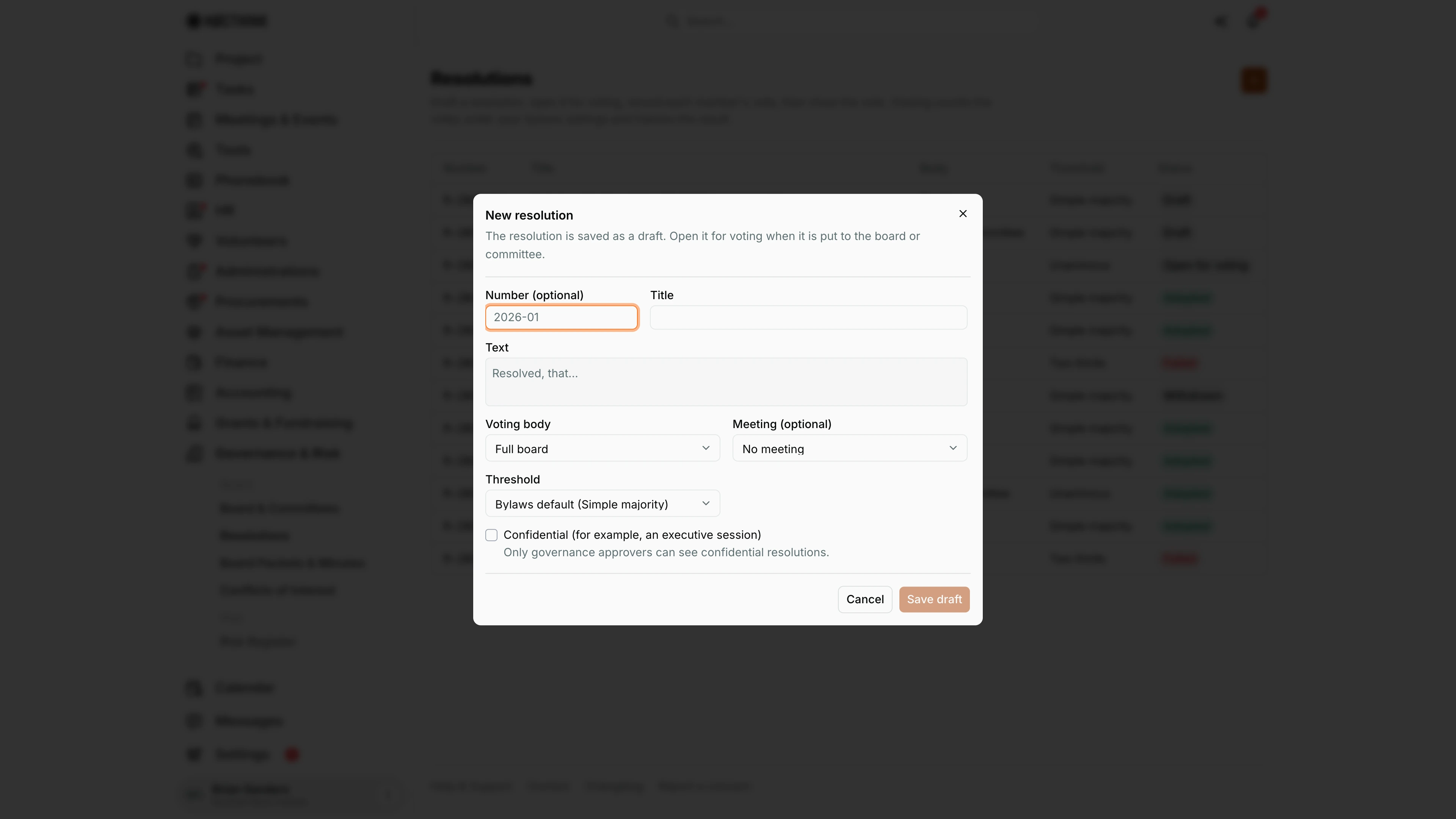
The + opens New resolution: "The resolution is saved as a draft. Open it for voting when it is put to the board or committee."
- Number (optional), for example 2026-01, and Title (required).
- Text (required), placeholder "Resolved, that…".
- Voting body: Full board or one of the committees. A committee resolution is voted only by that committee's serving voting members.
- Meeting (optional): a meeting from Meetings & Events.
- Threshold: Bylaws default (the label shows the current default) or a specific threshold.
- Confidential (for example, an executive session), shown only to governance approvers: "Only governance approvers can see confidential resolutions."
Save draft stays disabled until both title and text are filled in.
Access & permissions
- Governance is a restricted-view domain: only the owner, directors and users whose role grants
governance.viewsee the page. - Drafting needs
governance.create; Open for voting, recording votes and Withdraw needgovernance.update; Close vote needsgovernance.approve. - Confidential resolutions are hidden from anyone without
governance.approve(the server returns "not found"), and only approvers can create them.
Caveats
- Closing is irreversible: the tally is frozen and later changes to terms or bylaws settings do not change it. Votes can only be recorded while the status is Open for voting.
- A recusal cannot be changed back to a vote, and its reason stays on the record and in exports.
- Only members with a current voting term on the chosen body (board or committee) can be recorded; others are rejected with "This member has no current voting term on this body." Eligibility is checked against today's date (UTC), not the meeting date.
- Counting rules: abstentions count toward quorum but not for or against; Simple majority needs more yes than no; Two thirds needs yes ≥ two thirds of yes+no; Unanimous needs at least one yes and no "no" votes. A vote without quorum fails.
- Members who never had a vote recorded count as absent, which can make quorum fail.
- Resolution numbers must be unique in the organization.
Limitations
- A resolution cannot be edited or deleted after it is saved, even as a draft; withdraw it and draft a new one.
- No upload of signed resolutions or attachments, and no export from this page.
- Votes are recorded by the secretary; board members do not vote themselves in the app.
- No filter or search on the list.
Related menus
- Board & Committees — who is eligible to vote, and the quorum/threshold settings.
- Board Packets & Minutes — minutes are approved by an adopted resolution.
- Conflicts of Interest — disclosures that should lead to recusals.
- Meetings & Events — the meetings a resolution can be linked to.