
General Helpdesk
Open in NocthinkModule: Administrations · URL: /administrations/general-helpdesk · Responsible role: General Affairs / Admin (general-affairs) — handles general office requests · Also used by: Asset Officer (handles IT requests), every staff member (raises and follows their own requests), Owner/Director (full)
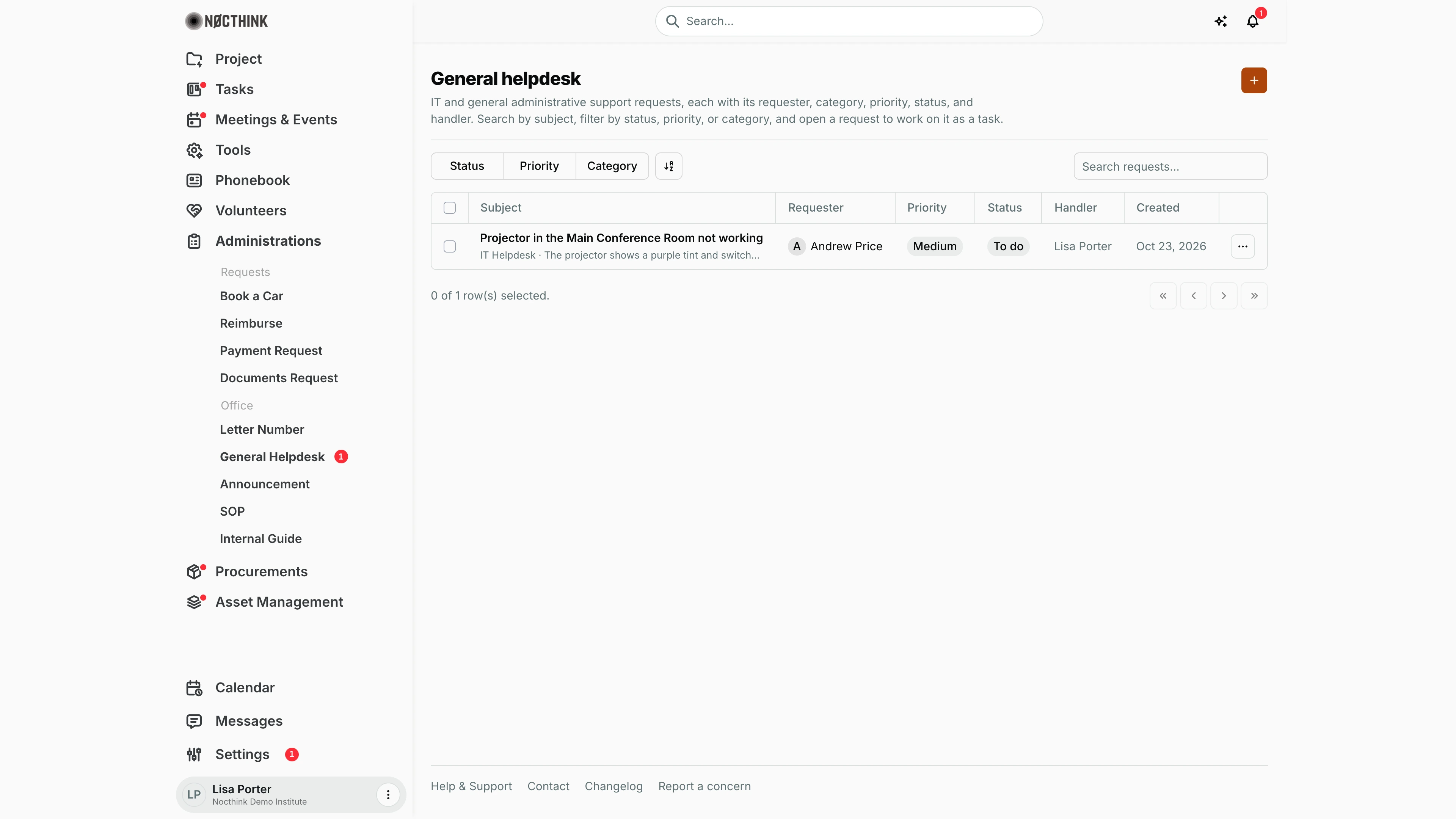
Screenshot: Lisa Porter (Operations Officer), Nocthink Demo Institute demo data — she is the handler of the open request shown.
Why I use this page
This is where colleagues ask the office for help: a broken projector, a desk move, a VPN error. Each request is created as a task assigned to a handler, so I work through it on the task page and the requester can follow it. I check it every morning (the red badge on General Helpdesk in the sidebar shows how many requests are still open) and hand IT problems to the Asset Officer.
What's on the screen
- Header — General helpdesk with a short description, and the orange + button (New helpdesk request).
- Toolbar — filters Status (To do, In progress, Review, Done, Cancelled), Priority (Urgent, High, Medium, Low) and Category (IT Helpdesk, General Helpdesk), a sort control, and Search requests… (searches the subject).
- Table columns
- Subject — the request title (click to open it as a task), with category and description underneath.
- Requester — who raised it, with an initial avatar.
- Priority — pill; Urgent is always red, High turns red when the request is open past its due date.
- Status — task status pill; Cancelled is red.
- Handler — the assignee, or Unassigned.
- Created — date raised.
- ⋯ — View and Edit, both open the task page.
- Footer — row-selection count and paging.
How I …
Raise a request (any staff member)
- Click +. The New helpdesk request dialog opens ("It becomes a task for the handler."); see New helpdesk request below.
- Enter Subject and Description (both required).
- Choose Category — IT Helpdesk or General Helpdesk. Category and Priority start from the organization defaults in Administrations settings.
- Set Priority (Low, Medium, High, Urgent).
- Pick a Handler if I know who should take it, or leave Unassigned.
- Leave Status at To do.
- Click Create request. The handler is notified that a task was assigned to them.
Triage new requests
- Filter Status = To do.
- Open each request from its Subject. It opens the task page (Task details, with tabs Description, Messages, Attachments, Activity); see Helpdesk ticket detail below.
- If it is an IT problem, use ⋯ → Reassign on the task page and pass it to the Asset Officer; otherwise keep it or reassign it to the right colleague in General Affairs.
- Adjust priority with Edit on the task page if the requester under- or over-stated it.
Work and close a request
- Open the request and set its status to In progress.
- Use the Messages tab to ask the requester questions or tell them what was done; add photos or documents under Attachments.
- When fixed, set the status to Done (or Review if the requester should confirm first). Use Cancelled for duplicates or requests that will not be done.
Find a request
- Type part of the subject in Search requests….
- Combine Status, Priority and Category filters, e.g. Urgent + To do.
Detail page, forms & dialogs
New helpdesk request
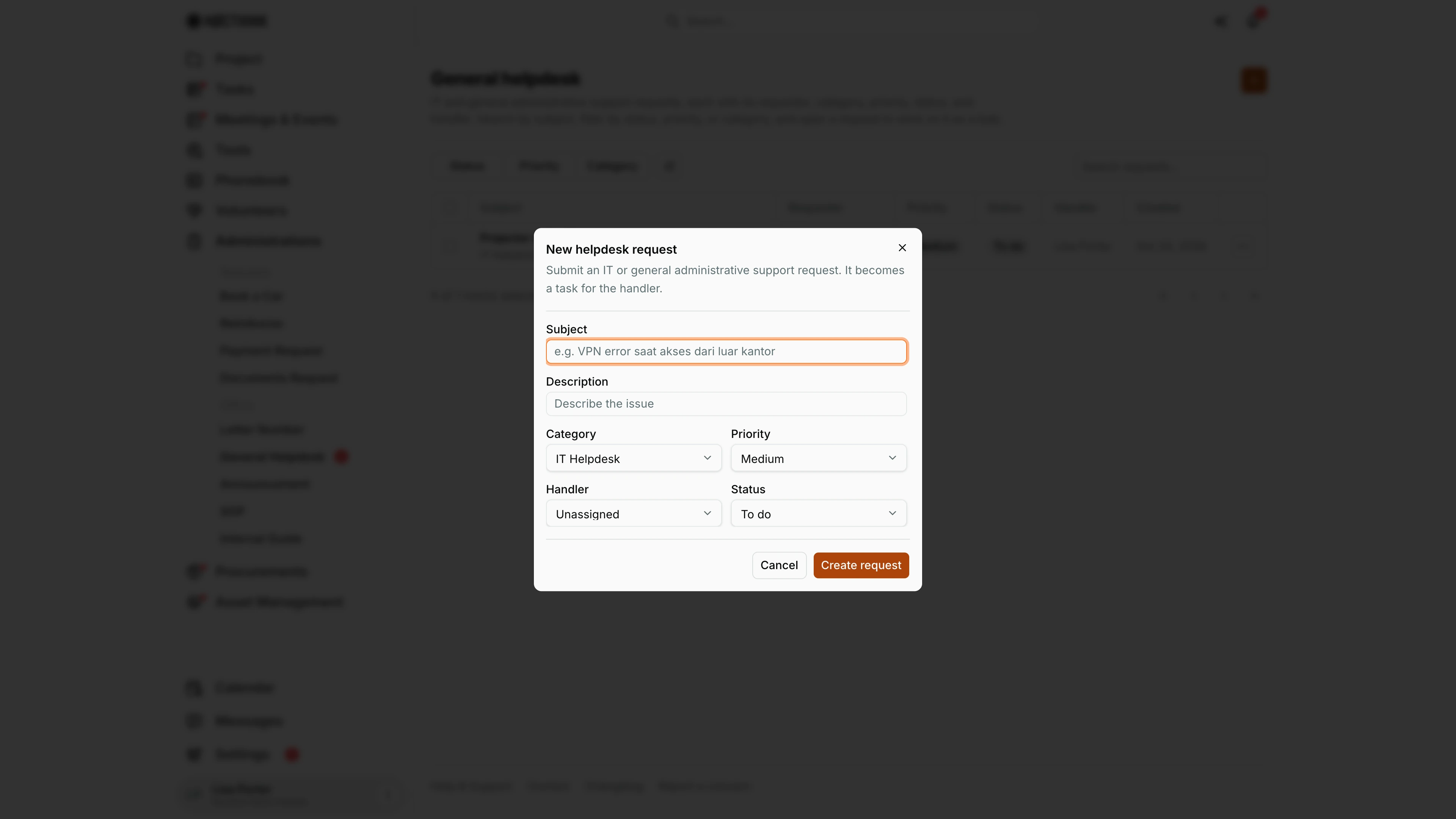
Screenshot: Lisa Porter (Operations Officer), Nocthink Demo Institute demo data.
+ opens New helpdesk request: "Submit an IT or general administrative support request. It becomes a task for the handler." Subject and Description are required. Category is IT Helpdesk or General Helpdesk, Priority is Low, Medium, High or Urgent (both start from the defaults in Administrations settings). Handler lists the organization's people, or leave it Unassigned. Status starts on To do. Create request creates the task and notifies the handler. The request opens as a task on the handler's Task List, tagged #helpdesk and the category. Cancel discards it.
Helpdesk ticket detail
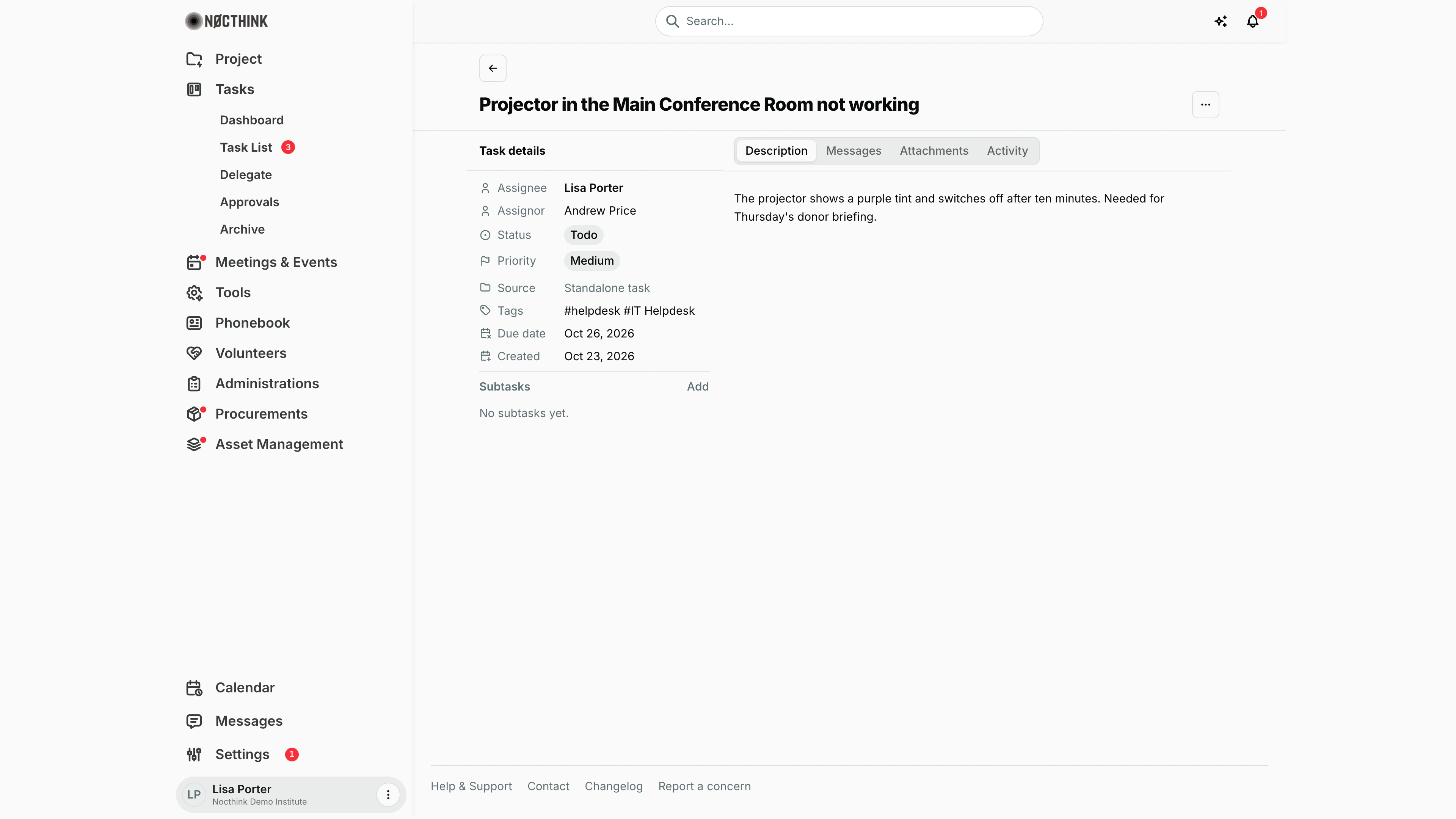
Screenshot: Lisa Porter (Operations Officer), Nocthink Demo Institute demo data.
A helpdesk request is a task, so clicking its subject opens the task page (/tasks/<id>). Task details lists Assignee (the handler), Assignor (who raised it), Status, Priority, Source ("Standalone task"), Tags (#helpdesk plus the category), Due date and Created. Subtasks has Add for breaking the job into steps.
The tabs on the right are Description (the requester's text), Messages (the conversation with the requester), Attachments (photos, quotes, documents) and Activity (the change log). The ⋯ menu at the top right holds Edit, Reassign and the other task actions. As handler I set In progress while working, then Done, or Review when the requester should confirm the fix.
Access & permissions
- The page is a personal-access route: every staff member can open it, even without the Administrations role.
- Requests are stored as tasks (source "helpdesk"), so visibility follows Tasks rules, not Administrations: I see requests I created or am the handler of (plus tasks in projects I belong to). Only people with full Tasks scope (
tasks.delete, Owner/Director) see every request. - Creating needs
tasks.create; changing a request needstasks.updateand being its creator, handler or a full-scope Tasks user. - Default category and priority are set in Settings → Administrations by General Affairs / the owner.
Caveats
- Unassigned requests are invisible to General Affairs unless we have full Tasks scope — the list only shows tickets I raised or am assigned to. Ask requesters to pick a handler, or have the owner give the GA lead full Tasks access.
- Delete is on the task page (⋯ → Delete) and is permanent.
- The sidebar badge counts the open helpdesk requests (To do, In progress, Review) that I can see in the list: ones I raised or am assigned to, or every request if I have full Tasks access.
- The Status in the new-request dialog can be set to anything (even Done); requesters should leave it at To do.
- Tasks are auto-archived 10 days after they are approved, and archived tasks drop off this list.
Limitations
- No ticket numbers or SLA timers on this page. The server also has a separate helpdesk-ticket API (
HD-00001numbering, open/in progress/resolved/closed), but this page does not use it. - Only two fixed categories (IT Helpdesk, General Helpdesk); no custom categories.
- No due date in the new-request dialog (it can be added on the task page).
- No export, no bulk status change, no queue view of unassigned requests.
Related menus
- Task List — the same requests appear among my tasks.
- Tickets — Asset Management's IT ticket queue for hardware and licences.
- Administrations settings — default category and priority for new requests.
- Internal Guide and SOP — point requesters to self-help answers.
- Dashboard — Administrations overview.