
Engagements
Open in NocthinkModule: HR · URL: /hr/engagements · Responsible role: HR Manager · Also used by: Owner/Director (full). Not available to HR Staff or regular staff.
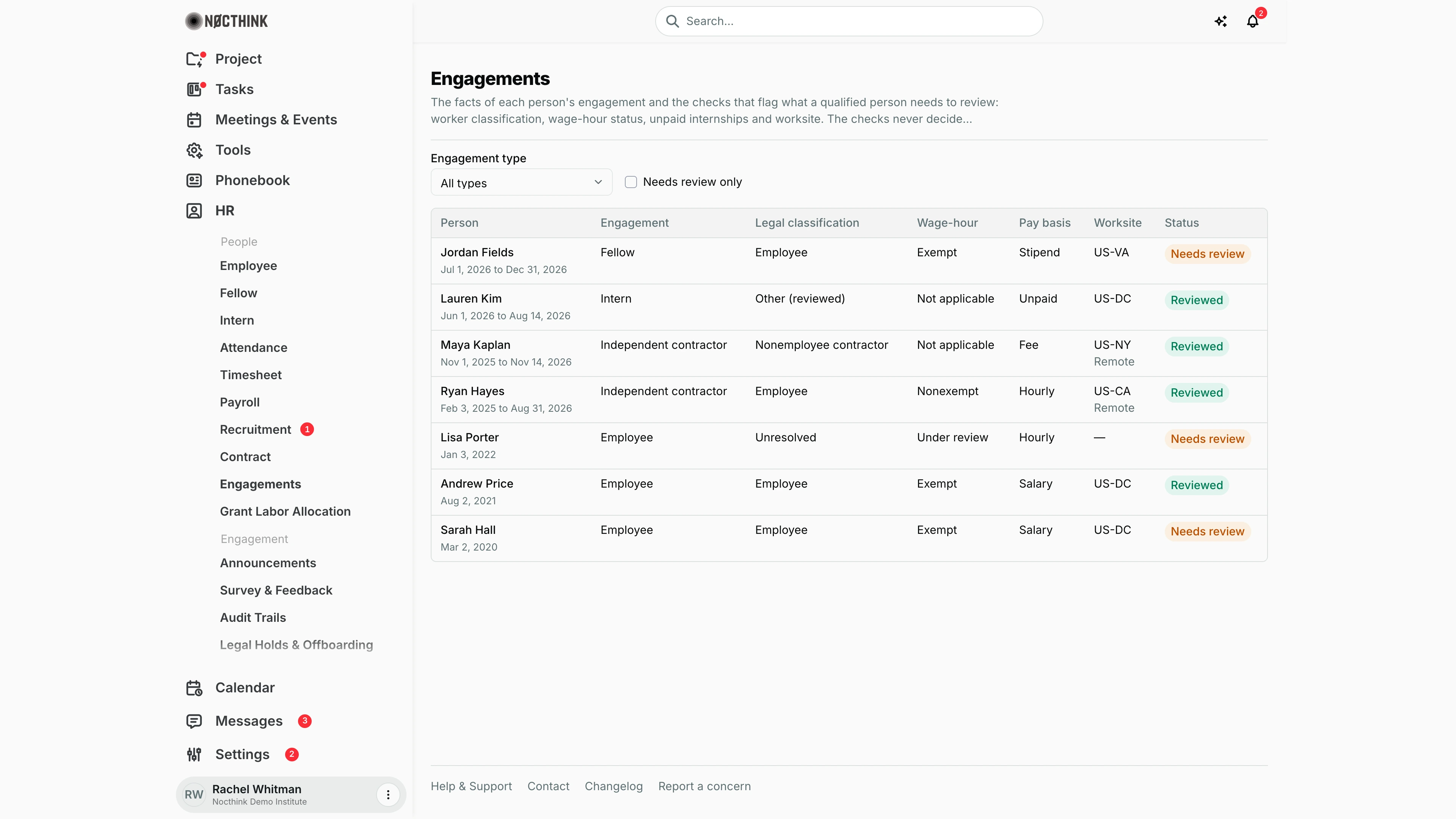
Screenshot: Rachel Whitman (Executive Director, org owner), Nocthink Demo Institute demo data. The demo HR login (Diana Lewis) holds HR Staff, which lacks hr.delete, so this page is not in her sidebar.
Why I use this page
As HR Manager, I use Engagements to keep a defensible record of how each person working with us is engaged: as an employee, intern, fellow, contractor and so on. It also shows where each person works and whether a qualified person has reviewed their worker classification and wage-hour (exempt/nonexempt) status. I check it whenever a contract starts or changes, when someone moves state or goes remote, and before audits. The page only flags what needs review. Classification changes only when I (or counsel) record a review.
What's on the screen
- Header: Engagements, with two notes. The checks flag what needs review (worker classification, wage-hour status, unpaid internships and worksite). They never decide classification, exemption or legality.
- Filters: an Engagement type dropdown (All types, Employee, Intern, Fellow, Visiting researcher, Independent contractor, Volunteer, Board member, Other) and a Needs review only checkbox.
- Table columns: Person (name plus engagement dates), Engagement, Legal classification, Wage-hour, Pay basis, Worksite (state code, plus "Remote" when it applies), Status (Needs review or Reviewed). In the demo:
- Jordan Fields (Fellow, Employee, Exempt, Stipend, US-VA): Needs review.
- Lauren Kim (Intern, Other (reviewed), Unpaid, US-DC): Reviewed.
- Maya Kaplan (Independent contractor, Nonemployee contractor, Fee, US-NY, Remote): Reviewed.
- Ryan Hayes (Independent contractor recorded as Employee, Nonexempt, Hourly, US-CA, Remote): Reviewed.
- Lisa Porter (Employee, Unresolved, Under review, Hourly, no worksite): Needs review.
- Andrew Price (Employee, Exempt, Salary, US-DC): Reviewed.
- Sarah Hall (Employee, Exempt, Salary, US-DC): Needs review.
- Clicking a row opens a side sheet with four sections: Engagement facts, Checks, Classification (with the review action) and Review history.
How I …
Find engagements that need a decision
- Tick Needs review only.
- Optionally pick an Engagement type, such as Independent contractor.
- Click a person to open the sheet and read Checks. Each check (Worker classification, Wage-hour (exempt or nonexempt), Unpaid internship or fellowship, Worksite) shows Pass, Needs review, Fail or Not applicable, the findings, any Missing: facts, and "A reviewer is required." (see Engagement drawer below)
Correct the engagement facts
- Open the person's sheet.
- Under Engagement facts, set Engagement type, Compensation basis (Salary, Hourly, Stipend, Fee, Unpaid, Other), Worksite state, and Works remotely.
- Enter the worksite as an ISO 3166-2 code such as
US-CAorUS-NY, or leave it empty if unknown. - Click Save facts. "Saved." appears when it is stored. Saving facts never changes the classification.
Record a classification review
- Open the sheet and click Record classification review in the Classification section.
- Choose the Legal classification (Employee, Nonemployee contractor, Volunteer, Unresolved, Other (reviewed)) and the Wage-hour status (Exempt, Nonexempt, Not applicable, Under review).
- Tick the Tests applied: Economic reality, Primary beneficiary, Duties test, Salary basis, Salary level, ABC test, Other.
- Write the Justification (required): the facts considered and why they lead to this determination.
- Optionally add Evidence: the agreements, documents or advice relied on.
- Enter the Reviewer name, the name and role of the person making the determination (required).
- Click Record review. The classification on the row updates, and the review is added at the top of Review history.
Check what was decided before
Open the sheet and read Review history. Each entry shows the classification, wage-hour status, worksite at the time, date, reviewer, tests applied, justification and evidence. Earlier reviews are never overwritten.
Detail page, forms & dialogs
Engagement drawer
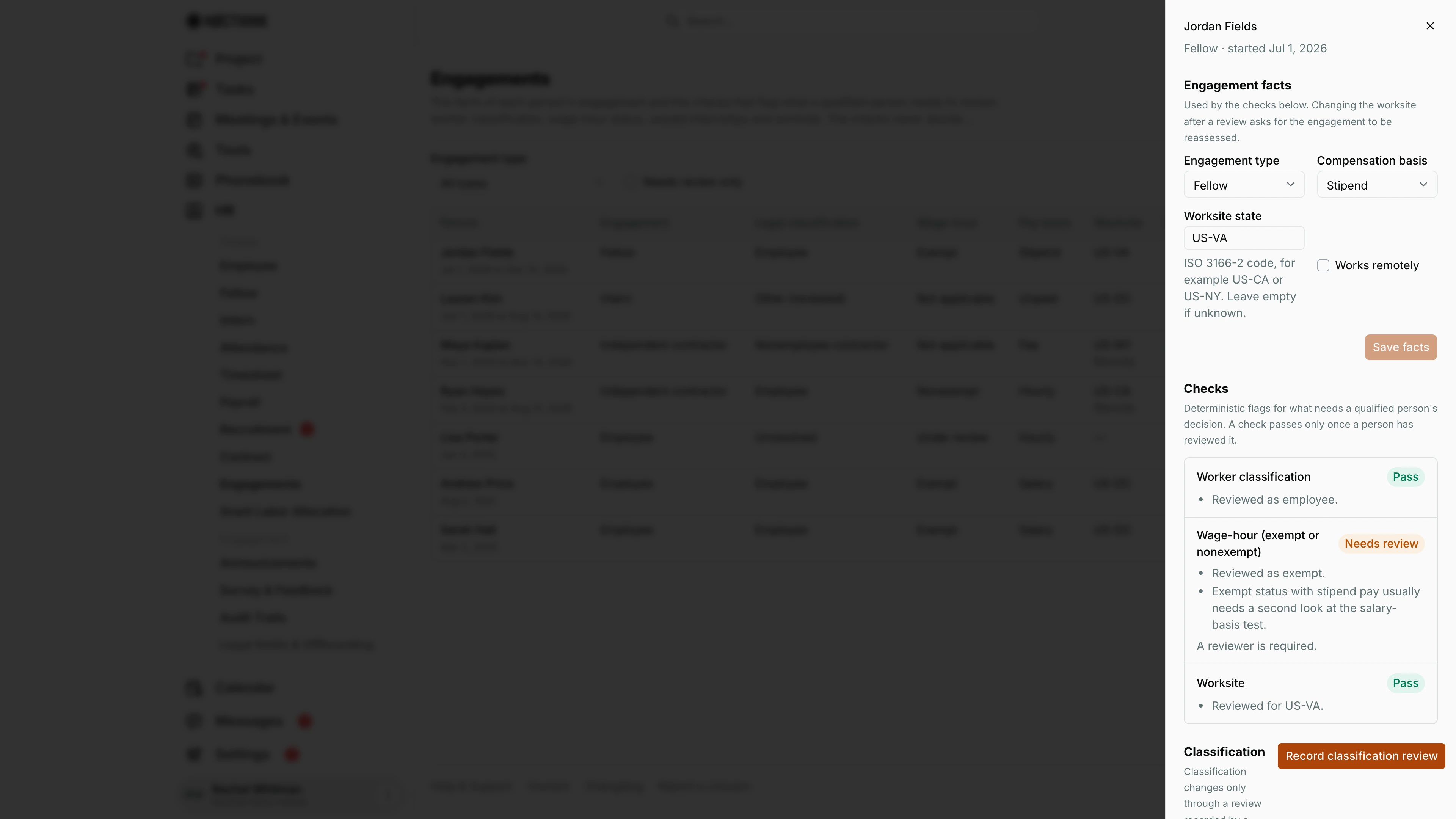
Screenshot: Rachel Whitman (Executive Director), Nocthink Demo Institute demo data.
Clicking a person opens their engagement sheet. The header gives the engagement type and start date. Engagement facts holds Engagement type, Compensation basis, Worksite state (an ISO 3166-2 code such as US-VA) and Works remotely; Save facts is enabled only after a change, and changing the worksite after a review asks for the engagement to be reassessed.
Checks are "Deterministic flags for what needs a qualified person's decision": Worker classification, Wage-hour (exempt or nonexempt), Unpaid internship or fellowship and Worksite, each with Pass, Needs review, Fail or Not applicable and the reasons. Here the wage-hour check needs review because "Exempt status with stipend pay usually needs a second look at the salary-basis test", and "A reviewer is required." Classification shows the current determination; it changes only through Record classification review, which opens the review form described in Record a classification review. Review history at the bottom lists earlier reviews.
Access & permissions
- The page needs
hr.delete(HR full scope: HR Manager, Owner, Director). The API rejects anyone else with "You do not have permission to perform this action." - A person cannot review their own classification. The button is disabled for them, and the API returns "You cannot review your own classification."
Caveats
- A check passes only after a person has recorded a review. A row stays Needs review until a review on file matches the current classification.
- Changing Worksite state after a review makes the Worksite check ask for reassessment ("Worksite changed from X to Y since the last review").
- Exempt status with non-salary pay (e.g., stipend) is flagged for a second look at the salary-basis test, as with Jordan Fields in the demo.
- Classification cannot be edited directly. The API refuses with "Change classification by recording a classification review."
- Every fact update and every review is written to the audit log.
- Engagements are built from contracts. A person without a contract row does not appear here.
Limitations
- No way to create or delete an engagement here. Add a contract in Contract instead.
- No export, and no attachment upload for evidence (it is free text only).
- The app gives no legal advice and does not decide classification. The checks are deterministic flags only.
Related menus
- Contract: every contract row is the basis of an engagement here.
- Employee, Fellow, Intern: the people being classified.
- Payroll: the pay basis and exempt status matter for overtime and pay runs.
- Access Grants: grants can be tied to an engagement and end with it.
- Legal Holds & Offboarding: preserve classification records when there is a claim.
- Audit Trails: shows
engagement_updateandclassification_reviewevents.