
Audit Trails
Open in NocthinkModule: HR · URL: /hr/audit · Responsible role: HR Manager · Also used by: Owner/Director (full). Not available to HR Staff or other roles.
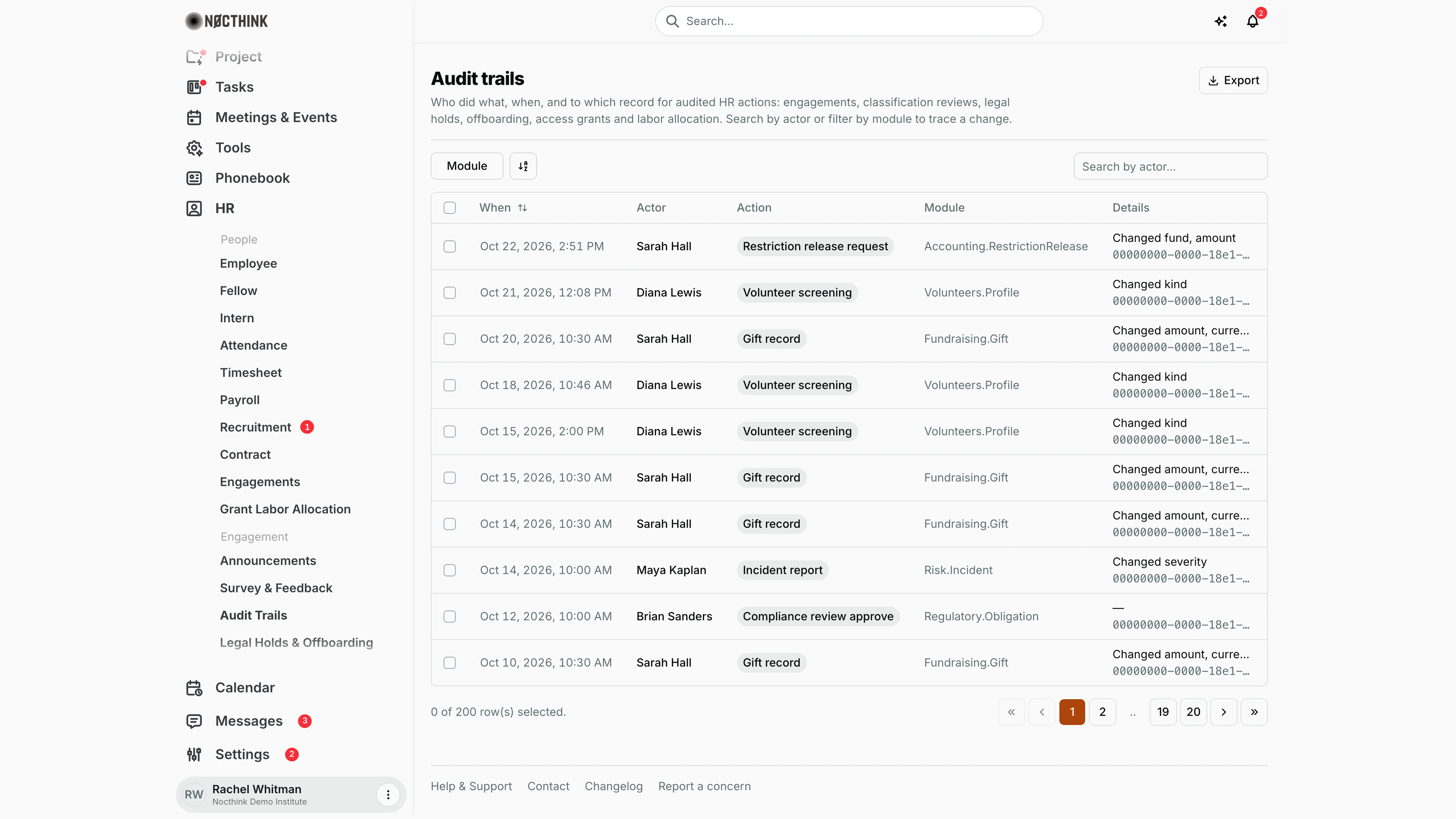
Screenshot: Rachel Whitman (Executive Director, org owner), Nocthink Demo Institute demo data. The demo HR login (Diana Lewis) holds HR Staff, which lacks hr.delete, so this page is not in her sidebar. As org owner she sees the whole organization's log, so non-HR entries (here, restriction releases, gifts, volunteer screenings, incidents and compliance reviews) appear next to HR ones; an HR Manager would see only the hr. record types.
Why I use this page
As HR Manager, I use Audit Trails to answer "who changed this, and when?". For example: who changed an engagement's facts, recorded a classification review, opened or closed a legal hold, ran offboarding, posted a labor allocation, or approved an access grant. Ordinary edits to employees, payroll, contracts and recruitment are not written to this log. I open it when investigating a complaint or discrepancy, before an internal or external audit, and when a record looks wrong and I need to trace the change.
What's on the screen
- Header: Audit trails, a description of what is audited (engagements, classification reviews, legal holds, offboarding, access grants and labor allocation), and an Export button.
- Filters: a Module checkbox filter (one option per record type found in the loaded entries), a view-options button, and Search by actor....
- Table columns:
- When: date and time in my local time zone, e.g. "Oct 22, 2026, 2:51 PM". It is sortable with the arrows button.
- Actor: the user who made the change, or "System".
- Action: a pill, e.g. Legal hold open, Classification review, Labor allocation post, Offboarding run (or, for an owner, other modules' actions such as Restriction release request, Gift record or Volunteer screening).
- Module: the record type, e.g. Hr.LegalHold, Hr.Engagement, Hr.AccessGrant, Hr.LaborAllocation, or for an owner Volunteers.Profile, Fundraising.Gift and so on.
- Details: a one-line summary of the field changes (e.g. "Changed kind"), with the record ID below it (truncated when long; hover to read it).
- Footer: row count and pagination, 10 rows per page. The page loads at most 200 entries (20 pages), which the demo fills.
How I …
Trace changes made by a person
- Type the person's name into Search by actor....
- Click When to sort oldest or newest first.
- Hover over Details to read the full change summary, and copy the record ID shown under it if I need to find the record.
Narrow to one area
- Open Module and tick the record type, e.g. Hr.LegalHold or Hr.Engagement.
- Combine with an actor search to narrow further.
Gather evidence for an audit or investigation
- Filter by actor and/or module as above.
- Click Export to download the loaded entries as CSV (time, actor, action, module, record ID, details), or note the entries by hand.
- If the records must be preserved, open a hold under Legal Holds & Offboarding.
Access & permissions
- The page needs
hr.viewplushr.delete(lib/domain-routes.ts). In docs/role.md, only HR Managers and Owners/Directors have it. HR Staff do not. - The data comes from the organization audit log API (
/audit-logs). Organization administrators (owners) and holders ofrbac.manageget the whole organization's log. Holders ofhr.delete(HR Manager) get HR records only (record types starting withhr.). Anyone else is refused.
Caveats
- The page loads only the latest 200 audit entries, and search and filters apply only to those 200. Older changes are not reachable here.
- What I see depends on who I am: an owner or
rbac.manageholder sees every module's entries (volunteers, procurement, accounting and so on, as in the screenshot), while an HR Manager sees HR entries only. For an owner, a burst of non-HR activity can push HR entries out of the latest 200; filter Module toHr.*types, or check Settings → Logs. - The Module filter lists the record types present in the loaded entries, so its options change with the data.
- Times are shown in the browser's local time zone. The Export file writes them as
yyyy-MM-dd HH:mm. - The log is read-only. Entries cannot be edited or removed from here.
Limitations
- Export downloads the loaded entries (at most 200, ignoring the current filters) as CSV.
- No date-range filter, and no paging beyond the first 200 entries.
- No IP address column, although the API returns it.
- No link from an entry to the record it describes.
Related menus
- Employee, Payroll, Contract, Recruitment: not audited; edits there do not appear in this log.
- Engagements: fact updates and classification reviews are logged.
- Legal Holds & Offboarding: hold open/close and offboarding runs are logged.
- Access Grants: requests, approvals, rejections and revocations are logged.
- Grant Labor Allocation: posting a run is logged.