
Grant Labor Allocation
Open in NocthinkModule: HR · URL: /hr/labor-allocation · Responsible role: HR Manager (computes) with an Accounting approver (approves and posts) · Also used by: Owner/Director (full), F.A.T. Manager / Accounting Staff with accounting.approve (approve and post)
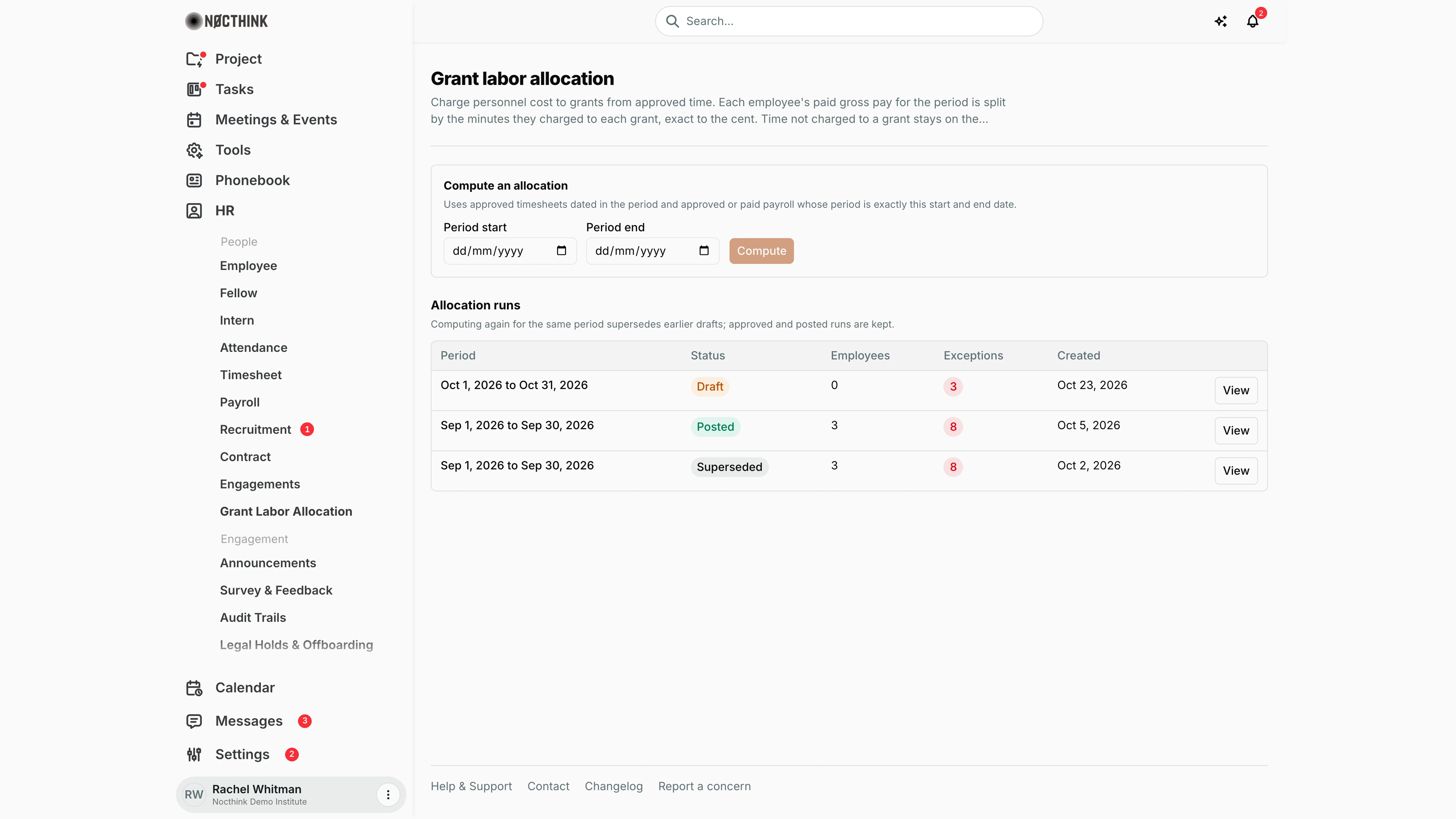
Screenshot: Rachel Whitman (Executive Director, org owner), Nocthink Demo Institute demo data. The demo HR login (Diana Lewis) holds HR Staff, which lacks hr.delete, so this page is not in her sidebar.
Why I use this page
Each month, after payroll is approved or paid and timesheets are approved, I use this page to charge personnel cost to grants based on time actually worked. The page splits each employee's gross pay for the period by the minutes they charged to each grant, exact to the cent. Time not charged to a grant stays on the payroll fund. I compute the run and check the exceptions. Then a colleague with accounting approval approves it and posts the reclass journal, so grant expenses are supported by time-and-effort records.
What's on the screen
- Header: Grant labor allocation, with the rules: allocation comes from approved time, someone other than the person who computed the run must give accounting approval, and posting books a reclass journal.
- Compute an allocation panel: Period start, Period end (date fields in the browser's date format, dd/mm/yyyy in the screenshot) and a Compute button, which stays disabled until both dates are set. It notes that it uses approved timesheets dated in the period, and approved or paid payroll whose period is exactly this start and end date.
- Allocation runs table: Period, Status (Draft, Approved, Posted, Superseded), Employees, Exceptions (count, highlighted when above zero), Created, and a View / Hide button. In the demo:
- Oct 1–31, 2026: Draft, 0 employees, 3 exceptions.
- Sep 1–30, 2026: Posted, 3 employees, 8 exceptions.
- An earlier Sep 1–30, 2026 run (created Oct 2, 2026): Superseded, 3 employees, 8 exceptions.
- Run detail (after View): a section titled "Allocation for <period>" with a status note, action buttons (Approve, Post journal, View journal entry), an Exceptions notice, and a table with Employee or grant, Time, Amount and Flags. Each employee row shows their gross pay, one line per grant, and a "Not charged to a grant (stays on payroll fund)" line.
How I …
Compute a run for a payroll period
- Make sure the period's payroll is Approved or Paid in Payroll, and that timesheets for the period are approved in Timesheet.
- Enter Period start and Period end. They must match the payroll period exactly, e.g., 2026-10-01 to 2026-10-31.
- Click Compute. The new run opens in detail as Draft.
- Read the Exceptions. Common ones are "paid for the period but has no approved time; nothing allocated", "n approved minutes not charged to any grant", and "approved time but no approved payroll for exactly this period".
- Check the Flags on grant lines: Before award period or After award period (time charged outside the grant's dates) and No ledger fund (the grant has no accounting fund, so its share will not be posted).
- Fix the source data if needed (timesheets, payroll, grant fund setup), then click Compute again for the same period. The earlier draft becomes Superseded.
Get the run approved
- Ask a colleague with accounting approval who did not compute the run to open the page, click View on the draft, and click Approve (see Allocation run detail below).
- If I try to approve my own run, the system refuses with "Someone other than the person who computed the allocation must approve it."
Post the reclass journal
- On an Approved run, the approver clicks Post journal.
- The journal debits salary expense on each grant's ledger fund and credits salary expense on the payroll fund. It is dated the last day of the period, with reference LABOR-ALLOCATION and journal number
JV-LAB-…. - When the run is Posted, click View journal entry to open it in Accounting.
Detail page, forms & dialogs
Allocation run detail
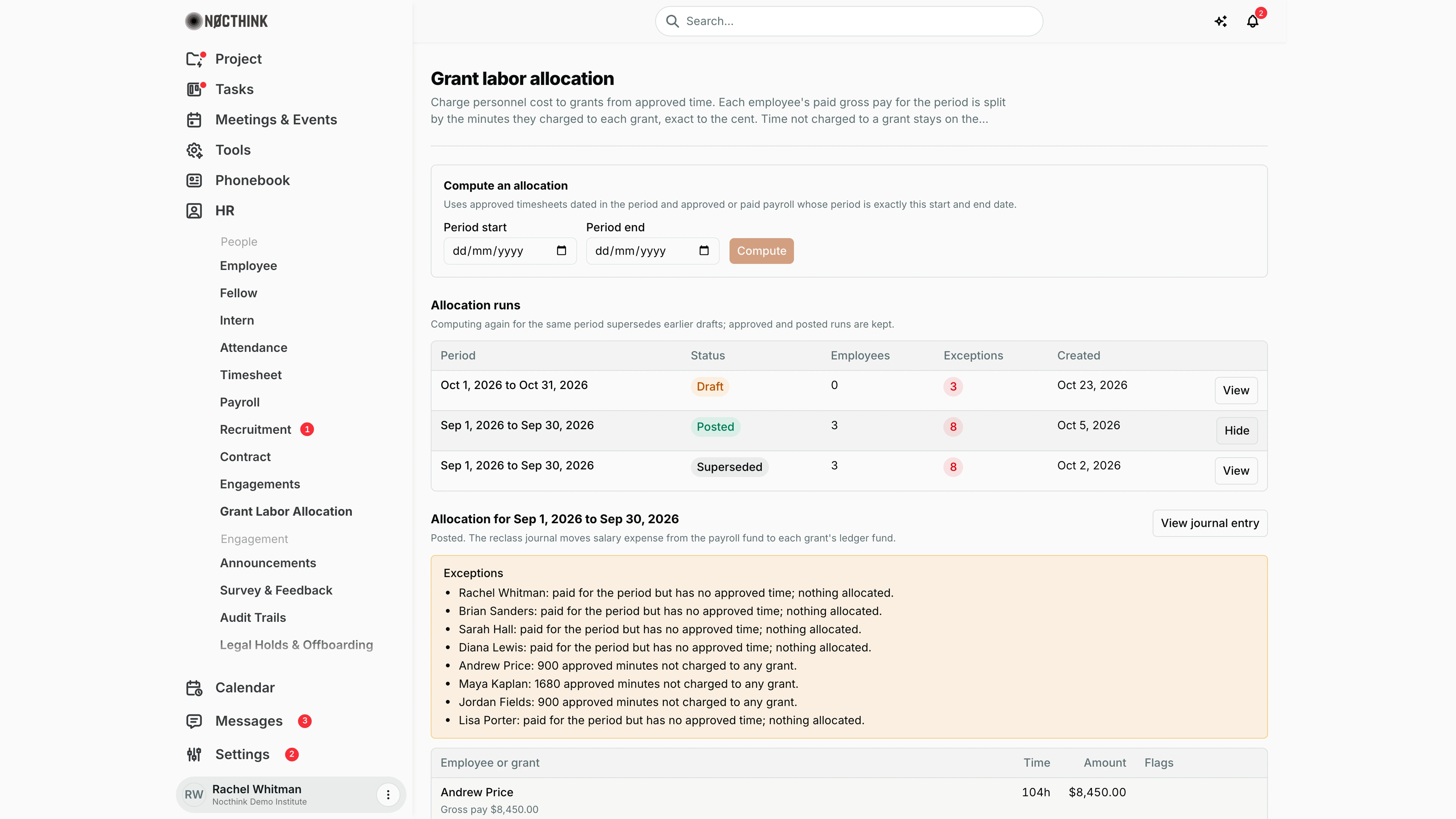
Screenshot: Rachel Whitman (Executive Director), Nocthink Demo Institute demo data.
View on a run opens its detail under the runs table (the button turns into Hide). The heading names the period and the text under it gives the status and next step: for a draft, "Review the lines and exceptions, then ask someone with accounting approval (not the person who computed it) to approve", with Approve; for an approved run, Post journal; for a posted run, View journal entry, which opens the reclass journal in Accounting.
Exceptions lists everything that was not allocated, e.g. "paid for the period but has no approved time; nothing allocated" or "900 approved minutes not charged to any grant". The table below lists each employee with their gross pay, then each grant they charged time to, with Time, Amount and Flags (Before award period, After award period, No ledger fund). Amounts are split by minutes, exact to the cent.
Access & permissions
- The page opens with
hr.deleteoraccounting.approve(lib/domain-routes.ts). - Listing runs needs HR full scope (
hr.delete: HR Manager, Owner, Director) oraccounting.approve, so the approver sees the runs waiting for them. Computing a run needs HR full scope. - The payroll the runs split is readable by finance and accounting authority (see Payroll).
- Approve and Post journal need
accounting.approve("Accounting approval is required."). The approver must not be the person who computed the run.
Caveats
- Only payroll whose period start and end match exactly is used. A run for a partial month finds nothing.
- "Gross" is base salary plus allowances from the payroll record. It is split by approved minutes, exact to the minor unit.
- Re-computing supersedes only Draft runs. Approved and posted runs are kept, so do not approve until the exceptions are understood.
- Posting fails if the salary expense account is not set under payroll posting settings ("Set the salary expense account under payroll posting settings first."), if the accounting period for the end date is closed, or if no allocated amount maps to a ledger fund ("Nothing to post").
- Posting is one-way. A run cannot be posted twice ("This allocation is already posted."), and the page has no reverse or unpost action.
- Exceptions refer to employees by name when the name is known. Otherwise they show a raw ID.
Limitations
- No reverse or unpost action. Corrections must be handled in Accounting.
- No export of run detail.
- Draft runs cannot be deleted. They can only be superseded by recomputing.
- No per-line manual adjustment. The split is purely by approved minutes.
Related menus
- Timesheet: approved time charged to grants is the input.
- Payroll: approved or paid payroll for the exact period gives the gross amounts.
- Funds and grants (Accounting): ledger funds that grant shares post to.
- Journal entries: where the posted reclass journal appears.
- Period close: a closed period blocks posting.
- Awards: award periods drive the before/after-period flags.