
Legal Holds & Offboarding
Open in NocthinkModule: HR · URL: /hr/legal-holds · Responsible role: HR Manager · Also used by: Owner/Director (full). Not available to HR Staff or other roles.
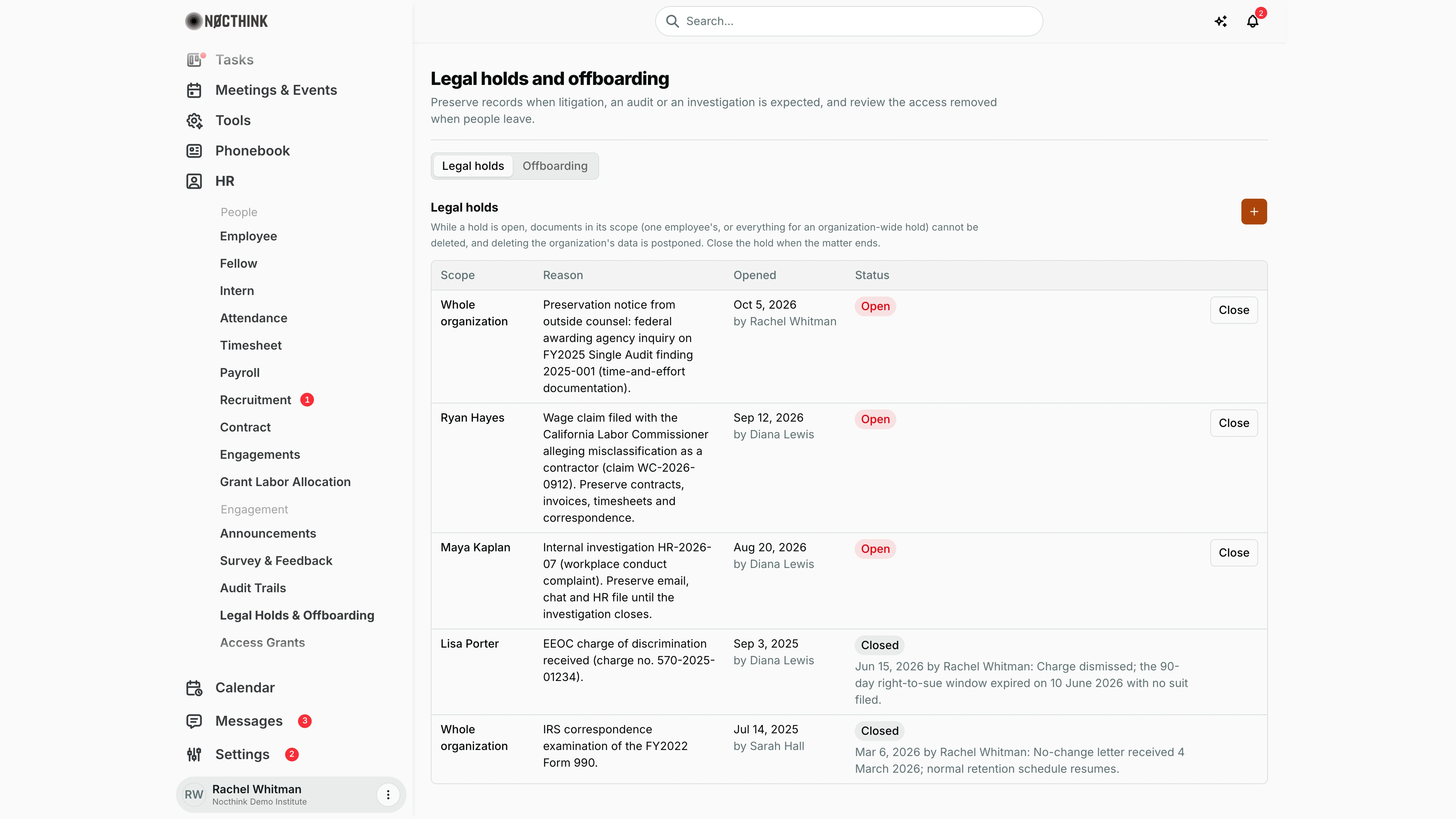
Screenshot: Rachel Whitman (Executive Director, org owner), Nocthink Demo Institute demo data. The demo HR login (Diana Lewis) holds HR Staff, which lacks hr.delete, so this page is not in her sidebar.
Why I use this page
As HR Manager, I use this page for two things. First, I open a legal hold as soon as litigation, an audit or an investigation is reasonably expected, so the records in scope cannot be deleted. I close it when the matter ends. Second, I review offboarding: the access the system removed when someone left. When a termination date has already passed and the automatic run did not pick the person up, I run offboarding by hand.
What's on the screen
- Header: Legal holds and offboarding, with a one-line purpose.
- Tabs: Legal holds | Offboarding.
- Legal holds tab:
- A note: while a hold is open, documents in its scope (one employee's, or everything for an organization-wide hold) cannot be deleted, and deleting the organization's data is postponed.
- A + button (Open legal hold).
- A table with Scope (an employee or Whole organization), Reason, Opened (date and "by <name>"), Status (Open, or Closed with date, closer and reason) and a Close button on open holds. In the demo:
- Whole organization: a preservation notice from outside counsel about a federal audit finding, opened Oct 5, 2026 by Rachel Whitman.
- Ryan Hayes: a California wage claim alleging misclassification, opened Sep 12, 2026 by Diana Lewis.
- Maya Kaplan: internal investigation HR-2026-07, opened Aug 20, 2026 by Diana Lewis.
- Lisa Porter: an EEOC charge, Closed Jun 15, 2026 after the right-to-sue window expired.
- Whole organization: an IRS examination of the FY2022 Form 990, Closed Mar 6, 2026 on a no-change letter.
- Offboarding tab:
- A notice explaining what automatic offboarding does.
- A Run offboarding now form (Employee, Run offboarding).
- An Offboarding history table: Employee, Effective, Trigger (Automatic, or Manual "by <name>") and Access removed (memberships, roles, director access, sign-out, login suspended or kept).
How I …
Open a legal hold
- On Legal holds, click + (Open legal hold); see Open legal hold below.
- In Employee, choose one person, or leave it on Whole organization to hold everything.
- Enter the Reason: the matter, request or reference number (required, up to 2,000 characters).
- Click Open hold. The hold appears as Open, and the opening is written to the audit log.
Close a legal hold
- Find the open hold and click Close.
- Enter the Reason for closing, e.g., "matter settled" (required).
- Click Close hold. Normal retention and deletion apply again to those records.
Run offboarding for someone who has left
- First, make sure the person's termination date is set on their Employee record, on or before today.
- Open the Offboarding tab (see Offboarding tab below).
- In Run offboarding now, pick the Employee and click Run offboarding.
- Read the result: "Offboarding complete." with the list of what was removed, or "Already offboarded for this termination date." Running it again for the same date changes nothing.
Review what was removed
On Offboarding, read Offboarding history. For each person it shows how many project memberships and roles were removed, whether director access was removed, "Signed out everywhere", and whether the login was suspended or kept (kept if they belong to another organization).
Detail page, forms & dialogs
Open legal hold
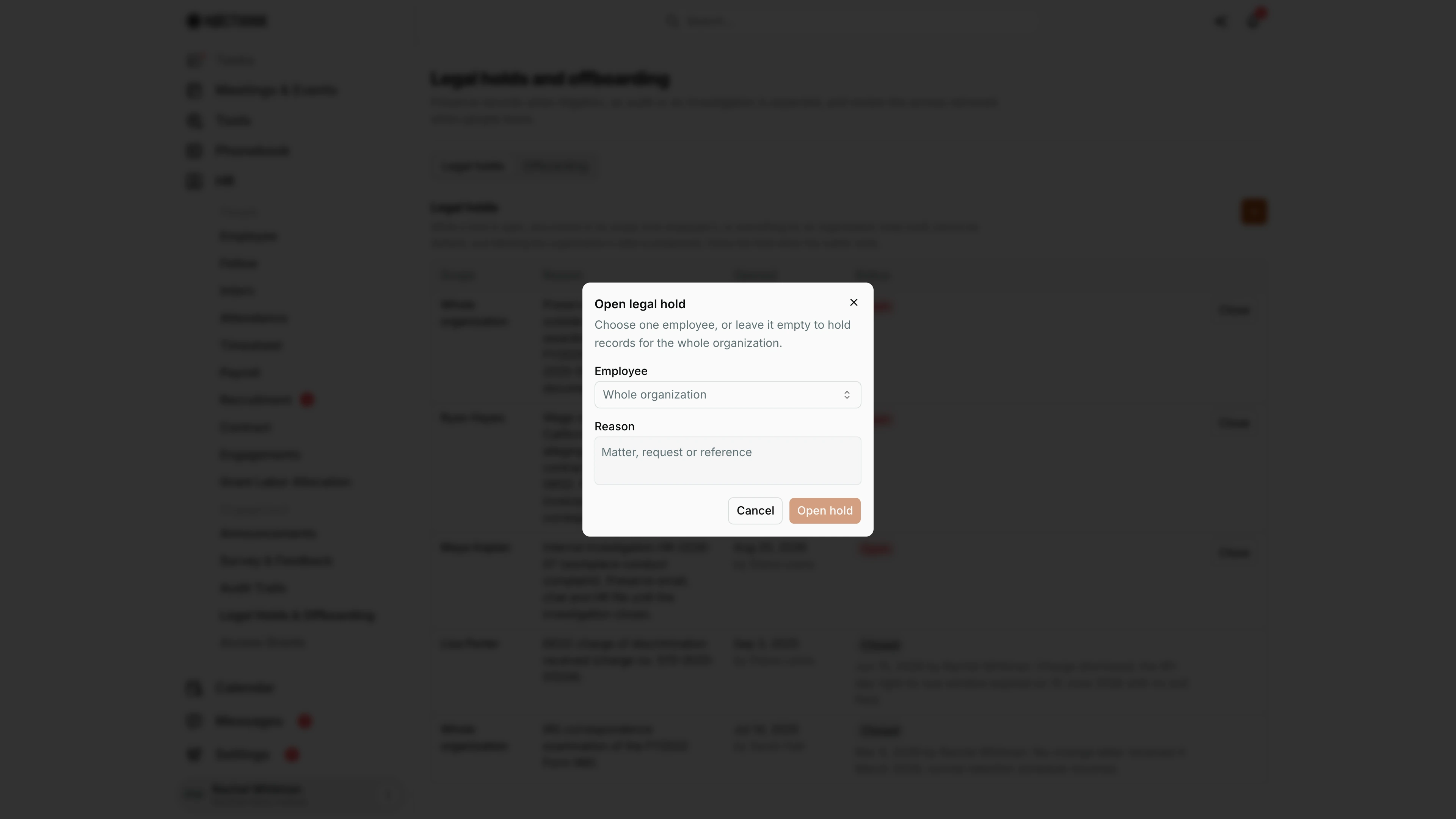
Screenshot: Rachel Whitman (Executive Director), Nocthink Demo Institute demo data.
+ on the Legal holds tab opens Open legal hold: "Choose one employee, or leave it empty to hold records for the whole organization." Employee defaults to Whole organization. Reason is required: write the matter, request or reference number so the hold can be traced later. Open hold creates the hold as Open and writes the opening to the audit log; while it is open, normal retention and deletion are suspended for those records. Cancel closes without creating anything. Each hold can be closed later with its own reason.
Offboarding tab
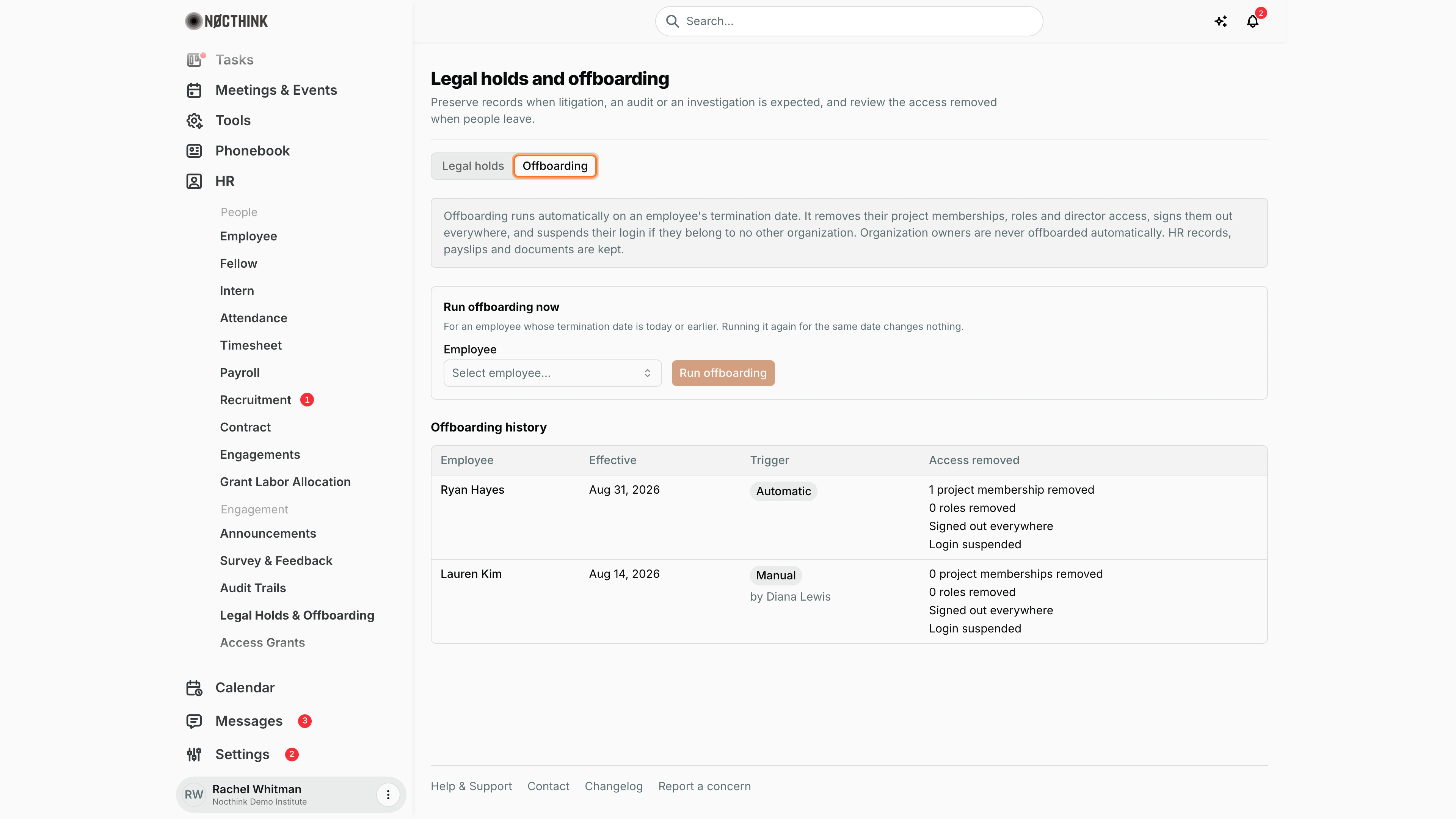
Screenshot: Rachel Whitman (Executive Director), Nocthink Demo Institute demo data.
Offboarding starts with an explanation: offboarding runs automatically on an employee's termination date, removes project memberships, roles and director access, signs the person out everywhere and suspends the login unless they belong to another organization; owners are never offboarded automatically, and HR records, payslips and documents are kept.
Run offboarding now is for someone whose termination date is today or earlier: pick the Employee and click Run offboarding. Running it again for the same date changes nothing. Offboarding history lists each run with Employee, Effective date, Trigger (Automatic, or Manual with who ran it) and Access removed (memberships and roles removed, signed out everywhere, login suspended or kept).
Access & permissions
- The page needs
hr.viewplushr.delete(HR full scope: HR Manager, Owner, Director). The API refuses others with "You do not have permission to perform this action." - I cannot offboard myself ("You cannot offboard yourself.").
Caveats
- Offboarding is irreversible from this page. It removes project memberships, roles and director access, signs the person out everywhere, and suspends their login if they belong to no other organization. Restoring access means re-adding roles and memberships by hand.
- HR records, payslips and documents are kept. Offboarding never deletes them.
- Organization owners are never offboarded automatically.
- Automatic offboarding runs from a scheduled job for everyone whose termination date has passed. A manual run fails with "Set a termination date on or before today first." if the date is missing or in the future.
- An open hold blocks document deletion only for its scope. A hold on one employee does not protect other people's records.
- Holds cannot be edited after opening. To change the scope or reason, close the hold and open a new one.
Limitations
- No edit of a hold's scope or reason, and no reopening of a closed hold.
- No export of holds or offboarding history. The history shows the latest 200 runs.
- No way to undo an offboarding run.
- Holds cover documents and organization data deletion. The page does not list which specific records fall under a hold.
Related menus
- Employee: set the termination date that triggers offboarding.
- Contract and Engagements: contracts and classification records often in scope of a hold.
- Access Grants: a holder's grants end when they leave.
- Audit Trails: hold opening and closing, and offboarding runs, are logged.
- Incidents: the governance record of the matter that prompted a hold.