
Period Close
Open in NocthinkModule: Accounting · URL: /accounting/period-close · Responsible role: F.A.T Manager · Also used by: Owner/Director (full); Accounting Staff can read the closing date and history through the API but the menu route needs accounting.approve, which the seeded Accounting Staff role does not have
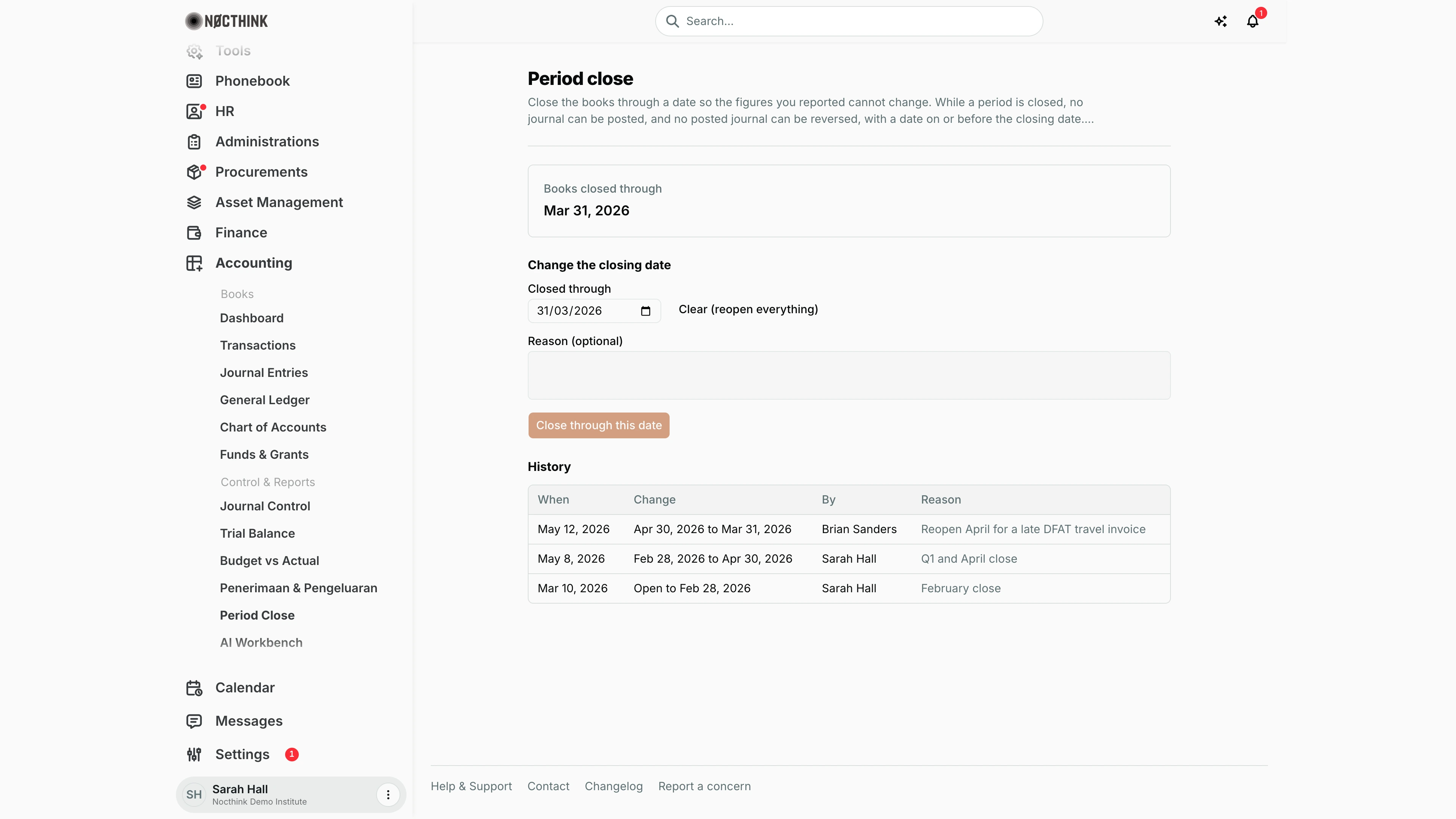
Screenshot: Sarah Hall (Finance Manager, also holds the F.A.T Manager role), Nocthink Demo Institute demo data.
Why I use this page
I use Period Close to lock the books through a date once a month has been reconciled and reported, so the figures I gave donors and the board cannot change underneath them. After the month-end checklist in the AI Workbench is all green, I move the closing date forward to the last day of the month. On the rare occasion a late invoice must land in a closed month, I reopen it here with a written reason, post the correction, and close it again.
What's on the screen
- Header — Period close with an explanation: while a period is closed, no journal can be posted and no posted journal can be reversed with a date on or before the closing date.
- Books closed through card — the current closing date (in the screenshot Mar 31, 2026), or Open (no period closed).
- Change the closing date form:
- Closed through — date field, prefilled with the current closing date (the browser shows it in its own date format,
31/03/2026in the screenshot). - Clear (reopen everything) — shown only when a date is set; empties the field.
- A yellow warning appears when the new date is earlier than the current one or empty: "Moving the date back reopens the days after … through …" / "Clearing the closing date reopens every period."
- Reason (optional) — becomes Reason (required) when reopening; max 500 characters.
- Submit button — Close through this date when moving forward, Reopen periods when moving back or clearing. Disabled until the date actually changes (and a reason is given when reopening).
- Closed through — date field, prefilled with the current closing date (the browser shows it in its own date format,
- History table — up to the last 50 changes, newest first: When, Change ("Feb 28, 2026 to Apr 30, 2026", "Open to …"), By (member name), Reason. Empty state: "No changes yet."
How I …
How I close a month
- Open the AI Workbench month-end close checklist for the month and clear every open item: bank statements reconciled and closed, no open statement exceptions, no Draft journals dated in the month, every posted journal balances, no AI drafts or required reviews outstanding, no payment requests due in the month still in approval, procurement postings booked, no pending restriction releases.
- Check the Trial Balance reads Balanced.
- Open Accounting → Control & Reports → Period Close.
- In Closed through, pick the last day of the month (for example 30/04/2026).
- Optionally type a Reason such as "April close".
- Click Close through this date. The card updates and a new row appears in History with my name.
How I reopen a closed period for a correction
- Decide the earliest date that has to change. Prefer not reopening at all: a correcting entry dated after the closing date needs no reopen.
- In Closed through, pick the day before that date (or click Clear (reopen everything) to remove the lock completely).
- Read the warning to confirm which days will reopen (see Reopening a closed period below).
- Fill in Reason — it is mandatory, for example "Reopen April for a late DFAT travel invoice".
- Click Reopen periods.
- Post or reverse the journal in Journal Entries.
- Come back and move Closed through forward again, then click Close through this date.
How I check who changed the lock and why
- Scroll to History.
- Each row shows when it happened, the old and new closing date, who did it and the reason. Every change is also written to the organisation audit log as
period_closeorperiod_reopen.
Detail page, forms & dialogs
Reopening a closed period
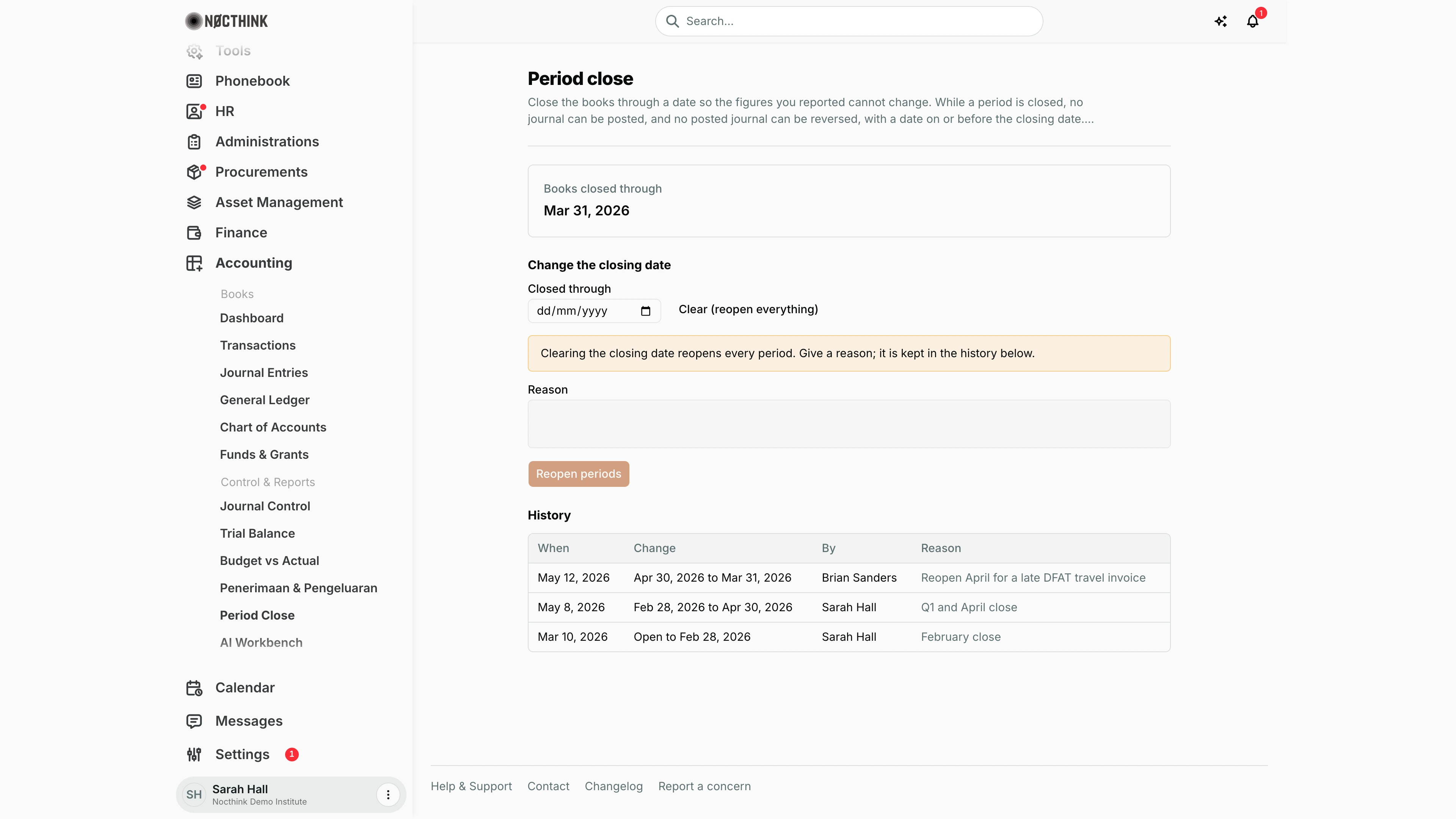
Screenshot: Sarah Hall (Finance Manager, also holds the F.A.T Manager role), Nocthink Demo Institute demo data.
This is the page after I click Clear (reopen everything) with the books closed through Mar 31, 2026. Nothing is saved yet: the Closed through date is emptied and a warning appears, "Clearing the closing date reopens every period. Give a reason; it is kept in the history below." Moving the date back instead of clearing it shows "Moving the date back reopens the days after … through …".
While reopening, the field label changes from Reason (optional) to Reason, and it is required. The submit button changes from Close through this date to Reopen periods, and it stays disabled until a reason is typed.
Clicking Reopen periods saves the new lock and adds a row to History with my name and reason. To back out, I pick the original date again or reload the page.
Access & permissions
- The route is gated by
accounting.approve(lib/domain-routes.ts), and the save endpoint (PUT /accounting/period-lock) requiresapproveon accounting. That means F.A.T Manager and Owner/Director in practice. - Reading the lock (
GET) only needs accounting view, so Accounting Staff are told the closing date in error messages when they try to post into a closed period, but cannot open this page from the sidebar. - Finance-only roles have no access.
Caveats
- The lock is one date for the whole organisation, not per project, fund or bank account.
- Closing is immediate. From then on, posting a journal or reversing a posted journal dated on or before that date fails with "The books are closed through …; date the entry after that or reopen the period."
- The same check blocks other ledger-touching actions dated in a closed period: approving a release from donor restriction, functional-expense allocation runs, fundraising gift postings and HR labor-allocation postings.
- Draft journals can still be created with a closed-period date; they just cannot be posted until the date is changed or the period reopened.
- Reopening without a reason is rejected by the server ("Give a reason to reopen a closed period.").
- Saving the same date again does nothing — the button stays disabled.
- Dates are calendar dates without time zone; "closed through 31 March" includes the whole of 31 March.
Limitations
- No built-in checklist on this page; the month-end checklist lives in the AI Workbench, and closing here does not require it to be green.
- No per-module or per-fund locks, and no soft-close (warn only) mode.
- History shows only the latest 50 changes.
- No notifications are sent to the team when the books are closed or reopened.
Related menus
- AI Workbench — month-end close checklist and AI narrative of what is still open.
- Trial Balance — confirm the books balance before closing.
- Journal Entries — posting and reversing are what the lock blocks.
- Journal Control — clear pending approvals before closing.
- Reconciliation — bank statements must be reconciled and closed for the checklist.
- Funds & Grants — pending restriction releases appear on the checklist.