
Financial Position
Open in NocthinkModule: Accounting · URL: /accounting/financial-position · Responsible role: Accounting Staff · Also used by: F.A.T Manager (full), Owner/Director (full); Finance Staff / Finance Manager (read-only)
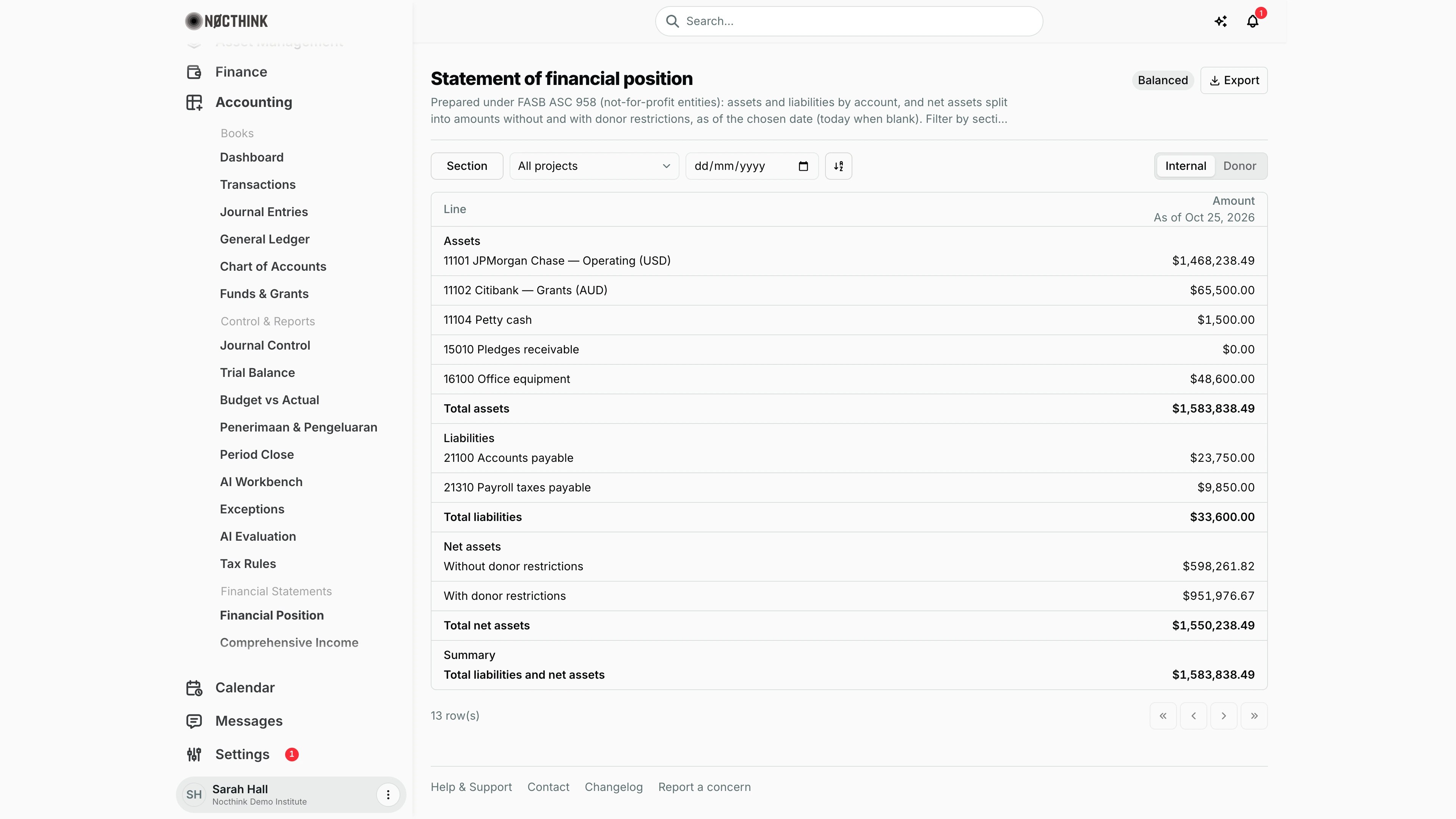
Screenshot: Sarah Hall (Finance Manager, also holds the F.A.T Manager role), Nocthink Demo Institute demo data.
Why I use this page
This is the balance sheet: what the organization owns, what it owes, and how much of the difference is restricted by donors, at a single date. I open it at every month end after the Trial Balance is clean, to hand the F.A.T Manager a statement that ties out. I also use it for donor reporting, filtered to one project and switched to the Donor view so each line carries the donor's budget codes.
What's on the screen
- Header. The title is Statement of financial position. The description underneath names the reporting standard: "Prepared under FASB ASC 958 (not-for-profit entities)" for ASC 958 organizations like the demo tenant, or "Laporan Posisi Keuangan under ISAK 35" for Indonesian books.
- Top right. A Balanced / Not balanced badge, which is red when not balanced and shows whether total assets equal total liabilities plus net assets. Next to it is the Export menu with PDF, Excel, CSV and JSON.
- Toolbar, left to right:
- Section filter, with checkboxes for Assets, Liabilities, Net assets and Summary.
- Project dropdown, set to All projects by default.
- As of date box (dd/mm/yyyy). Leave it blank for today.
- A sort toggle.
- On the right, an Internal / Donor switch.
- Table. It has two columns:
- Line: the account code and name, with the section heading above the first line of each section.
- Amount: the header shows "As of <date>". Negative amounts appear in parentheses.
- Sections in the table:
- Assets: one line per Asset account with posted activity (an account that nets to zero, like 15010 Pledges receivable in the demo, still shows as $0.00), then Total assets.
- Liabilities: one line per Liability account, then Total liabilities. The demo shows 21100 Accounts payable ($23,750.00) and 21310 Payroll taxes payable ($9,850.00), totalling $33,600.00.
- Net assets: Without donor restrictions, With donor restrictions and Total net assets.
- Summary: Total liabilities and net assets.
- Footer. The row count (13 in the screenshot) and pager. The table loads up to 200 rows per page.
How I …
Produce the month-end balance sheet
- Check that Trial Balance balances and that all of the month's journals are Posted. Draft journals are not counted here.
- Leave Project on All projects and set As of to the last day of the month.
- Confirm the badge reads Balanced.
- Choose Export → PDF for the signed pack, or Export → Excel for a working copy. The Excel file has the organization letterhead, a title block, the currency caption, and real numbers formatted
#,##0;(#,##0).
Prepare a project statement for a donor
- Pick the project in the Project dropdown.
- Set As of to the donor's reporting date.
- Switch to Donor. A Donor Budget Code column appears first, listing the donor's budget codes behind each asset or liability line. A dash means none was found. Net-asset and total lines carry no code.
- Export to PDF or Excel. The file name ends in
_Donor, and the subtitle shows the project name.
Find why the statement is "Not balanced"
- Note the As of date and open Trial Balance for the same scope.
- Look for postings to accounts whose type is not Asset, Liability, Equity, Income or Expense, or for a journal that was posted unbalanced. This statement only buckets those five types.
- Use the Section filter to hide Assets and compare Total liabilities and Total net assets with the ledger.
Access & permissions
- The menu needs
accounting.view. The server also requires accounting authority:accounting.approve, or theaccounting-stafforfat-managerrole. - Accounting Staff and F.A.T Manager both see the full statement. Owner and Director see everything.
- The page is read-only. It has no write actions to permission.
- Finance Staff and Finance Manager are read-only here: their seeded roles include
accounting.view, and the server lets finance authority withaccounting.viewread the books. They can't create, change or post anything on this page.
Caveats
- Only Posted journals are counted, up to and including the As of date. Draft or pending journals and AI drafts are excluded.
- Restricted vs unrestricted net assets depends on the fund behind each Income, Expense or Equity line. The fund is the line's own fund, or the journal's fund if the line has none. Only funds whose type is Restricted on Funds & Grants count as "With donor restrictions". A line without a fund, or with a non-Restricted fund, lands in "Without donor restrictions".
- Project scope works through funds. A project's statement includes lines whose fund is linked to that project, to one of its grants, or to one of its grant fund codes. Postings without a fund never appear on a project statement.
- The Donor view only does something with a project selected. On All projects it looks identical to Internal.
- An invalid As of date is rejected with "as_of must be a valid date in YYYY-MM-DD format."
- Amounts are in the organization's base currency. Foreign-currency journals are already converted at posting. The caption reads "In USD" or "In IDR".
Limitations
- There is no comparative column for a prior date. To compare, run the statement twice with different As of dates.
- There is no drill-down: clicking a line does not open its ledger. Use General Ledger for that.
- Each Asset or Liability account is listed flat. Parent accounts are not rolled up, and accounts with no posted activity do not appear.
- JSON export returns the raw API response, not the on-screen layout.
Related menus
- Trial Balance: prove debits equal credits before trusting this statement.
- Comprehensive Income: the period result that flows into net assets.
- Changes in Net Assets: shows how each net-asset class moved.
- Donor Restrictions: the restricted balances by fund behind "With donor restrictions".
- Funds & Grants: fund type decides whether a balance is restricted.
- Period Close: lock the month once this statement is final.