
Tax Rules
Open in NocthinkModule: Accounting · URL: /accounting/tax-rules · Responsible role: F.A.T Manager · Also used by: Accounting Staff (install the pack and submit versions — accounting.create), Owner/Director (full)
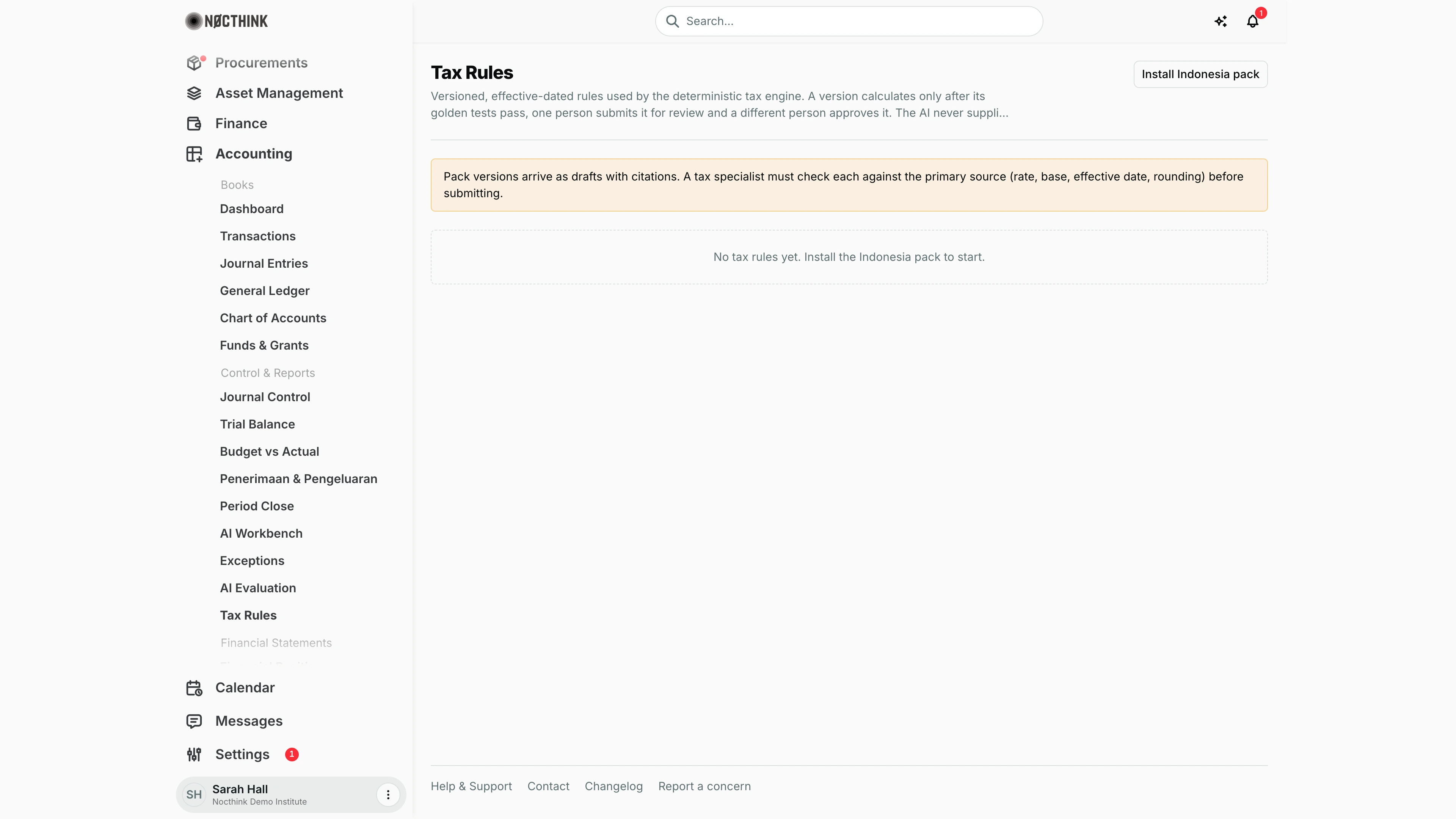
Screenshot: Sarah Hall (Finance Manager, also holds the F.A.T Manager role), Nocthink Demo Institute demo data. The demo tenant has not installed a tax pack, so no rules are listed.
Why I use this page
Tax Rules holds the versioned, effective-dated rules the deterministic tax engine uses to calculate PPN and withholding (Indonesia: PPh 23, PPh 4(2), PPh 26; United States: backup withholding and NRA withholding) on AI tax determinations and invoices. The AI never supplies rates — it only picks a rule; the rate, base and rounding come from an approved version here. As F.A.T Manager I approve each version after a colleague has checked it against the regulation, and I retire versions when the law changes. I come here when we start using the AI tax features, and whenever a regulation changes.
What's on the screen
- Header — Tax Rules with the explanation that a version calculates only after its golden tests pass, one person submits it and a different person approves it; one Install … pack button per country pack this organization may install (only its own country once Country is set in Settings → Nonprofit; every pack while it is blank).
- Info notice (only while the organization has no country set) — every pack is offered; set the country to see only your own and keep other countries' rules out of AI tax suggestions.
- Warning notice — "Pack versions arrive as drafts with citations. A tax specialist must check each against the primary source (rate, base, effective date, rounding) before submitting."
- Empty state — "No tax rules yet. Install your country's pack to start."
- One section per rule once installed — title is the rule name (e.g. "PPN — standard delivery of non-luxury goods/services", "PPh 23 — services and rent (other than land/buildings)", "PPh Final 4(2) — rent of land and/or buildings", "PPh 26 — payments to non-residents (no treaty relief)", "Backup withholding — reportable payments without a valid TIN", "NRA withholding — U.S.-source FDAP income paid to a foreign person (no treaty relief)"); subtitle shows code (e.g.
ID.PPH23.SERVICES,US.BWH.3406), tax type, jurisdiction and either "vN in force today" or "no approved version in force". - Version table per rule:
- Version (v1, v2 …)
- Effective — from date to end date, or "open".
- Source — the regulation citation, notes, and a Primary source link.
- Tests — number of golden test vectors.
- Status — Draft, In review, Approved, Retired.
- Action — Submit for approval (Draft), Approve (second person) (In review), Retire (Approved).
How I …
How I install my country's pack
- Click Install Indonesia pack or Install United States (federal) pack.
- The pack's rules are created with all their versions as Draft, each with citations and test vectors — four Indonesian rules (PPN, PPh 23, PPh 4(2), PPh 26) or two U.S. federal rules (backup withholding 24%, NRA withholding 30%).
- Installing again does not duplicate anything — rules that already have versions are skipped.
How I get a version checked and submitted (Accounting Staff or tax specialist)
- Open the Primary source link and compare the version's rate, base, effective dates and rounding with the regulation; read the notes.
- If it matches, click Submit for approval.
- The server re-runs every golden test vector. If any fails, submission is refused ("Golden test vectors fail."); a version with no test vectors cannot be submitted.
- The version moves to In review, and the person who submitted is recorded as the reviewer.
How I approve a version (F.A.T Manager)
- Find the version marked In review.
- Confirm the citation and effective window myself.
- Click Approve (second person).
- The server checks I am neither the author nor the reviewer, re-runs the tests, and refuses if another approved version of the same rule overlaps the period.
- The rule subtitle changes to "vN in force today" once its window covers today.
How I retire a version
- On an Approved version, click Retire.
- Type the reason in the browser prompt ("Why retire this version?") and confirm — at least 3 characters.
- The status becomes Retired and the reason is appended to its notes. Retire the old version before approving a new one for an overlapping period.
Access & permissions
- Visible to anyone with
accounting.view(Accounting menu). - Installing the pack and Submit for approval need
accounting.create(Accounting Staff, F.A.T Manager). - Approve (second person) and Retire need
accounting.approve(F.A.T Manager, Owner/Director). - Segregation of duties is enforced on the server: the approver must be a different person from the author and the submitter. Every install, submit, approve and retire is written to the audit log.
Caveats
- Pack versions are drafts. Nothing calculates until a version is approved, so tax determinations in the AI Workbench need at least one approved version per rule they use; with no rules at all, AI tax drafting fails with "Install a tax rule pack first."
- Two packs exist: Indonesia (
id) and United States federal (us). Once the organization's country is set, installing another country's pack is refused, and rules from another country never reach AI tax suggestions. - Approved versions cannot overlap in time for the same rule.
- Retire takes effect immediately and cannot be undone from the page.
- Amounts in test vectors and calculations are in minor units of the base currency (rupiah ×100, or U.S. cents); rates and rounding come only from the rule definition.
Limitations
- No form to create a new version or edit a definition, test vectors or effective dates on this page; the API supports creating versions, but the page only shows install, submit, approve and retire.
- No way to view the rule definition or test vector details here — only the count.
- No reject action for an In review version; it can only be approved (or left).
- No jurisdictions other than Indonesia and U.S. federal. The U.S. pack has no state taxes, payroll withholding, UBIT, or the 14% rate for F/J/M/Q scholarship recipients.
Related menus
- AI Workbench — tax determinations and invoice withholding use these rules.
- AI Evaluation — evaluation runs for tax determinations use our approved rules.
- Supplier Bills — bills where withholding is applied.
- Payments — payments net of withholding.