
Cash Flows
Open in NocthinkModule: Accounting · URL: /accounting/cash-flows · Responsible role: Accounting Staff · Also used by: F.A.T Manager (full), Owner/Director (full); Finance Staff / Finance Manager (read-only)
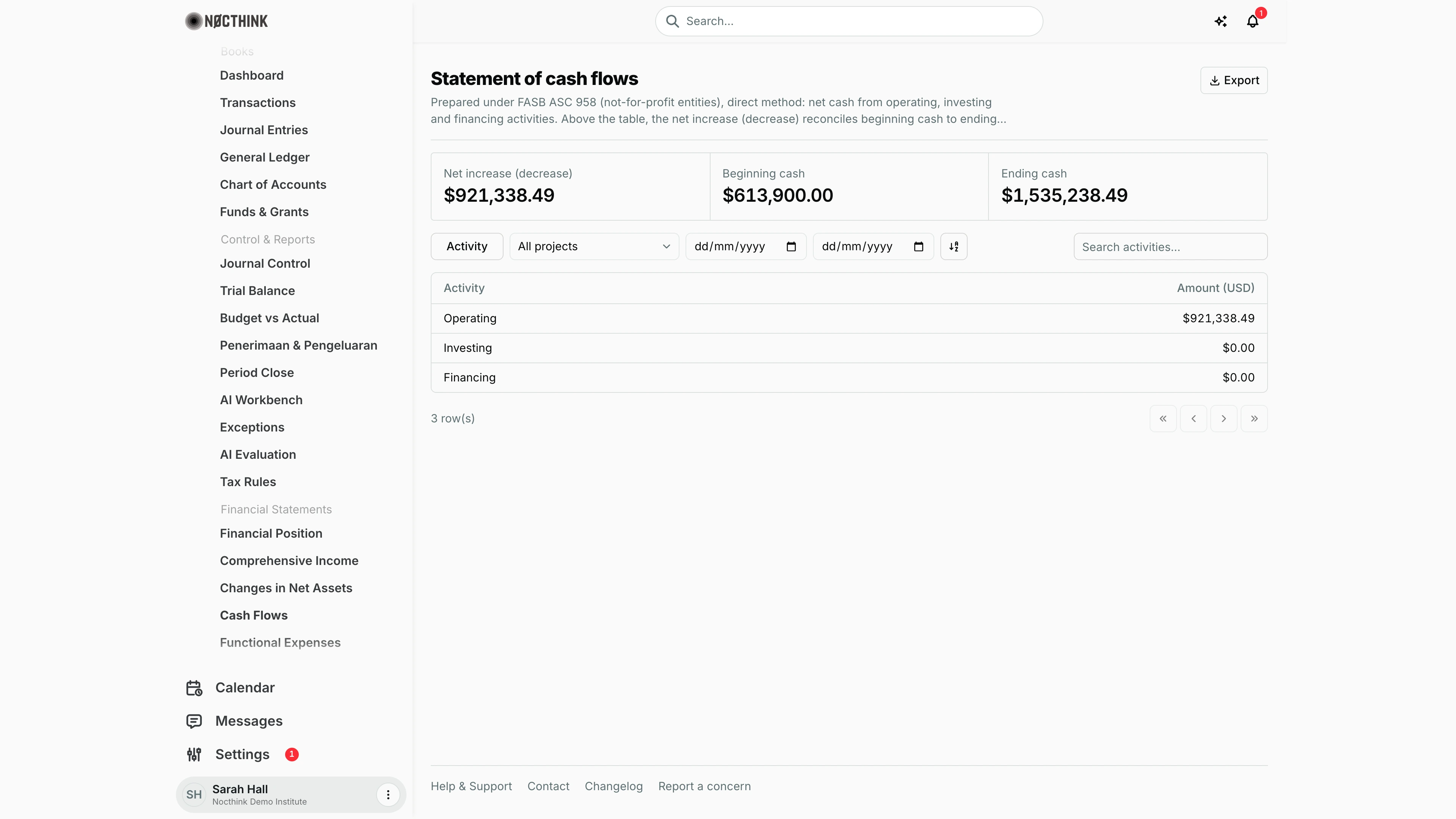
Screenshot: Sarah Hall (Finance Manager, also holds the F.A.T Manager role), Nocthink Demo Institute demo data.
Why I use this page
I use this page to explain how cash moved. It splits net cash from operating, investing and financing activities and reconciles beginning cash to ending cash. It is the last of the core statements I put in the financial-statement pack, after Financial Position and Comprehensive Income. I also open it when a project's bank balance looks wrong and I want to see whether the movement came from operations or from financing such as loans or transfers.
What's on the screen
Header
- The title is Statement of cash flows, followed by a line that cites the reporting standard and the direct method.
- Export is at the top right, with options for PDF, Excel, CSV and JSON.
Stat cards
- Net increase (decrease): highlighted when it is negative.
- Beginning cash.
- Ending cash.
Toolbar
- Activity filter, with checkboxes for Operating, Investing and Financing.
- Project dropdown, set to All projects by default.
- From and To dates, plus Reset period once a date is set. Blank dates mean from the first posted journal through the last.
- A sort toggle.
- Search activities… search box.
Table
- Activity column.
- Amount (USD) column, which shows the organization's base currency in the header. Negative amounts appear in parentheses.
- There is one row for each of the three activities.
How I …
Produce the cash flow statement for the pack
- Confirm the period's bank and cash journals are Posted. Bank-statement matching on Reconciliation should already be done.
- Leave Project on All projects.
- Check that Ending cash equals the sum of the cash accounts on Financial Position when that page's As of is left blank.
- Choose Export → Excel or Export → PDF. The export lists the three activities followed by Net increase (decrease) in cash, Beginning cash and Ending cash.
Make sure an account lands in the right activity
- Each journal's cash movement is classified by its non-cash lines (the counterparts). Each counterpart account's cash-flow category (operating, investing, financing or none) decides where its share goes.
- Cash accounts are those flagged as cash on Chart of Accounts. In the account form this is the option that "counts as cash on the cash flow statement".
- New accounts default to operating. Change it with Cash flow category in the account form on Chart of Accounts, for example investing for a fixed-asset account or financing for a loan account.
Review cash flow for one project
- Pick the project in Project.
- Read the three activity amounts and Ending cash. Only journals with lines on that project's funds are included.
- Export with the project name in the subtitle and in the file name.
Access & permissions
- You need
accounting.viewplus accounting authority on the server. That meansaccounting.approve, or theaccounting-stafforfat-managerrole. - Accounting Staff and the F.A.T Manager can read and export. The Owner and Director can see everything.
- The page is read-only.
- Finance Staff and Finance Manager are read-only here: their seeded roles include
accounting.view, and the server lets finance authority withaccounting.viewread the books. They can't create, change or post anything on this page.
Caveats
- Beginning cash is the cash held before From (zero with no From), plus the cash of opening-balance journals inside the period. Ending cash is the cash balance at To.
- Opening-balance journals. A journal that brings net assets (an Equity account) in against other accounts is an opening balance, the same rule Changes in Net Assets uses. All of its cash counts in Beginning cash, and its other lines (pledges, equipment, payables) are balances carried in, not operating or investing flows. In the demo the opening journal JV-2023-0011 puts $613,900.00 into cash, so with no From the page shows beginning cash $613,900.00, net increase $921,338.49 (all operating) and ending cash $1,535,238.49, which matches the cash accounts on Financial Position. A journal made only of Equity lines (a release from restriction, a board designation) moves no cash.
- Category "none" on any non-Equity counterpart counts as operating, the residual class for cash flows that aren't investing or financing (ASC 230).
- Cash moved between two cash accounts nets to zero. A transfer from one bank to another produces no activity line.
- Mixed journals are split by share. When a cash journal has several non-cash lines, the cash movement is divided across their categories in proportion to each line's absolute amount, rounded to the cent (operating takes any rounding cent). Opening-balance journals are not split; see above.
- Project scope works through funds. Cash journals without a project-linked fund are left out of a project's statement, so project Ending cash is not the same as a project bank-account balance.
- Amounts are in base currency, converted at posting.
Limitations
- No comparison between periods side by side.
- There are no line items inside each activity, such as receipts from donors or payments to suppliers. Only the three totals are shown, even though the page is labelled the direct method.
- There is no indirect-method reconciliation from the change in net assets.
- There is no drill-down to the journals behind each activity. Use General Ledger on the cash accounts instead.
- The PDF export uses a plain table layout rather than the letterhead style used by the Financial Position and Comprehensive Income PDFs.
Related menus
- Financial Position: its cash accounts should total Ending cash.
- Comprehensive Income: the accrual-basis result, set against the cash movement shown here.
- Chart of Accounts: the cash flag decides which accounts count as cash.
- Penerimaan & Pengeluaran: a project's receipts and disbursements report, in the donor layout.
- General Ledger: trace individual cash movements.