
Penerimaan & Pengeluaran
Open in NocthinkModule: Accounting · URL: /accounting/receipts-disbursements · Responsible role: Accounting Staff · Also used by: F.A.T Manager (full), Owner/Director (full); Finance Staff / Finance Manager (read-only)
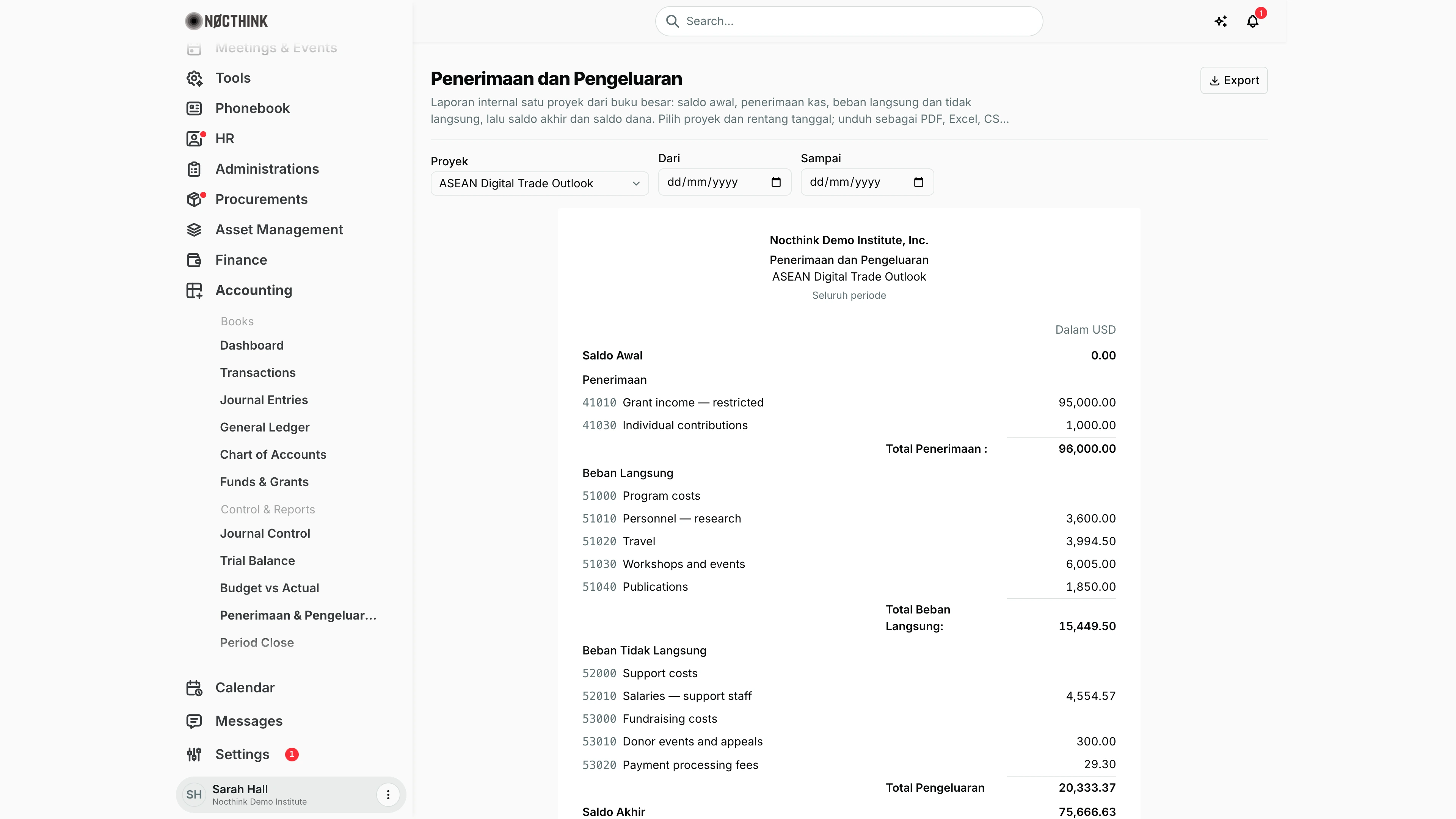
Screenshot: Sarah Hall (Finance Manager, also holds the F.A.T Manager role), Nocthink Demo Institute demo data, with project "ASEAN Digital Trade Outlook" selected and no dates (Seluruh periode).
Why I use this page
This is the internal receipts-and-disbursements report (Laporan Penerimaan dan Pengeluaran) for one project: opening balance, money received, direct costs, indirect costs, closing balance and fund balance. I prepare it for programme managers and for donors who want a cash-style statement in the Indonesian format, typically monthly or at each donor reporting date, and attach the PDF or Excel to the donor report pack. The page labels are in Indonesian because the printed report is.
What's on the screen
Header
- Title: Penerimaan dan Pengeluaran, followed by a short Indonesian description.
- Export sits on the right. It stays disabled until a report with rows has loaded.
Filters
- Proyek: the project picker, set to ASEAN Digital Trade Outlook in the screenshot. Until a project is picked, the page shows only the prompt "Pilih proyek untuk menampilkan laporan."
- Dari (from) and Sampai (to): date fields, both blank in the screenshot.
- Reset tanggal: appears once a date is set and clears both dates.
Report sheet
The sheet is laid out like the printed version, centred on the page. In the screenshot it reads, top to bottom:
-
Title block: the organisation logo (only when one is uploaded; the demo has none) and legal name (Nocthink Demo Institute, Inc.), the title, the project name, and the period line. The period line reads:
- Seluruh periode when no dates are set, as here;
- Sejak … when only Dari is set;
- Sampai … when only Sampai is set;
- Dari … sampai … when both are set.
-
Currency caption on the right: "Dalam USD".
-
Saldo Awal: the opening cash balance before Dari. Here it is 0.00.
-
Penerimaan: cash receipts recorded in the ledger, by credited account code, then Total Penerimaan. This is cash in the books, so it can differ from Received on Funds & Grants (the grant's tranche register) and from Contributions on Donor Restrictions (revenue, including pledges). Here that is 41010 Grant income — restricted, 95,000.00, and 41030 Individual contributions, 1,000.00, for a total of 96,000.00.
-
Beban Langsung: direct expenses grouped by parent account, with the sub-accounts listed under it, then Total Beban Langsung. Here the group is 51000 Program costs, with:
- 51010 Personnel — research, 3,600.00;
- 51020 Travel, 3,994.50;
- 51030 Workshops and events, 6,005.00;
- 51040 Publications, 1,850.00;
- total 15,449.50.
-
Beban Tidak Langsung: indirect expenses with the same grouping. Here:
- 52000 Support costs, with 52010 Salaries — support staff at 4,554.57;
- 53000 Fundraising costs, with 53010 Donor events and appeals at 300.00 and 53020 Payment processing fees at 29.30.
This section is followed by Total Pengeluaran (direct plus indirect), here 20,333.37.
-
Saldo Akhir: the closing balance, here 75,666.63.
-
Uang Muka: outstanding staff advances (account 15021), here 0.00.
-
Kas dan setara Kas: the closing balance minus advances, here 75,666.63.
-
Saldo Dana: the fund balance, here 75,666.63.
-
Sumber dana (below the sheet): the fund(s) the report draws on, here "FND-002 Ford Foundation — ASEAN Digital Trade Outlook".
When a section has no entries, the sheet says so explicitly:
- "Tidak ada penerimaan pada periode ini"
- "Tidak ada beban langsung"
- "Tidak ada beban tidak langsung"
How I …
How I produce the report for a reporting period
- Open Accounting → Control & Reports → Penerimaan & Pengeluaran.
- Choose the project under Proyek.
- Set Dari to the first day of the period and Sampai to the last day. Leave both empty for the whole life of the project.
- Check that Saldo Awal matches the Saldo Akhir of the previous period's report.
- Review receipts and the direct/indirect expense groups. If an expense sits under the wrong section, its account's direct/indirect class is set wrong in the Chart of Accounts.
- Confirm Kas dan setara Kas against the bank balance for the project's account and Uang Muka against open advances.
How I export it
- With the report on screen, click Export.
- Choose PDF (letterhead layout identical to the sheet), Excel, CSV (columns Kode, Uraian, Jumlah (Rp)) or JSON (raw API data).
- Files are named
Laporan_Penerimaan_Pengeluaran_<ProjectName>.
How I open the report for a project directly
- Use the URL
/accounting/receipts-disbursements?project=<project id>; the project is preselected. - Adjust the dates as usual; the picker takes over after the first load.
Access & permissions
- Sidebar item under Accounting → Control & Reports, needs
accounting.view. - API
GET /accounting/receipts-disbursementsuses the accounting gate (Owner/Director,accounting.approve, or theaccounting-staff/fat-managerrole). - Read-only page; corrections are made with journals.
- Finance Staff and Finance Manager are read-only here: their seeded roles include
accounting.view, and the server lets finance authority withaccounting.viewread the books. They can't create, change or post anything on this page.
Caveats
- Only Posted journals are counted. Drafts and journals pending in Journal Control are left out.
- The project scope is by fund: lines whose fund belongs to the project (directly, via one of its project funds/grants, or by matching fund code). A posting without the right fund will not appear even if it is about this project.
- Dari must be on or before Sampai; otherwise the server rejects the request and the page shows "Gagal memuat laporan. Silakan coba lagi."
- Saldo Awal is only calculated when Dari is set; with no start date it is zero and everything counts as in-period.
- A receipt is detected from a journal that increases a cash account; its amount is attributed to the credited non-cash accounts. Advance settlements (account 15021) are excluded from receipts.
- Uang Muka is the advance balance up to Sampai, regardless of Dari.
- Expenses are grouped by the ledger account each journal line was posted to. The report does not re-map them by budget line, so its totals need not match Budget vs Actual: in the demo the ASEAN project shows 15,449.50 of direct costs here but 12,619.50 cumulative there, because Budget vs Actual counts only spend tagged to a donor budget line, while this report takes every expense line charged to the project's fund. The 2,830.00 gap is two journals with no budget line (the Kuala Lumpur travel, 980.00, and the working-paper copy editing, 1,850.00).
- Figures are in the organisation's base currency, and the CSV amount header names it (e.g. "Jumlah (USD)").
Limitations
- One project per report; no consolidated organisation-wide version.
- No drill-down from a line to its journals.
- Only one date range; no comparative columns.
- Labels are Indonesian only.
Related menus
- Budget vs Actual — the same project's spend against the approved budget lines.
- Funds & Grants — the funds that decide which postings belong to the project.
- Journal Entries — the posted journals behind each figure.
- Chart of Accounts — cash flag, parent accounts and direct/indirect class drive the grouping.
- Cash Flows — the organisation-wide cash statement.
- Project Finance — project budgets and expenses on the finance side.