
General Ledger
Open in NocthinkModule: Accounting · URL: /accounting/general-ledger · Responsible role: Accounting Staff · Also used by: F.A.T Manager (full), Owner/Director (full); Finance Staff/Manager (read-only)
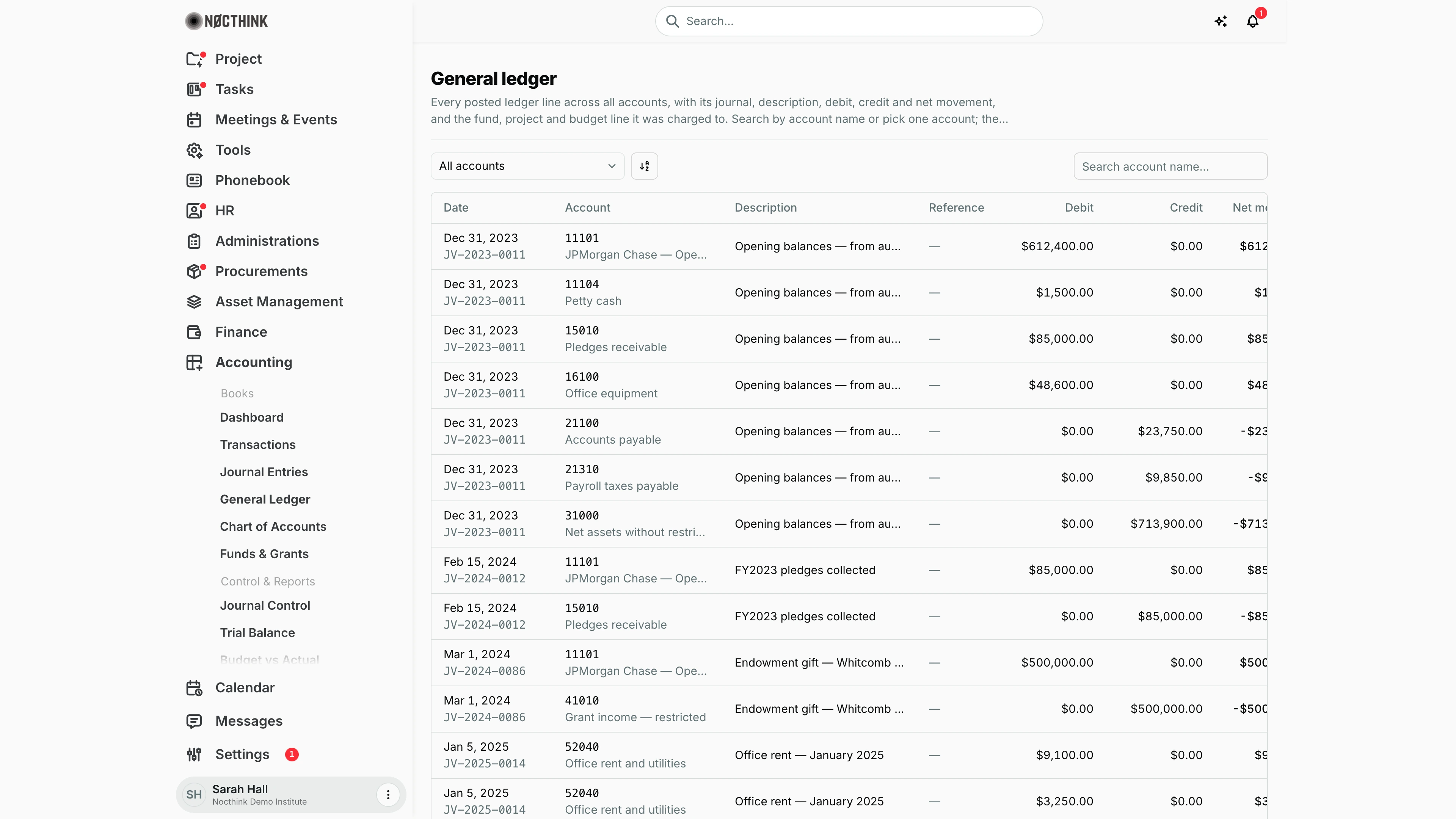
Screenshot: Sarah Hall (Finance Manager, also holds the F.A.T Manager role), Nocthink Demo Institute demo data. Net movement is cut off at the right edge and Fund, Project and Budget line are off-screen; scroll the table sideways to see them.
Why I use this page
The General Ledger lists every line of every posted journal, one row per line. I use it to trace a balance back to the journals behind it, to answer an auditor's "show me the entries on account 51030", and to check that a posting landed on the right fund, project and budget line. I check it after each posting run and again during the month-end close.
What's on the screen
- Header — the title General ledger and a description. There are no actions; the ledger is read-only.
- Toolbar — an Account dropdown (All accounts, or one account reading "code — name"), a sort/view control, and Search account name…. Both run on the server, so they reach every posted line, not just the page on screen.
- Table:
- Date stays in place when I scroll sideways and shows the journal number underneath (for example
JV-2023-0011). - Account shows the code with the account name underneath.
- Description is the line description, or the journal description when the line has none.
- Reference is the journal reference.
- Debit, Credit and Net movement (debit minus credit) are in the base currency.
- Fund is the fund ID, or the donor name when no fund is set. Project and Budget line complete the row.
- Date stays in place when I scroll sideways and shows the journal number underneath (for example
- Footer — the row count and a pager. The server sends 100 lines a page, oldest first; the pager moves through every page.
How I …
Look at the movements on one account
- Pick the account in Account, for example
11101 — JPMorgan Chase — Operating (USD). - Or type part of the account name into Search account name….
- Read Net movement row by row. Positive means a net debit.
- To see the whole journal behind a line, note the journal number under the date and open it from Journal Entries.
Check that a posting hit the right fund and budget line
- Filter to the expense account that was charged.
- Scroll right to Fund, Project and Budget line.
- If the fund or budget line is wrong, the posted journal can't be edited. Ask the F.A.T Manager to reverse it, then key in a corrected draft.
Tie the ledger to the trial balance
- Filter to one account and add up Debit and Credit.
- Compare the totals with that account's row in Trial Balance. With more than 100 lines on the account, page through them and add up each page.
Access & permissions
- To see the page: accounting authority, meaning the
accounting-stafforfat-managerrole, oraccounting.approve. Owners and Directors always pass. - Nothing on this page can be changed, so everyone who can open it has the same view.
- docs/role.md gives Accounting Staff write access to the General Ledger. In practice that write access is exercised through Journal Entries.
- Finance Staff and Finance Manager are read-only here: their seeded roles include
accounting.view, and the server lets finance authority withaccounting.viewread the books. They can't create, change or post anything on this page.
Caveats
- Only Posted journals appear. Drafts and rejected journals are left out, so a journal I have just keyed in shows up here only after the F.A.T Manager posts it.
- A line's fund is its own fund if it has one, otherwise the fund on the journal header.
- Amounts are in the base currency; there is no original-currency column.
Limitations
- One account at a time in the Account filter. The API also takes several codes (
?account=11101,11102) and?fund=,?project=and?budget_line=filters, which the page doesn't offer. - No date-range filter, no opening or running balance, and no export.
- Rows don't link to their journals.
Related menus
- Journal Entries — where these lines come from, and where corrections are made.
- Chart of Accounts — the account definitions behind the Account column.
- Trial Balance — the account balances calculated from these lines.
- Funds & Grants — the funds in the Fund column.
- Reconciliation — matching the cash-account lines against bank statements.