
Changes in Net Assets
Open in NocthinkModule: Accounting · URL: /accounting/changes-in-net-assets · Responsible role: Accounting Staff · Also used by: F.A.T Manager (full), Owner/Director (full); Finance Staff / Finance Manager (read-only)
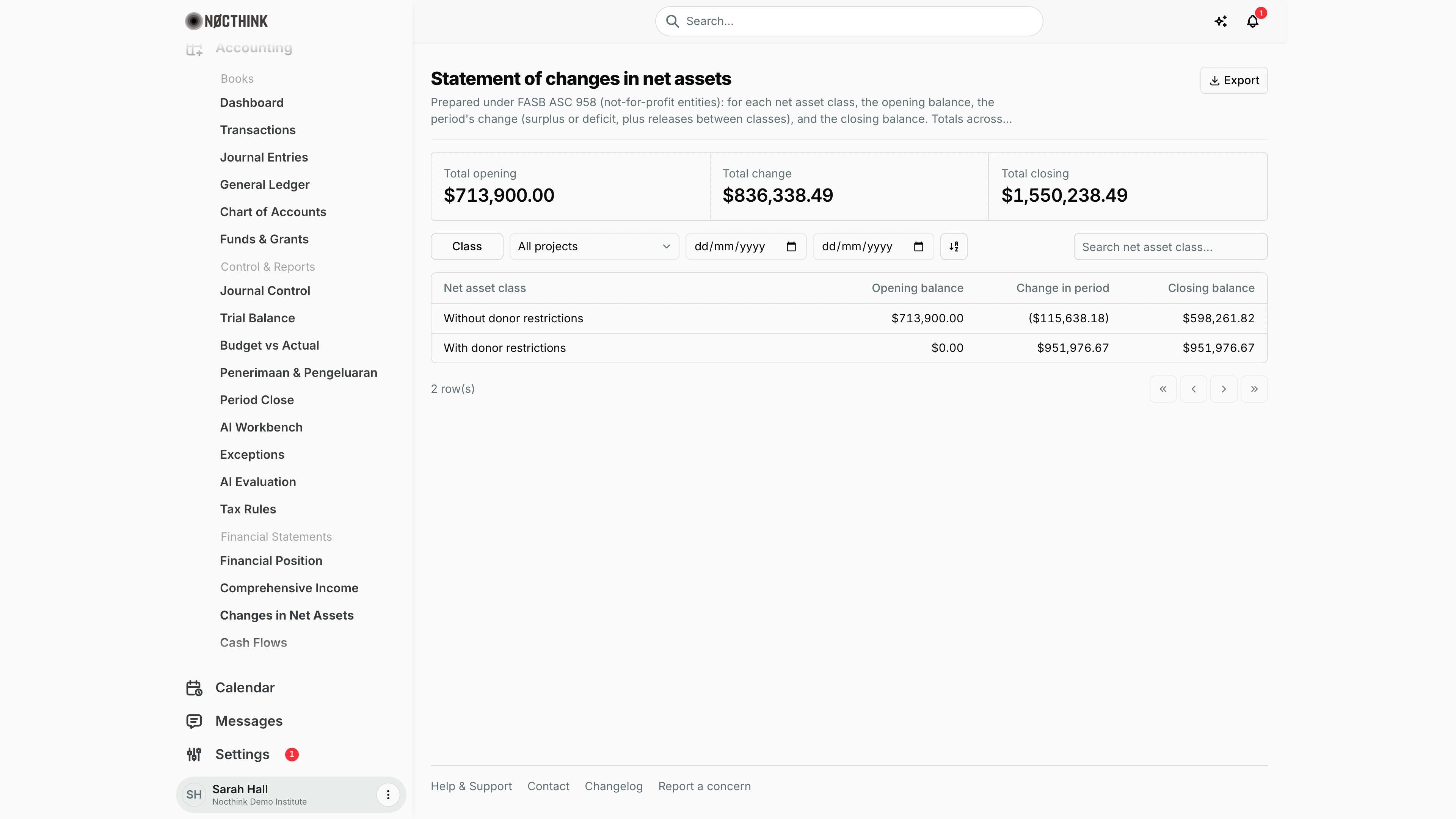
Screenshot: Sarah Hall (Finance Manager, also holds the F.A.T Manager role), Nocthink Demo Institute demo data.
Why I use this page
This statement connects the income statement to the balance sheet. For each net-asset class, without and with donor restrictions, it shows where the balance started, how much surplus or deficit was added, and where it closed. I open it when I assemble the year-end or donor financial-statement pack, and when I need to show a donor that their restricted balance moved only through their own grant's income and spending.
What's on the screen
-
Header. The title is Statement of changes in net assets. The description cites the reporting standard: ASC 958 for the demo tenant, or "Laporan Perubahan Aset Neto under ISAK 35" for Indonesian books. Export sits at the top right, with PDF, Excel, CSV and JSON.
-
Stat cards. There are three: Total opening, Total change and Total closing, each covering both classes. Total change is highlighted when it is negative.
-
Toolbar:
- Class filter, with checkboxes for Without donor restrictions and With donor restrictions.
- Project dropdown, set to All projects by default.
- From and To dates, plus Reset period once a date is set. Blank dates mean from the first posted journal through the last.
- A sort toggle.
- Search net asset class… on the right.
-
Table. One row per class. The columns are:
Column What it shows Net asset class Without or with donor restrictions Opening balance Where the class started Change in period Surplus or deficit for the period, plus net assets moved between classes (releases from restriction) Closing balance Where the class closed Negatives show in parentheses.
-
Footer. The row count and pager.
How I …
Prepare the organization-wide statement
- Confirm that Trial Balance balances and that Financial Position shows Balanced for today.
- Leave Project on All projects.
- Check that Total closing equals Total net assets on Financial Position when that page has a blank As of date. Both are built from the same posted lines.
- Choose Export → PDF or Export → Excel. The exports add a Total row at the bottom, where the page shows the totals as stat cards.
Produce a year's roll-forward
- Set From to 1 January and To to 31 December.
- Opening balance is the class's net assets before 1 January, Change in period is the year's income minus expenses plus releases between classes, and Closing balance is net assets at 31 December.
- Export. The PDF and Excel subtitles carry the period.
Show a donor their restricted balance for one project
- Pick the project in Project.
- Tick only With donor restrictions in Class.
- Read Change in period. This is that project's restricted income minus restricted spending, less any amount released from restriction in the period.
- Export to PDF. The subtitle is the project name and the file name includes it.
Investigate a negative restricted class
- If With donor restrictions shows a negative opening or closing balance, Equity lines with a debit balance have been posted to a Restricted fund outside a release.
- Open General Ledger, filter to the Equity accounts, and look at the fund on each line.
- Fix the fund on the journal via a correcting entry in Journal Entries. Posted journals cannot be edited.
Access & permissions
- Requires
accounting.viewplus accounting authority on the server:accounting.approve, or theaccounting-stafforfat-managerrole. - Accounting Staff and F.A.T Manager can read and export it. Owner and Director see everything.
- The page is read-only.
- Finance Staff and Finance Manager are read-only here: their seeded roles include
accounting.view, and the server lets finance authority withaccounting.viewread the books. They can't create, change or post anything on this page.
Caveats
- Opening is the class's net assets before From (Equity lines plus income minus expenses), plus opening-balance entries dated inside the period (a journal that brings equity in against assets, such as the demo's JV-2023-0011 "Opening balances — from audited FY2023 statements"). With no dates set, the demo opens at $713,900.00 without restrictions and $0.00 with restrictions.
- A journal made only of Equity lines dated inside the period, such as a release from restriction or a board designation, is a reclassification: it shows in Change in period for each class (the release lowers the restricted class and raises the unrestricted one), not in Opening.
- Change in period is income minus expenses from From to To, plus those reclassifications. With no dates set it is the lifetime figure; the total across both classes matches the Cumulative column of Comprehensive Income.
- Lines dated after To are left out; with no To, every posted line counts, including future-dated ones.
- The class is decided by fund type. A line whose fund (the line's own, or the journal's) is a Restricted fund counts as "With donor restrictions". Everything else, including lines with no fund, is "Without donor restrictions".
- Project scope works through funds, just like the other statements. Spending posted without a project-linked fund is left out of a project's statement.
- Restriction releases. A release recorded on Donor Restrictions only moves amounts between classes here once its journal is Posted.
Limitations
- No comparison between two periods side by side.
- Movements are not itemised: contributions, releases from restriction, expenses and transfers are not shown as separate lines.
- There is no Donor view or donor budget codes on this statement, unlike Financial Position and Comprehensive Income.
- The Excel export has the letterhead. The PDF uses a generic table layout, not the letterhead style of the other statement PDFs.
Related menus
- Comprehensive Income: the surplus or deficit that makes up Change.
- Financial Position: its net-asset section should equal Closing balance.
- Donor Restrictions: restricted balances by fund and release requests.
- Funds & Grants: set each fund's type to Restricted or Unrestricted.
- General Ledger: trace the Equity and fund lines behind each figure.