
Nonprofit
Open in NocthinkModule: Settings · URL: /settings/nonprofit · Responsible role: Owner (organization admin) · Also used by: nobody else in the app — Finance Manager / F.A.T. Manager typically advise on the books and annual-return fields but cannot open the page
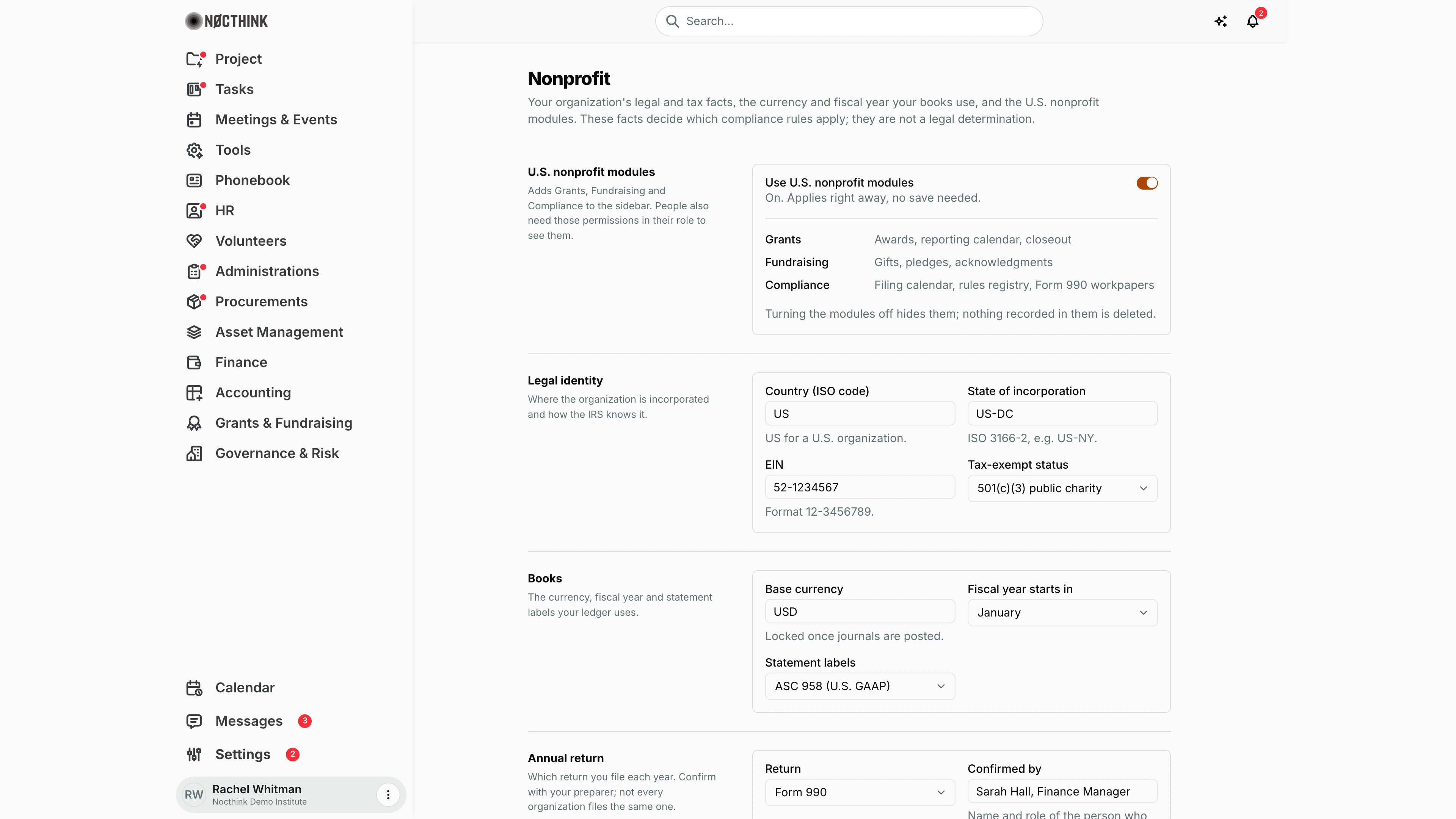
Screenshot: Rachel Whitman (Executive Director, organization owner), Nocthink Demo Institute demo data.
Why I use this page
This page holds the legal and tax facts the rest of the system relies on: our country and state, EIN and tax-exempt status, the base currency and fiscal year of our books, the statement framework, which annual return we file, where we are registered, and whether we take federal awards. Those facts decide which compliance rules and filing deadlines apply. I set it up once during onboarding (before Finance posts the first journal), switch on the U.S. nonprofit modules if we need Grants, Fundraising and Compliance, and revisit it when our registrations change or our preparer confirms a different return.
What's on the screen
- Header — Nonprofit with "…These facts decide which compliance rules apply; they are not a legal determination."
- U.S. nonprofit modules — switch Use U.S. nonprofit modules ("On. Applies right away, no save needed."), the list Grants (Awards, reporting calendar, closeout), Fundraising (Gifts, pledges, acknowledgments), Compliance (Filing calendar, rules registry, Form 990 workpapers), and "Turning the modules off hides them; nothing recorded in them is deleted."
- Legal identity — Country (ISO code) (e.g.
US), State of incorporation (ISO 3166-2, e.g.US-DC), EIN (format12-3456789), Tax-exempt status (Not set, 501(c)(3) public charity, 501(c)(3) private foundation, 501(c)(4), 501(c)(6), Other). - Books — Base currency (e.g.
USD, "Locked once journals are posted."), Fiscal year starts in (month), Statement labels (ISAK 35 (Indonesia) or ASC 958 (U.S. GAAP)). - Annual return — Return (Not confirmed, Form 990, Form 990-EZ, Form 990-N (e-Postcard), Form 990-PF, No annual return) and Confirmed by (name and role, e.g. "Sarah Hall, Finance Manager").
- Registrations and funding (below the fold) — Registered to do business in, Registered to solicit in (comma-separated state codes), and the Receives U.S. federal awards switch ("2 CFR 200 (Uniform Guidance) may apply.").
- Save profile at the bottom.
How I …
Turn the U.S. nonprofit modules on or off
- Flip Use U.S. nonprofit modules. It saves immediately.
- Make sure the people who need Grants, Fundraising or Compliance have those permissions in their role (Roles); the switch alone does not show the menus to them.
Set up the legal and tax profile
- Under Legal identity, enter Country (ISO code), State of incorporation, EIN, and choose Tax-exempt status.
- Under Annual return, choose the Return our preparer confirmed and type their name and role in Confirmed by.
- Under Registrations and funding, list the states in Registered to do business in and Registered to solicit in (e.g.
US-CA, US-NY), and switch on Receives U.S. federal awards if applicable. - Click Save profile.
Set the base currency and fiscal year before go-live
- Under Books, type the Base currency (3-letter code). If it differs from what the country usually uses, a hint appears ("US organizations usually keep books in USD.") with a Use USD button.
- Choose Fiscal year starts in and Statement labels.
- Click Save profile — do this before Finance or Accounting posts any journal.
Access & permissions
- The route requires organization-admin status (
*): only the Owner sees Nonprofit in Settings and can open the URL. - Once the modules are on, Grants, Fundraising and Compliance still need their own
<domain>.viewpermissions; their view is not open to all staff.
Caveats
- Base currency is locked once journals are posted. Choose it carefully at setup; the server rejects a change afterwards.
- Country and state codes are uppercased automatically; state lists are split on commas or spaces and stored as uppercase codes.
- The modules switch applies immediately with no confirmation; everything else needs Save profile — leaving the page without saving discards changes.
- The profile drives compliance rules and the filing calendar, but it is not legal advice; confirm the return type with the preparer and record who confirmed it.
- Changing Fiscal year starts in affects how periods and year-to-date figures are grouped in Finance and Accounting reports.
Limitations
- No history of who changed these facts on this page (check Logs).
- Only two statement frameworks (ISAK 35, ASC 958).
- Registrations are free-text code lists; there are no registration numbers, renewal dates or document uploads here (filing deadlines live in Compliance).
Related menus
- Company — public name, legal name, tax ID and address.
- Roles — grant Grants, Fundraising and Compliance permissions.
- Awards and Gifts — modules enabled by the switch.
- Obligations and Form 990 Workpapers — Compliance pages enabled by the switch.
- Journal Entries — books kept in the base currency and fiscal year set here.